Superb quality and spec AB-Com PULSe 4K SE. Crazy offer! Only £99! FREE UK DELIVERY! 4K UHD, Enigma 2, Multiboot 4 images & more!...
Superb quality and spec AB-Com PULSe 4K Rev II Twin Satellite tuner only £149! FREE UK DELIVERY! 4K UHD, Enigma 2, SATA HDD facility, Multiboot 4 images & more!...

EPG files test: Phase 1. Refactor

I'm using Grid EPG, but with channel preview mode set to "no".
Interesting, I turned off channel preview mode and EPG looks the same as posted by me earlier. It made no difference to EPG view!!!

I'm going to put box to sleep and delete settings file (I have a backup) so box will treat setup as new again.

I didn't notice no timeline but once adding maintain old data from 0 to 15 minutes I see the timeline.
Yes, if I enable maintain old data then I now see timeline.

I've never done that previously I don't believe but I do have a backup of old settings file if anyone know what setting is so I can check?
 
Last edited:
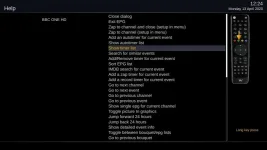
Help seems ok on mine, arrow moves around the remote for all the options.
 

Attachments

  • help.webp
    help.webp
    28.7 KB · Views: 4
Interesting, I turned off channel preview mode and EPG looks the same as posted by me earlier. It made no difference to EPG view!!!

I'm going to put box to sleep and delete settings file (I have a backup) so box will treat setup as new again.

Did you restart the GUI? Some options certainly used to need one.
 
Yes, if I enable maintain old data then I now see timeline.

I've never done that previously I don't believe but I do have a backup of old settings file if anyone know what setting is so I can check?

I'm not sure what's happening now it's gone past 12:30pm the timeline starts at the beginning.

So I have maintain epg data 15 minutes and grid epg setting (I'm sure this was called graphical epg) base time 15 minutes.
 
Did you restart the GUI? Some options certainly used to need one.
I did yes, just in case.

I can get timeline to show if I maintain epg history 15mins. Is that what you do @ccs?

Checked old settings I never had that enabled (ie set as 0).

@Dsayers, do you not normally enable maintain epg history?
 
Channel preview mode just means that the OK/OKLong button presses behave differently, it doesn't actually change the way the EPG looks
 
So with the timeline bug, would it be correct to say that if the EPG data retain is < 15, the timeline is trying to be drawn off the left of the view?
 
@Dsayers, do you not normally enable maintain epg history?
No but I can't remember what I had for base time settings. I think this maybe causing the issue
 
Channel preview mode just means that the OK/OKLong button presses behave differently, it doesn't actually change the way the EPG looks

@bbbuk - It's "Picture in graphics" I've got set to "no" then, no wonder I'm always confused.:confused:
 
Last edited:
Perhaps a review of the descriptions of those options is in order!
 
So with the timeline bug, would it be correct to say that if the EPG data retain is < 15, the timeline is trying to be drawn off the left of the view?
Yes. I can't confirm but it does look like it does likely exist but doesn't show unless EPG data retain is 15+ mins because it's drawn to the far left.

I did check my old settings file and it was set to 0 so something has changed with view of EPG.

I have deleted my current settings file and setup fresh (ie specifically chose nothing) and couldn't see timeline. However, same setup when I did flashed back to stock vix image did show a timeline.

@Dsayers has same issue as I do with when EPG data retain is set to 0. If others could set their EPG data retain to 0 to see if timeline doesn't show then we'll know that is issue.
 
Last edited:
I've just been trying out different values for Maintain old EPG data, and ended up with the 1st timeline timed at 14:30, despite it being 14:20, and even rebooting the box didn't get it back to what it should be.
Different values of Maintain old EPG data made no difference either.

So maybe this is another side effect, happening after a quarter past the hour?

Edit: Or maybe not..... it's now stuck missing up to 15 minutes of the current programs.
 

Attachments

  • missing.webp
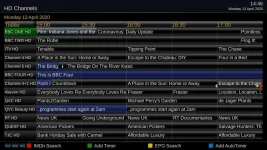
    missing.webp
    56.8 KB · Views: 9
Last edited:
Just looked at Stock EpgSelection.py file and don't know if it has something to do with this.

Code:
now = time() - int(config.epg.histminutes.value) * SECS_IN_MIN
where SECS_IN_MIN is static 60.

I also see just below that if on graphical epg then:
Code:
self.ask_time = self.ask_time = now - now % (int(config.epgselection.graph_roundto.value) * SECS_IN_MIN)

Could these be reason why stock code is okay even with 0 set as maintain epg data? I've not checked if they are in any of test epg files tbh !!
 
Last edited:
I tested maintain EPG, when = 0, the line went missing. Changing it back to 15 showed it. The base time in Grid EPG was default of 15 minutes. I checked every two minutes or so between 15:02 and 15:20, the line was not visible
 
Ok, looking at code for the gridepg, I found the following which I think is cause of it (most of this code is not in stock file I could see):

Code:
def __setTimeBase(self, time_center):
		# prefer time being aligned in the middle of the EPG, but clip to the maximum EPG data history
		self.time_base = int(max(time_center - self.time_epoch_secs // 2, time() - int(config.epg.histminutes.value) * SECS_IN_MIN))
		# round up so that we favour a bit more info to the right of the timeline
		self.time_base += -self.time_base % self.round_by_secs

The stock code makes reference to following:
Code:
config.epgselection.graph_roundto.value

Now I see no reference to that setting in test grid epg code or even the alternative:
Code:
config.epgselection.grid.roundto

Looking at UsageConfig.py, this is used to round the time to x mins (default is 15). If I remember correctly the time on EPG was always rounded to 15mins so 16:45, 17:00, 17:15, etc

When I looked at test epg, there was no rounding done.
 
Last edited:
Maintain old EPG data and Base time are somehow interlinked,
and produce different results depending on the time of day (eg just before and just after 17:00).

Too complicated for my brain to summarise at the moment, I'll try again later.
 
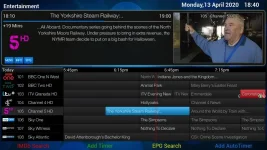
Found out what it's doing! I can see it's always rounding up, rather than round to nearest 15mins. See pics below...

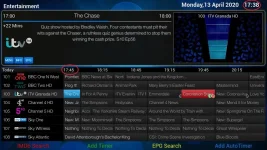
The time the EPG was loaded was 17:38 (see time circled in red in top-right) but earliest time displayed on EPG timeline was rounded to nearest 15mins hence the 17:45 (circled in red for reference) and you will notice no red actual timeline due to fact it's not yet 17:45
17_45_before.webp


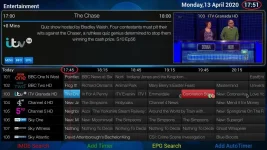
Now with the EPG still loaded, I wait until after 17:45 and red EPG timeline now shows and slowly moves to the right with the current time. I purposely took screenshot at 17:51 to show timeline bar moves as expected
17_45_after.webp

I then exited out of EPG and went back in at 17:52 and the timeline now isn't starting until 18:00

This is without maintain 15mins EPG being set (which I normally don't).
 
Here's the latest update, which deals with the disappearing timeline by trying to ensure it's a few minutes within the grid when there's a low setting for the EPG data.

It's now got all the config migration sorted out. I've also changed the primetime setting to a single Clock style entry.View attachment 59938
 
Here's the latest update, which deals with the disappearing timeline by trying to ensure it's a few minutes within the grid when there's a low setting for the EPG data.

It's now got all the config migration sorted out. I've also changed the primetime setting to a single Clock style entry.
Thanks :)

How far is it looking back? Looks like a lot going by what I see now:
epgtimelinefix1.webp

Can this be changed? I would say max it needs to look back would be 15mins (plus whatever is added via maintain epg data)
 
Ack, logic bug in line 202 of EpgListGrid.py. This determines how many minutes are to the left of the timeline on opening when there's no EPG data. It should currently be about a 1/4 of the overall time represented by the grid EPG.

If you can, change it to
Code:
            time() - (int(config.epg.histminutes.value) + self.time_epoch // 4) * SECS_IN_MIN))

You could also experiment with replacing self.time_epoch // 4 with a constant value of minutes
 

OpenViX Feeds Status

Back
Top