There's no changes to the movie code in the EPG changes and a cursory glance at the history of the movie related files shows no recent changes anywhere that'd change the playback ended behaviour.Why does "Behaviour when a movie reaches the end" keep getting changed to "Return to previous service"?
Could that be due to these new tests or is it a problem with 5.3.034?

Superb quality and spec AB-Com PULSe 4K SE. Crazy offer! Only £99! FREE UK DELIVERY! 4K UHD, Enigma 2, Multiboot 4 images & more!...
Superb quality and spec AB-Com PULSe 4K Rev II Twin Satellite tuner only £149! FREE UK DELIVERY! 4K UHD, Enigma 2, SATA HDD facility, Multiboot 4 images & more!...
You are using an out of date browser. It may not display this or other websites correctly.
You should upgrade or use an alternative browser.
You should upgrade or use an alternative browser.
[ViX_Misc] EPG files test, phase 2: Button mods
- Thread starter abu baniaz
- Start date

B
BrianTheTechieSnail
Guest
How do I get rid of these test files?
I want to report a possible bug in plain OpenVIX.
Would doing a USB flash using https://www.openvix.co.uk/openvix-builds/zgemmah7/openvix-5.3.034.release-zgemmah7_recovery_emmc.zip
and restoring my settings do it?
I want to report a possible bug in plain OpenVIX.
Would doing a USB flash using https://www.openvix.co.uk/openvix-builds/zgemmah7/openvix-5.3.034.release-zgemmah7_recovery_emmc.zip
and restoring my settings do it?

abu baniaz
Moderator
Flash and restore will do it for you.
Thanks. I've just committed a fix for this.With the number zap I've noticed this only works for typing numbers in the current bouquet. If I'm in entertainment and try 301 for sky Premiere it doesn't seem to move to that channel.
abu baniaz
Moderator
Latest files attached.
Fixes the crash that was reported earlier.
Allows usage of Ch+/CH- for paging. Default is 24hour jumps
The number selection that AndyBlac added to Enhanced EPG 7 years ago has been extended to apply to Grid EPG. Option is currently called "Number buttons mode", default is off. It works without issue on the bouquet you are in.
OK button configurable in Grid EPG
Allows for selecting number in different bouquet
InfobarEPG number navigation
Crash fix for multibouquet = no
Change primetime to set the time of the left hand edge of the grid EPG
Change log here
https://github.com/SimonCapewell/eni...custom-buttons
Some skin changes are required to fully support these. Draft files attached and go in /usr/share/enigma2/
Nothing changed with previous skin upload, just adding here to keep together.
Fixes the crash that was reported earlier.
Allows usage of Ch+/CH- for paging. Default is 24hour jumps
The number selection that AndyBlac added to Enhanced EPG 7 years ago has been extended to apply to Grid EPG. Option is currently called "Number buttons mode", default is off. It works without issue on the bouquet you are in.
OK button configurable in Grid EPG
Allows for selecting number in different bouquet
InfobarEPG number navigation
Crash fix for multibouquet = no
Change primetime to set the time of the left hand edge of the grid EPG
Change log here
https://github.com/SimonCapewell/eni...custom-buttons
Some skin changes are required to fully support these. Draft files attached and go in /usr/share/enigma2/
Nothing changed with previous skin upload, just adding here to keep together.
Last edited:

ccs
ViX Beta Tester
- Joined
- Sep 6, 2014
- Messages
- 5,836
- Reaction score
- 5
- Points
- 0
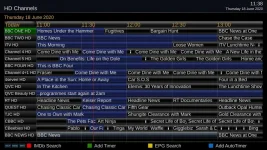
I overwrote the existing phase 2 files using epg-mod-buttons_2020.06.17.zip and restarted.
Everything ok, except the HD channels bouquet now has CBBC HD and Cbeebies HD included. (They're excluded in ABM)
I've not retuned for ages, and my other box with the earlier phase 2 mods doesn't show them.
Everything ok, except the HD channels bouquet now has CBBC HD and Cbeebies HD included. (They're excluded in ABM)
I've not retuned for ages, and my other box with the earlier phase 2 mods doesn't show them.
Attachments
ccs
ViX Beta Tester
- Joined
- Sep 6, 2014
- Messages
- 5,836
- Reaction score
- 5
- Points
- 0
I went back to the earlier phase 2 release, and CBBC HD and Cbeebies HD are still there. Maybe a new placeholder is being picked up?
Retuned and they're now gone. Sorry, must be me again, although the other box never showed them.
Reinstalled the latest epg test files and now HD Channels bouquet is as expected.
Retuned and they're now gone. Sorry, must be me again, although the other box never showed them.
Reinstalled the latest epg test files and now HD Channels bouquet is as expected.
Last edited:
abu baniaz
Moderator
There is an inconsistency with the text when pressing the record button between the screens in channel selection and the EPG screens. One set says add timer other says record now. Looks like it is to do with interaction with autotimer. Anyway, let's stay away from channel selection for now.
On the EPG screens, when a recording is active, there are three options:
Delete Timer (green)
Edit timer (blue)
Disable timer (no colour)
Can a colour button be assigned to it please?
Secondly, can we add a long press record function and make it record the current event without the prompts? I suppose there will be scope to configure what short/long does. But that may be complicated if a recording is taking place.
On the EPG screens, when a recording is active, there are three options:
Delete Timer (green)
Edit timer (blue)
Disable timer (no colour)
Can a colour button be assigned to it please?
Secondly, can we add a long press record function and make it record the current event without the prompts? I suppose there will be scope to configure what short/long does. But that may be complicated if a recording is taking place.
I'd say the difference is justified; on the channel selection you have to decide whether you want to record the thing that's playing now, or the thing that's next, so the text needs to be different, at least for Record now
For that EPG option, we already have Add Timer on green by default, which pops the menu up when there's a timer on the selected event.
Long record is currently in use by set a silent z** timer.
Personally, I'd like record to set a timer silently without the Timer/AutoTimer popup menu. Perhaps the record button should be included in the key options, with the following options:
- Timer popup menu (the current behaviour)
- Add Timer (same as green)
- Quick Add Timer (same as picking Timer from the current popup menu)
- Quick Add Zap Timer (same as picking AutoTimer from the current popup menu)
How many people are using the instant autotimer from the Record button popup? You get no feedback when creating an AutoTimer this way, it takes a minute or two before autimer kicks in and adds the timer, which makes for a poor user experience. I'd expect it to immediately set a timer and show it with the autotimer icon.
For that EPG option, we already have Add Timer on green by default, which pops the menu up when there's a timer on the selected event.
Long record is currently in use by set a silent z** timer.
Personally, I'd like record to set a timer silently without the Timer/AutoTimer popup menu. Perhaps the record button should be included in the key options, with the following options:
- Timer popup menu (the current behaviour)
- Add Timer (same as green)
- Quick Add Timer (same as picking Timer from the current popup menu)
- Quick Add Zap Timer (same as picking AutoTimer from the current popup menu)
How many people are using the instant autotimer from the Record button popup? You get no feedback when creating an AutoTimer this way, it takes a minute or two before autimer kicks in and adds the timer, which makes for a poor user experience. I'd expect it to immediately set a timer and show it with the autotimer icon.

Willo3092
ViX Beta Tester
How many people are using the instant autotimer from the Record button popup? You get no feedback when creating an AutoTimer this way, it takes a minute or two before autimer kicks in and adds the timer, which makes for a poor user experience. I'd expect it to immediately set a timer and show it with the autotimer icon.
I use the record button to add timers and autotimers and allocated the coloured buttons to IMDB search, EPG search, CH- and CH+
I have changed the AutoTimerSilent to just AutoTimer in epgselectionbase.py so that I still get the autotimer options though.
abu baniaz
Moderator
I didn't realise those were different functions even though text is same. Let's go with the configurable options if others agree.
My opinion is that there should an option to press record and it records with no further selections/button presses. The conflict checks run before it kicks off.
My opinion is that there should an option to press record and it records with no further selections/button presses. The conflict checks run before it kicks off.

...How many people are using the instant autotimer from the Record button popup? You get no feedback when creating an AutoTimer this way, it takes a minute or two before autimer kicks in and adds the timer, which makes for a poor user experience. I'd expect it to immediately set a timer and show it with the autotimer icon.
My preference is something similar except I prefer autotimersilent because most of time the AutoTimer defaults I've set handle that for me.I use the record button to add timers and autotimers and allocated the coloured buttons to IMDB search, EPG search, CH- and CH+
I have changed the AutoTimerSilent to just AutoTimer in epgselectionbase.py so that I still get the autotimer options though.
However, maybe add a default option (via menu) that checks whether you prefer normal AutoTimer (where u get prompted for everything) or AutoTimerSilent when you press the Rec button?
Basically, an extra check would have to be put in when user clicks on AutoTimer (via Rec button). If user has set default to run AutoTimerSilent then run it otherwise run AutoTimer.
Update:
So around this line, a check is done to see if user would prefer to run AutoTimer (ie so they can make amendments) or AutoTimerSilent (current default, where it's added based on defaults previously set in AutoTimer).
Best of both worlds this way and upto user to decide based upon their preference.
I'm happy to do a PR based on this from simonc branch?
Last edited:

ccs
ViX Beta Tester
- Joined
- Sep 6, 2014
- Messages
- 5,836
- Reaction score
- 5
- Points
- 0
Crash reported here, epg search......
https://www.world-of-satellite.com/...n-causes-crash&p=499503&viewfull=1#post499503
https://www.world-of-satellite.com/...n-causes-crash&p=499503&viewfull=1#post499503
Willo3092
ViX Beta Tester
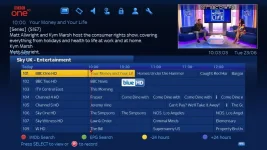
On the Blue HD skin I'm getting picon_default.png where the EPG Zap would be when the EPG is opened.
After using the number zap function (which works as it should) it disappears until the EPG is opened again.
After using the number zap function (which works as it should) it disappears until the EPG is opened again.
On the Blue HD skin I'm getting picon_default.png where the EPG Zap would be when the EPG is opened.
Ah yes, thanks for reminding me that this still needs sorting. I'm going to completely change the way the picon in the zap popup is composed as it's not very flexible as things stand.
abu baniaz
Moderator
latest files in post 2
Main new things:
- rec/reclong customisation
- EPG service number selector is now a skinnable screen, name is EPGServiceNumberSelection
Main new things:
- rec/reclong customisation
- EPG service number selector is now a skinnable screen, name is EPGServiceNumberSelection
ccs
ViX Beta Tester
- Joined
- Sep 6, 2014
- Messages
- 5,836
- Reaction score
- 5
- Points
- 0
latest files in post 2
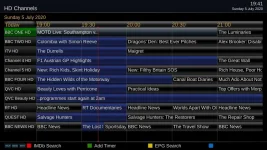
Filename got me confused for a while... epg-mod-buttons_2020.05.07.zip
Similar threads
[Mut@nt HD2400]
feeds and status-message.php for self built 6.8.007 ?
- Replies
- 6
- Views
- 621
- Replies
- 4
- Views
- 952

- Replies
- 5
- Views
- 2K

- Replies
- 1
- Views
- 2K