Superb quality and spec AB-Com PULSe 4K SE. Crazy offer! Only £99! FREE UK DELIVERY! 4K UHD, Enigma 2, Multiboot 4 images & more!...
Superb quality and spec AB-Com PULSe 4K Rev II Twin Satellite tuner only £149! FREE UK DELIVERY! 4K UHD, Enigma 2, SATA HDD facility, Multiboot 4 images & more!...

[VU+ Duo2] Epg

Same issue here.

I use Cross EPG all the time as I'm sure a lot of users do. To date for every version / build of VIX, pressing the EPG button loads Cross EPG once its setup. This is exactly what I prefer. Having read this thread, non of the suggested fixes work for re-instating this desired behaviour to the EPG key.

Can we please revert back to the way things were. I want my EPG to just work without me having to set up any keys. I dont want to have to remember to do that months from now when I'm updating or something. Please just reinstate this desired behaviour.

Anyone else agree ?
 
All working fine on 43 and LX3 XPeed box...

Upgraded tonight from 41 and no problems what so ever
 
I think we are just going to hold tight for 44 guys.


Sent from my iPhone using Tapatalk
 
.... To date for every version / build of VIX, pressing the EPG button loads Cross EPG once its setup. ....
EPG-button loads Cross? This is completely new to me. I have no idea what you mean.

The EPG-button is supposed to open an EPG-view, nothing to do with Cross.
So press long-EPG and select the view you want to see, or wait for the next build to be able to make the desired behaviour of the EPG-button.
 
EPG-button loads Cross? This is completely new to me. I have no idea what you mean.

The EPG-button is supposed to open an EPG-view, nothing to do with Cross.
So press long-EPG and select the view you want to see, or wait for the next build to be able to make the desired behaviour of the EPG-button.

Did you miss the "once its setup" bit ?
I install VIX, Menu, Setup, System, EPG, Cross EPG, configure it, save etc. Then pressing EPG button loads Cross EPG. Whats not to understand ?

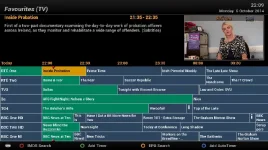
I'm talking about this screen. At present, on build 43, there is no way to assign it to the EPG button.
1_0_19_835_3EA_2174_EEEE0000_0_0_0.webp
 
Last edited by a moderator:
Did you miss the "once its setup" bit ?
I install VIX, Menu, Setup, System, EPG, Cross EPG, configure it, save etc. Then pressing EPG button loads Cross EPG. Whats not to understand ?

It's not loading Cross EPG, it's loading Graphical EPG.
Also, some boxes have both EPG & Info buttons. The ones that don't have both are a bit problematic at the moment, currently being worked on...
 
It's not loading Cross EPG, it's loading Graphical EPG.
Also, some boxes have both EPG & Info buttons. The ones that don't have both are a bit problematic at the moment, currently being worked on...


Its not loading either, pressing epg just brings up the current program info. Can we just leave the epg button alone, let it do what it always did by default.
 
Did you miss the "once its setup" bit ?
I install VIX, Menu, Setup, System, EPG, Cross EPG, configure it, save etc. Then pressing EPG button loads Cross EPG. Whats not to understand ?

I'm talking about this screen. At present, on build 43, there is no way to assign it to the EPG button.
View attachment 37513

You're getting confused between cross epg and graphical epg. Cross epg downloads the info to populate the graphical epg which your box uses to display the info on your tv screen.
 
Did you miss the "once its setup" bit ?
I install VIX, Menu, Setup, System, EPG, Cross EPG, configure it, save etc. Then pressing EPG button loads Cross EPG. Whats not to understand?
Ah, I see that you misinterpret Cross.
Cross is one of the way's to download EPG-data to your box. Cross is loaded via the menu --> EPG --> Cross.
What you're talking about is to show the EPG (whatever the source of the data is).

But with Hotkey you can indeed bring Cross up with any button you like :)

But please don't get so nervous: for the moment you can bring any EPG via EPG-long-push and select. And as has been said: in the next build you can again assign the EPG-button to show the desired EPG-view directly.
 
Apollo 44, then 45 this morning in New Zealand
 
We now have 'Hotkey' to adjust the settings. And not only for this button, but to virtually all.
It is in the system menu.

Hotkey has disappeared in my 045 update. Was this intended to avoid the GEPG problem for now till it's added to hotkeys, and will it make a reappearance in a latr release?

I had a play with hotkeys and found it really useful to program my universal remote to do other things, e.g. on my VU box, have an info and an EPG button that work! Even though hotkeys menu is not there, my hotkeys are defined still :)
 
lol - thanks
Feel like a lazy bugger now not spotting that :D
 
And note that on VU Solo2 at least, the button that is marked 'EPG' on the remote, is called 'INFO' when programming in the menus... :p
 

OpenViX Feeds Status

Back
Top