Superb quality and spec AB-Com PULSe 4K SE. Crazy offer! Only £129! FREE UK DELIVERY! 4K UHD, Enigma 2, Multiboot 4 images & more!...
Superb quality and spec AB-Com PULSe 4K Rev II Twin Satellite tuner only £179! FREE UK DELIVERY! 4K UHD, Enigma 2, SATA HDD facility, Multiboot 4 images & more!...

[VU+ Duo2] Error when trying to Boot!

  • Thread starter Thread starter markalfc
  • Start date Start date
M

markalfc

Guest
Not too sure about this just looking for a bit of help as when I boot it is hanging with VIX icon in the corner.IMG_7718.JPG.webp
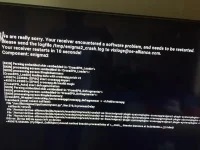
I have posted the image of the error that has come up and would just appreciate any info if anyone has had this problem or maybe what I can do


Thanks to anyone willing to help sorry mods if this is not in correct place.

I have a Vu Duo 2
 
It is saying there is no space left on the internal flash memory.

Were you saving EPG to internal flash memory, USB stick or HDD?
What is the last thing you did/happend to receiver before the problem?
 
I assume it has tried to update whilst I was out and I have come in to that screen. I have a 250GB HDD that definitely is not full so it must be saving to the internal flash memory.

Looking on control centre though it says only HDD is in use.
 
Last edited by a moderator:
Nope the receiver doesn't auto update. Your Internal Flash is full not the HDD. Where are you saving your EPG Data?


Sent from my iPhone using Tapatalk
 
Are you sure? Can you check, menu > setup > system > epg and check the settings and see if its saving to internal flash or hdd?


Sent from my iPhone using Tapatalk
 
Are you sure? Can you check, menu > setup > system > epg and check the settings and see if its saving to internal flash or hdd?


Sent from my iPhone using Tapatalk


Only through going on my laptop on the control centre, I cannot get the menu up via the remote as when I now boot up I have my background and VIX rotating in the corner.

File epg.dat is in media/hdd
 
Last edited by a moderator:
Personally I would put a fresh image of ViX on your receiver (Latest image is 4.1-004 I think) and I would setup the box as new with no backup restores, because if you have any corrupt files in your current setup you will just transfer them over if you restored from a backup so personally i'd start a fresh.


Sent from my iPhone using Tapatalk
 
Personally I would put a fresh image of ViX on your receiver (Latest image is 4.1-004 I think) and I would setup the box as new with no backup restores, because if you have any corrupt files in your current setup you will just transfer them over if you restored from a backup so personally i'd start a fresh.


Sent from my iPhone using Tapatalk


Cheers for the responses.

Yes I have got so far with it boots back up and my channels are all working again, although there is still problems such as channel listings not showing until I go onto them and I'm not convinced the error has completely gone. Seems maybe the channel downloader may have corrupted files.
 
Cheers for the responses.

Yes I have got so far with it boots back up and my channels are all working again, although there is still problems such as channel listings not showing until I go onto them and I'm not convinced the error has completely gone. Seems maybe the channel downloader may have corrupted files.

What do you mean by channel listings? I think you mean your 7 day guide which is your EPG. And what do you mean by channel downloader?
Did you do as I asked? Fresh install & no restores, just setup as if you were starting from scratch?
 

OpenViX Feeds Status

Back
Top