Superb quality and spec AB-Com PULSe 4K SE. Crazy offer! Only £129! FREE UK DELIVERY! 4K UHD, Enigma 2, Multiboot 4 images & more!...
Superb quality and spec AB-Com PULSe 4K Rev II Twin Satellite tuner only £179! FREE UK DELIVERY! 4K UHD, Enigma 2, SATA HDD facility, Multiboot 4 images & more!...

[Zgemma H7] FAV screen sorting broken

  • Thread starter Thread starter BrokenUnusableAccount
  • Start date Start date
B

BrokenUnusableAccount

Guest
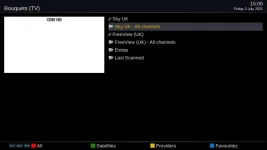
This is the screen of bouquet's that comes up if I press the [FAV] button on my remote:
FAV.webp

If I try to change the order by pressing [MENU] [RED] to go into move mode it gets mangled and I can never get the order back to normal.
Even just exiting from move mode changes the order again!
I have to restore backed up settings to get back to normal.

(I actually only tried this accidentally first because I had forgotten to exit move mode after sorting the contents of my extras bouquet)
 
Last edited:
This is the screen of bouquet's that comes up if I press the [FAV] button on my remote:
View attachment 62322

If I try to change the order by pressing [MENU] [RED] to go into move mode it gets mangled and I can never get the order back to normal.
Even just exiting from move mode changes the order again!
I have to restore backed up settings to get back to normal.

(I actually only tried this accidentally first because I had forgotten to exit move mode after sorting the contents of my extras bouquet)

Although not a solution for the on-screen mode but I find that using the webif and bouquet editor much simpler.
 
... me too, I've never got the gui to work.
 
... me too, I've never got the gui to work.
It works fine for copying entries into and then reordering them in my Extras Bouquet (aka favourites, not made by ABM), but it permanantly makes things weird if activated on the bouquet names themselves.
 
This is the screen of bouquet's that comes up if I press the [FAV] button on my remote:
View attachment 62322
Would you say the way I have my bouquets set up is unusual and/or not how it was intended to be used?
(Just using the all-channels bouquets and no subset bouquets, favourites bouquet renamed to Extras, I can zap to a sky channel with its official Sky number or to a Freeview channel with 2000+its official number)
 
Last edited:
Why no more comments on this?
Does nobody care that this is totally screwed up?
And now I discover that after one screws things up like this then restoring settings to get back to sanity is screwed up too.
:(
 
I've just checked and indeed it is broken. If you move a bouquet down the list it will jump back when you disable move mode. If you move a bouquet up a place it jumps up another place when disabling move mode. On 5.5.014.001
 
Last edited:
If you want to move a bouquet down one you must move it down 2 spaces and then exit. Then it jumps back up one.
 
I can't reproduce this. Maybe there is another setting in the mix.
 
I can't reproduce this. Maybe there is another setting in the mix.

I managed to move a bouquet, but when I exited, the box rebooted, no crash log or any clue why.

That was on 5.4.013 (Release).
 
I've just checked and indeed it is broken. If you move a bouquet down the list it will jump back when you disable move mode. If you move a bouquet up a place it jumps up another place when disabling move mode. On 5.5.014.001

Interesting its working for me, but I don‘t have FAV button so I have to use the up button/blue button/menu to get there.
If anybody could post debug would like to see it so I can check against my debug
 
Interesting its working for me, but I don‘t have FAV button so I have to use the up button/blue button/menu to get there.
If anybody could post debug would like to see it so I can check against my debug
Haven't you got a Mio? Anyway does the same as pressing "tv" button, or same as pressing blue from ChannelSelection.

No clue about the crash... doesn't happen to me.
 
Last edited:
Here is debug log: Enigma2_debug_2021-07-12_16-19-17.zip (at least I hope it's the right one).
Bouquet's were set up as in image in that thread.
As soon as I came out of move mode the bouquet order was changed.
It would help me to not accidentally do this if it was not possible to accidentally leave yourself in move mode after moving channels around within a bouquet.

(This is a repost from: https://www.world-of-satellite.com/...ython-3-images&p=515576&viewfull=1#post515576)

Maybe the problem only occurs with the very simple bouquet arraingement I use with just a main bouquet for each provider.
 
Last edited:
Here is debug log: Enigma2_debug_2021-07-12_16-19-17.zip (at least I hope it's the right one).
Bouquet's were set up as in image in that thread.
As soon as I came out of move mode the bouquet order was changed.
It would help me to not accidentally do this if it was not possible to accidentally leave yourself in move mode after moving channels around within a bouquet.

(This is a repost from: https://www.world-of-satellite.com/...ython-3-images&p=515576&viewfull=1#post515576)

Maybe the problem only occurs with the very simple bouquet arraingement I use with just a main bouquet for each provider.

Good point about the move mode. Maybe it would be better if when exiting the menus the box could ask if you want to exit move mode?
 
I accidentally messed up the bouquet order again today and had to restore.
(I'm running 6.0.004.006 (developer) on my Zgemma H7S)

Is there anything I can do that might help find the problem?
Would having my backed up settings help perhaps?
 
How were the bouquets made?

The main ones were made by ABM.
The bouquet I've called Extras is made by copying channels from the ABM bouquets or from Last scanned into Extras.
 

OpenViX Feeds Status

Back
Top