J
Jonathanm
Guest
Overall very happy with the VIX Apollo image - fairly happy with version 3 - don't see a need to fix something that is not broken...
Running these 2 images on a VU Duo and a Solo.
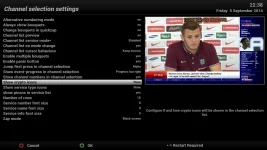
On the solo when going in see the list of channels in a genre all the channels have a little "sat dish" icon next to them.
Any one know what this is and how to rid of it?
I have tried to search and not had much luck.
Thanks for your help and of course this is the reference site!
Jonathan
Running these 2 images on a VU Duo and a Solo.
On the solo when going in see the list of channels in a genre all the channels have a little "sat dish" icon next to them.
Any one know what this is and how to rid of it?
I have tried to search and not had much luck.
Thanks for your help and of course this is the reference site!
Jonathan