- What type of support thread are you creating?
- Support question
- What OpenViX Image build number are you using?
- Latest (6.8?)
- Have you tried re-flashing WITHOUT settings restore?
- NO
- Have you tried re-flashing WITH a settings restore?
- NO
My box is working with a Teamblue image, which I've kept up to date. I had previous OpenVix images which got corrupted and just kept rebooting the box. I've not touched these for some years!
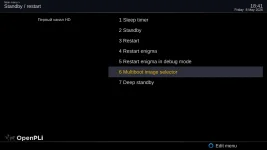
I would like to load new OpenVix images but obviously I don't want any to overwrite the good working TeamBlue slot in the multiboot!
Is there a way to do this, specifying which slot the image gets installed to? In olden times, I remember copying an image to a USB stick and rebooting the box in a way it read the stick (long on/off press?).
Wouldn't it be easier to use FTP or copy directly from my laptop to the box (I'm on Mac and can read the box's disc directly in File Manager)?
Many thanks
I would like to load new OpenVix images but obviously I don't want any to overwrite the good working TeamBlue slot in the multiboot!
Is there a way to do this, specifying which slot the image gets installed to? In olden times, I remember copying an image to a USB stick and rebooting the box in a way it read the stick (long on/off press?).
Wouldn't it be easier to use FTP or copy directly from my laptop to the box (I'm on Mac and can read the box's disc directly in File Manager)?
Many thanks