Superb quality and spec AB-Com PULSe 4K SE. Crazy offer! Only £99! FREE UK DELIVERY! 4K UHD, Enigma 2, Multiboot 4 images & more!...
Superb quality and spec AB-Com PULSe 4K Rev II Twin Satellite tuner only £149! FREE UK DELIVERY! 4K UHD, Enigma 2, SATA HDD facility, Multiboot 4 images & more!...

[GiGaBlue QUAD] [NOT QUAD+] recording problem

  • Thread starter Thread starter Ojustaboo
  • Start date Start date
:rolleyes:sorry to say its not a temperature issue with the gigablue quad or the plus had so many problems with vix image after image 30 I believe its the way the image is programed as switched image and box runs perfect at extremely high temperatures I recommend you downgrade your image to below vix 30 or as I have done switched to open atv 4.1 until the problem is solved as vix has always been a good image.

it is a programing issue with the drivers I am certain of that.:mad:

yes and no.

I agree it's a driver problem but something happened when we had to use the new bootloaders and ever since then, while it is wrongly repoprting the temp, it is only rebooting for many of us (me and Richard for example) when the box thinks it's getting to 100C.

Hence by us installing fans, it never gets near that wrongly reported temp and the boxes now run perfectly.

So while it could be argued it's not a true temp issue in that the boxes aren't really getting that hot, it is a temp issue and us installing the fans has proved that with 100% certainty as since then, we have had zero reboots and the temps are getting no where near the wrongly reported 100.

I first had this problem over a month ago, have been without my box for a few weeks while Stef checked it over, spent £16 on postage and there comes a point where enough is enough. What if it takes gigablue another 2 months to sort the drivers out?

I and others proved that by cooling it down the problem no longer happened, and a couple of hours installing the fan, all my problems have gone away, so to say it isn't a temp problem, well I'm not going to argue, I'm just saying what I see.

The links I posted in post 271, the thread was started on 21 January 20 2013, many people have had reboot problems caused by it reporting 99C for over a year, it's just since these recent updates, more boxes were caught into the trap.

It seems to be a recurring problem and I suspect it's simply a matter of different boxes run at different temps due to how the heatsink was applied etc

Maybe something in the latest updates is hammering the CPU causing the temp to rise more than it was, causing boxes like mine to get caught into the temperature causing the reboot.

So the cause of the incorrect temp is caused by something in the recent update, no one is denying that, but it is still a fact that the only thing causing my (and others) boxes to reboot is how hot the box thinks it's getting and putting in a fan stops this.

A few other threads about this on the web, for example

Code:
http://www.opena.tv/gigablue-quad/4407-quad-reboot.html

Code:
http://www.opena.tv/gigablue-quad/4225-temperatur-luefter-topic.html
f

And this thread here (and prior to the recent updates)

http://www.world-of-satellite.com/showthread.php?38754-What-temperature
 
Last edited:
As already stated i must be one of the lucky ones my box stays between 53 and 58 degrees never gone any higher yet, i have installed the latest bootloader and several images as i had the same problem recording tried fans everything thinking my box was overheating changed the image as advised by other giga quad users never had problems since. like i said lucky i hope it stays that way.:baby:
 
;)Just been reading on the gigablue site forum the main problem is different images are using different interfaces and some work with their drivers and some don't.
I am not a programmer so cant elaborate on that. :confused:
 
That's a cop out. Their sales would drop if their receivers would not work with images, especially one as popular as Vix.
 
;)Just been reading on the gigablue site forum the main problem is different images are using different interfaces and some work with their drivers and some don't.
I am not a programmer so cant elaborate on that. :confused:
That's the same kind of crap TM tried to pull and as said above its a cop out. This is a Gigablue issue and they need to fix it or find image support pulled.

Sent from my SM-G900F using Tapatalk
 
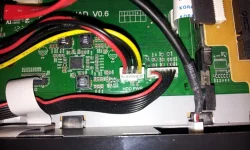
I made this FAN installation a few months back - and I have not had a single crash since.
Power taken internally. And you dont have a big hole in the lid.

http://www.world-of-satellite.com/showthread.php?38754-What-temperature/page2&highlight=temperature

20140929_071239.webp 20140929_071824.webp
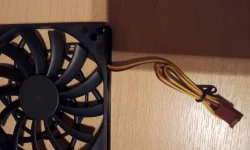
I have got one of the Scythe Kaze Jyu Slim fans and as I have a HDD fitted, maybe intend to slave the power from the leads going to the HDD. I assume the red/black leads are all that is needed to get power to the fan motor. Assume that the yellow is just ground.
 
if it is the case the drivers are causing the processor to overheat :mad: and you reach a certain temperature you might as well chuck your box in the bin as the processor would of been cooked and will never work the same again. However on the other hand we should all demand that they replace or repair the boxes free of charge if you can prove they are at fault or if they have already admitted its their drivers are at fault.

I have already sent gigablue an email requesting if there boot loaders are at fault for crashes and overheating of box's that was three days ago and to date have had no reply mind you I am only one voice.:confused:
 
I for one will send another email to gb. Not had any reply to my post on the gb forum or mail. I'll keep trying.

Sent from my GT-I9100 using Tapatalk
 
It's the other way around; it's the driver that makes the SoC think it's too hot and hence the temperature protection kicks in.

Cant see the point of fitting a fan then, if its not overheating and the software is telling the box its overheating no matter how many fans you put on it the SOC is still going to tell the box its overheating.
surely all that is needed is to alter the threshold of the temperature on the driver which for a good programmer should be pretty simple problem solved as the fans that are being put on must be bringing the temperature just below the maximum threshold therefore no crashes.
 
Cant see the point of fitting a fan then, if its not overheating and the software is telling the box its overheating no matter how many fans you put on it the SOC is still going to tell the box its overheating.
surely all that is needed is to alter the threshold of the temperature on the driver which for a good programmer should be pretty simple problem solved as the fans that are being put on must be bringing the temperature just below the maximum threshold therefore no crashes.

IF the box is NOT in reality overheating then try this scenario.

The box is running 30' but the software says its 50'.
You do a few recordings etc & the temp goes up to 60' but now the software tells the box its 100' & you get a reboot.

You fit a fan & the box is running 20' but the software says its 30'.
You do a few recordings etc & the temp goes up to 40' but the software says its 80' but since this is short of 100' you don't get a reboot.

By fitting a fan you are starting from a lower temp base.
The software is still telling the box a higher temp but starting from such a low base because of the fan the box never reaches a temp which results in a reboot.

Perhaps this is a simplistic way of looking at the problem.
If this is the type of scenario that is happening you would think it would be pretty simple to deal with ?

I have a Quad Plus but haven't done much with it yet as I've only had it a few days.
I've looked at the temp after its been on for a while & it says 39' ?
 
The fan does bring down the actual temperature; as reported by several people that seems to be sufficient to omit this issue.

If it was as simple as you suggest, I'm pretty sure GB would have fixed the issue already. So apparently it isn't.

Personal note: quite often it's a combination of kernel version and drivers. Every kernel has issues (because bugless software doesn't exist) and when drivers that were fine under a previous kernel are being compiled against another kernel, unexpected issues may turn up. And generally they are not easy to fix.
 
Cant see the point of fitting a fan then, if its not overheating and the software is telling the box its overheating no matter how many fans you put on it the SOC is still going to tell the box its overheating..

No, as I've explained in my earlier posts, without the fan my box was constantly wrongly reporting 99C then a couple of minutes later rebooting (when it thinks it's got to 100)

Since putting in the fan, it runs so much cooler that with the same software version under the same conditions (recording 3 things while watching a forth) the box no longer wrongly thinks it's getting to 100C, the highest mine thinks it's getting is now 59C.

All my reboot problems have 100% stopped since fitting the fan, others have reported the same thing. On the threads I linked to earlier, other users experienced the same problem (and a fan fixed this) well over a year ago. Which makes me think some quads run hotter than others hence mine wasn't affected until the recent bootloader change.

5 weeks is long enough for me to have an unusable box, it is now working perfectly. Maybe they will bring out new drivers this week, maybe in 2 months time they still won't be fixed, I (and others) gave up waiting and our problems are now solved.

I went the more drastic route of cutting a hole in the top, my warranty expires next month so it makes no difference to me. Others have mounted fans without cutting the case and their problems have also stopped, so it can still be done without affecting the warranty and a small fan costs about £5.

I emailed the 3 gigablue addresses Sicilian posted in post 230, I got replies from two of them (post 239), I replied to both and got further replies from both. One of the replies I quoted in post 239 says installing a fan won't affect the warranty, obviously me cutting a big hole in the top is a different thing and will affect it.

With regards to your above post

;)Just been reading on the gigablue site forum the main problem is different images are using different interfaces and some work with their drivers and some don't.
I am not a programmer so cant elaborate on that. :confused:

since installing the bootloader that started this problem, I had reboots (prior to my fan) regardless of whether I ran ViX or Openmips (I tried various Openmips versions).
 
IF the box is NOT in reality overheating then try this scenario.

The box is running 30' but the software says its 50'.
You do a few recordings etc & the temp goes up to 60' but now the software tells the box its 100' & you get a reboot.

You fit a fan & the box is running 20' but the software says its 30'.
You do a few recordings etc & the temp goes up to 40' but the software says its 80' but since this is short of 100' you don't get a reboot.

By fitting a fan you are starting from a lower temp base.
The software is still telling the box a higher temp but starting from such a low base because of the fan the box never reaches a temp which results in a reboot.

Perhaps this is a simplistic way of looking at the problem.
If this is the type of scenario that is happening you would think it would be pretty simple to deal with ?

I have a Quad Plus but haven't done much with it yet as I've only had it a few days.
I've looked at the temp after its been on for a while & it says 39' ?

Exactly...got it in 1
 
...
I have a Quad Plus but haven't done much with it yet as I've only had it a few days.
I've looked at the temp after its been on for a while & it says 39' ?

That's a good description of how fitting a fan reduces the re-boot issue by keeping the interior temperature of the Quad (not Plus) below a level where the incorrect sensor reading trips the protection. I too, have a Quad Plus and have never had the reported temperature go above 46C even with four tuners in operation recording to the internal disk.
 
;)Just been reading on the gigablue site forum the main problem is different images are using different interfaces and some work with their drivers and some don't.
I am not a programmer so cant elaborate on that. :confused:
This is not a very smart remark of them; what they actually say is that their drivers are not E2-compatible.
Anyway: good to see them admitting the issue.
 
Admitting is one thing fixing seems to be the issue gb are not quick at resolving. Can you imagine if Apple had this delay in fixing a bad software update! There would be riots in the streets :)

Sent from my GT-I9100 using Tapatalk
 
Admitting is one thing fixing seems to be the issue gb are not quick at resolving. Can you imagine if Apple had this delay in fixing a bad software update! There would be riots in the streets :)

Sent from my GT-I9100 using Tapatalk

yeah but Apple are a multi billion dollar company, Gigablue are not (not that I am defending them on this mind you).
 

OpenViX Feeds Status

Back
Top