Superb quality and spec AB-Com PULSe 4K SE. Crazy offer! Only £129! FREE UK DELIVERY! 4K UHD, Enigma 2, Multiboot 4 images & more!...
Superb quality and spec AB-Com PULSe 4K Rev II Twin Satellite tuner only £179! FREE UK DELIVERY! 4K UHD, Enigma 2, SATA HDD facility, Multiboot 4 images & more!...

OpenViX 6.8 Release discussion thread

Status
Not open for further replies.
What I'll do is leave it using the Export / import now as that is setup and working after all of your efforts but.... if it glitches its good to know that I can swap back over to my old method also.

At least the EPGExport has been fixed so that it handles daylight savings properly for anyone else who might use it (although I have a sneaking suspicion it may not be many who use it for enigma2 to enigma2 export/import) and so I guess other folk (who perhaps use it for enigma2 to Tivo / plex / Something else) may already have a correction in place at the destination end. Wait now for all the folk complaining that all of their imports into other systems being an hour out by fixing it for enigma2 to enigma2
:)
Hi @Huevos

What I did next was to set the EPGExport plugin to run automatically and then every 2 hours, did a restart GUI and got an unresponsive box. Went in and did an Init 6 to fully restart the box and it is still unresponsive since setting EPGExport to Active and to run every coupole of hours.

Attached debug log

For now I have gone back to the NFS shared EPG method as I think the Epgexport plugin is still a bit problematic. I will most likely stick with the NFS share method for the time being but happy to test some more. It would be good for some other setups to also test any new changes, maybe on a non-production box as mine is used for proper day-to-day TV (if such a thing is available)? At least to get to the point where it can be enebled and then sheduled to run and does not lock up the box at reboot - even if it doesnt actually do anything "real" it would be good to know I won't get a hanging box again.

Thanks
Paul


thanks
Paul
 

Attachments

Last edited:
Something wrong with the timer I guess. Maybe running multiple instances.

Do init 4 and then edit the settings file. After removing the ref to timed downloads do init 3.

I will try to find the problem later when I have spare time.
 
Hi,

Gigablue gbue4k user here.

Just updated to 6.8.008 and now the front panel display shows nothing when watching live or in the epg. If I open the recording list and play something it's ok.

Also another mention for the bug playing .webm or .mkv files that has existed since 6.8 started. You can't jump within the file it just goes back to the start. 6.7 does not do this.

Edit: Front panel skin default DOES work but the one with picons doesn't. My picons are on HDD. If I change "Use separate Picon pack for Front Display" to Yes I get the default picon instead of nothing. If I change it back to No then enigma crashes and restarts.
 
Last edited:
Don't worry, fix coming some time today.
 
Last edited:
another mention for the bug playing .webm or .mkv files that has existed since 6.8 started. You can't jump within the file it just goes back to the start. 6.7 does not do this.
Testing on gbquad4kpro and vuplus duo4kse we have no problem seeking .webm or .mkv files. Can you provide some test files?
 
Testing on gbquad4kpro and vuplus duo4kse we have no problem seeking .webm or .mkv files. Can you provide some test files?
Not sure how, I will have a think. It's not all files of that type that have the problem, only some.
 
I just did a software update and my box gets stuck in a crash loop, Octagon SF8008 with Slyk Onyx 1080 skin, I went to multiboot and it wouldn't find my backups😧 on USB so I did a Network download to a spare slot, this also went into the same crash loop, I had to load an old version I luckily had in a different slot, then restore my backup into slot1, I think I saw in the error message it could not select channel.
 
I just did a software update and my box gets stuck in a crash loop, Octagon SF8008 with Slyk Onyx 1080 skin, I went to multiboot and it wouldn't find my backups😧 on USB so I did a Network download to a spare slot, this also went into the same crash loop, I had to load an old version I luckily had in a different slot, then restore my backup into slot1, I think I saw in the error message it could not select channel.
We need to see crash log
 
i updated last nigt in New Zealand.. but the satelllite time was reading UTC.. even when i had correct timezone settings. reverted to 6.8.7

are the reported epg issues actually related to time?
 
Interesting thing. I have OpenVix 6.8.007 and when I got this newer device, I thought all the problems would finally be gone, but it actually seems to have more issues than my old device ever had.

I’ve been wondering about this for quite some time, and this morning I finally decided to test it properly. Sure enough, when I switched to the satellite side (Hotbird) and watched channels there, then switched back to the terrestrial/antenna side, none of the antenna channels would appear anymore. The signal levels (dB) just kept going up and down, and the only thing that helped was restarting Enigma2 — after that, everything worked again.

Previously, when this same thing happened, usually the first terrestrial tuner (I) would still work, but the second tuner (J) would stop working completely. Then the only solution was to restart Enigma2, after which both tuners would work normally again.

EDIT1: I tested the same thing on OpenATV, but there it did not reproduce the same issue.

EDIT2: The problem is still ongoing. I tried searching online since my own expertise is limited, and I found replies similar to this regarding the device’s message logs:

kern.warn kernel: LINE2393:
kern.warn kernel: LINE2395:

These look suspicious.
They appear to be poorly debugged output from a kernel module or driver.
The actual error message is missing, so some driver is only printing line numbers.

Most likely some:
• DVB driver
• GPU driver

is outputting those debug lines. Since the GB Quad 4K Pro is a satellite/Enigma2 device, DVB drivers are especially suspect.

This fits perfectly into the same overall issue.

The GB Quad 4K Pro has had occasional issues on different images, including:

• frontend lockups
• tuner resource deadlocks
• DVB API bugs
• FBC/hybrid tuner issues
• especially when using mixed satellite + terrestrial setups.

The important observation is this:

Restarting Enigma2 fixes the issue without needing a full reboot of the box.

That usually indicates:
• the hardware itself is not actually failing
• but rather the Enigma2/driver state becomes corrupted or confused.

Possible practical causes:

  1. OpenViX 6.8 driver regression
    Most likely.
  2. Hybrid tuner bug
    If tuners I/J are:
    • DVB-T2 dual tuners
    • USB terrestrial tuners
    • combo tuners
then resource management may break during satellite → terrestrial switching.
3. Fast channel change / PiP / stream relay
These can leave the frontend in a “reserved” or locked state.

How could this issue be investigated further and how could I get rid of it?

The debug log also contained this:

< 58746.369623> [eDVBPESReader] ERROR reading PES (fd=44): Function not implemented

I don’t know what it is related to, but it does say ERROR after all.
 
Crash logs are on but no log was created, it was the first thing I looked for?
Crash logs would have been taken, but depends when crash happened….could well be in /home/root/logs for image that crashed.
 
Interesting thing. I have OpenVix 6.8.007 and when I got this newer device, I thought all the problems would finally be gone, but it actually seems to have more issues than my old device ever had.

I’ve been wondering about this for quite some time, and this morning I finally decided to test it properly. Sure enough, when I switched to the satellite side (Hotbird) and watched channels there, then switched back to the terrestrial/antenna side, none of the antenna channels would appear anymore. The signal levels (dB) just kept going up and down, and the only thing that helped was restarting Enigma2 — after that, everything worked again.

Previously, when this same thing happened, usually the first terrestrial tuner (I) would still work, but the second tuner (J) would stop working completely. Then the only solution was to restart Enigma2, after which both tuners would work normally again.

EDIT1: I tested the same thing on OpenATV, but there it did not reproduce the same issue.

EDIT2: The problem is still ongoing. I tried searching online since my own expertise is limited, and I found replies similar to this regarding the device’s message logs:

kern.warn kernel: LINE2393:
kern.warn kernel: LINE2395:

These look suspicious.
They appear to be poorly debugged output from a kernel module or driver.
The actual error message is missing, so some driver is only printing line numbers.

Most likely some:
• DVB driver
• GPU driver

is outputting those debug lines. Since the GB Quad 4K Pro is a satellite/Enigma2 device, DVB drivers are especially suspect.

This fits perfectly into the same overall issue.

The GB Quad 4K Pro has had occasional issues on different images, including:

• frontend lockups
• tuner resource deadlocks
• DVB API bugs
• FBC/hybrid tuner issues
• especially when using mixed satellite + terrestrial setups.

The important observation is this:

Restarting Enigma2 fixes the issue without needing a full reboot of the box.

That usually indicates:
• the hardware itself is not actually failing
• but rather the Enigma2/driver state becomes corrupted or confused.

Possible practical causes:

  1. OpenViX 6.8 driver regression
    Most likely.
  2. Hybrid tuner bug
    If tuners I/J are:
    • DVB-T2 dual tuners
    • USB terrestrial tuners
    • combo tuners
then resource management may break during satellite → terrestrial switching.
3. Fast channel change / PiP / stream relay
These can leave the frontend in a “reserved” or locked state.

How could this issue be investigated further and how could I get rid of it?

The debug log also contained this:

< 58746.369623> [eDVBPESReader] ERROR reading PES (fd=44): Function not implemented

I don’t know what it is related to, but it does say ERROR after all.
So you have a gigablue Pro receiver?
What is the tuner configuration? What is attached to the fbc tuners and tuners I/J … are you using the gigablue T2 plugin tuner or ?
Can you provide debug logs for when this happens.
 
We need to see crash log
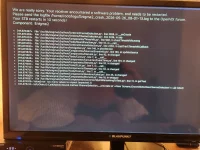
Ok, fresh morning, I again did a network flash to a spare slot, but this time I didn't restore plugins, It booted ok😊, 1st plugin to install, Kiddacs Onyx 1080, back to crash loop, gutted I really like this skin!
 

Attachments

  • 20260526_080121.webp
    20260526_080121.webp
    187.2 KB · Views: 6
Ok, fresh morning, I again did a network flash to a spare slot, but this time I didn't restore plugins, It booted ok😊, 1st plugin to install, Kiddacs Onyx 1080, back to crash loop, gutted I really like this skin!

Try running this script. It worked for me.

Bash:
#!/bin/bash
rm -r /usr/lib/enigma2/python/Components/Converter/Slyk18RemainingToText.pyc
rm -r /usr/lib/enigma2/python/Components/Converter/Slyk18RemainingToText.py
exit 0
 
Try running this script. It worked for me.

Bash:
#!/bin/bash
rm -r /usr/lib/enigma2/python/Components/Converter/Slyk18RemainingToText.pyc
rm -r /usr/lib/enigma2/python/Components/Converter/Slyk18RemainingToText.py
exit 0
Thx for the reply Willo, at what point do I do this, Reflash the image, restore settings, do the 'bash' then download/install the skin?
 
Status
Not open for further replies.

OpenViX Feeds Status

Back
Top