
Superb quality and spec AB-Com PULSe 4K SE. Crazy offer! Only £99! FREE UK DELIVERY! 4K UHD, Enigma 2, Multiboot 4 images & more!...
Superb quality and spec AB-Com PULSe 4K Rev II Twin Satellite tuner only £149! FREE UK DELIVERY! 4K UHD, Enigma 2, SATA HDD facility, Multiboot 4 images & more!...
You are using an out of date browser. It may not display this or other websites correctly.
You should upgrade or use an alternative browser.
You should upgrade or use an alternative browser.
Openvix on DM900
- Thread starter 2stein
- Start date

2stein
ViX Beta Tester
as i've never configured multi-boot and my search revealed several methods... id like to ask for a starting point: in addition to vix in flash id like to install a second image like atv on a usb ssd. can this be done in addition to already available data on the disk? thanks.@2stein - you mentioned that you were “ still waiting for the vu+ duo 4k“ but have to say the dm900 is a nice box, good coloured lcd display, boots fast and with multiboot installed is easy to update/change images without needing to use the dreambox method of flashing a root image.

So multiboot on dreambox dm900/920 uses the space on mmcblkop2/3.as i've never configured multi-boot and my search revealed several methods... id like to ask for a starting point: in addition to vix in flash id like to install a second image like atv on a usb ssd. can this be done in addition to already available data on the disk? thanks.
Long press power button - select Create MultiBoot System and then press green button on remote to initiate- will reboot and afterwards you will have a multiboot selector screen available on long press power and imagemanager will ask you to select an image slot to flash when you online flash an image.
If you want openatv select Downloads in Imagemanager select and flash to a slot.
From OpenViX or OpenATV use multibootselector/manager screen (long press power) to boot between images
2stein
ViX Beta Tester
mmcblk0p2 is the root fs and mmcblk0p3 is /data.
i'm worried that this will destroy existing data.
root@dm900:~# df
Filesystem 1K-blocks Used Available Use% Mounted on
none 502652 64 502588 0% /dev
/dev/mmcblk0p2 983448 415128 501148 45% /
tmpfs 64 0 64 0% /media
tmpfs 510844 1240 509604 0% /var/volatile
/dev/mmcblk0p3 6351776 1849612 4156464 31% /data
/dev/sda1 975409576 5147444 970245748 1% /media/hdd
/dev/sdb1 229648680 234808 229397488 0% /media/usb
none 510844 0 510844 0% /dev/shm
root@dm900:~#
i'm worried that this will destroy existing data.
root@dm900:~# df
Filesystem 1K-blocks Used Available Use% Mounted on
none 502652 64 502588 0% /dev
/dev/mmcblk0p2 983448 415128 501148 45% /
tmpfs 64 0 64 0% /media
tmpfs 510844 1240 509604 0% /var/volatile
/dev/mmcblk0p3 6351776 1849612 4156464 31% /data
/dev/sda1 975409576 5147444 970245748 1% /media/hdd
/dev/sdb1 229648680 234808 229397488 0% /media/usb
none 510844 0 510844 0% /dev/shm
root@dm900:~#

abu baniaz
Moderator
You shouldn't translate the original text in msgid. It is derived from Enigma2. Any errors there should be fixed in the python files.
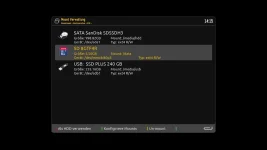
LCD screenshot:
Just for reference, you can get a screenshot of the LCD by using following command (adapted for your IP address)
I am stuck in a vicious circle with my DM900. It seems there is some clash/mismatch about the partitions between Vix/ATV
LCD screenshot:
Just for reference, you can get a screenshot of the LCD by using following command (adapted for your IP address)
Code:
http://192.168.yy.xxx/grab?format=jpg&mode=lcdI am stuck in a vicious circle with my DM900. It seems there is some clash/mismatch about the partitions between Vix/ATV
It just sticks 2 files on mmcblk0p2, the rest go mmcblk0p3.mmcblk0p2 is the root fs and mmcblk0p3 is /data.
i'm worried that this will destroy existing data.
root@dm900:~# df
Filesystem 1K-blocks Used Available Use% Mounted on
none 502652 64 502588 0% /dev
/dev/mmcblk0p2 983448 415128 501148 45% /
tmpfs 64 0 64 0% /media
tmpfs 510844 1240 509604 0% /var/volatile
/dev/mmcblk0p3 6351776 1849612 4156464 31% /data
/dev/sda1 975409576 5147444 970245748 1% /media/hdd
/dev/sdb1 229648680 234808 229397488 0% /media/usb
none 510844 0 510844 0% /dev/shm
root@dm900:~#
This is standard code for the OE-A and there would be people yelling if it screwed things, and of course it was tested back in July.
The partitioning code is same on both images - never seen it on my dm900 - how about some debug etc?I am stuck in a vicious circle with my DM900. It seems there is some clash/mismatch about the partitions between Vix/ATV
… and I have both images on my box, but will check tomorrow.
So I just flashed slot1 with latest openvix and slot 2 with latest openatv 7.6.I am stuck in a vicious circle with my DM900. It seems there is some clash/mismatch about the partitions between Vix/ATV
i have no issues booting between them.
@2stein so hold off until the next build……..
@abu baniaz …
There is an issue flashing on the dm9x0 boxes (probably on the new boxes s well) due to a frame buffer change that was added to speed up things - for some reason it causes an ofgwrite issue. (Frame buffer setup is changed)
Openatv just complains that it fails, openvix gives the failure information.
Will revert tomorrow.
@abu baniaz …
There is an issue flashing on the dm9x0 boxes (probably on the new boxes s well) due to a frame buffer change that was added to speed up things - for some reason it causes an ofgwrite issue. (Frame buffer setup is changed)
Openatv just complains that it fails, openvix gives the failure information.
Will revert tomorrow.
2stein
ViX Beta Tester
how do i install this image? there is no new image under downloads.Huevos will run an image build for the dm9x0 boxes

abu baniaz
Moderator
The release image does not have the ofgwrite issue.
Trial
Moderator
Yes I started to update it 10-12 years ago but for 3 years now I use mainly IPTV with Android TV. I think I updated it the last time a couple of month ago. I am native german speaking but this does not mean I am good in it especially with commas I always struggleDate format should be handled in enigma code, not in the translation file. Just select the correct date format in setup.
You are welcome to update the translation where broken. I think that translation is from @Trial.
 I would like that a new (young?) guy takes over.
Not to be misunderstood: I still have 5 more or less active Enigma2 boxes with OpenVix.
Ralf
Last edited:
Similar threads

- Replies
- 10
- Views
- 462
- Replies
- 66
- Views
- 2K
- Replies
- 15
- Views
- 1K
[Mut@nt HD2400]
feeds and status-message.php for self built 6.8.007 ?
- Replies
- 6
- Views
- 605