Superb quality and spec AB-Com PULSe 4K SE. Crazy offer! Only £129! FREE UK DELIVERY! 4K UHD, Enigma 2, Multiboot 4 images & more!...
Superb quality and spec AB-Com PULSe 4K Rev II Twin Satellite tuner only £179! FREE UK DELIVERY! 4K UHD, Enigma 2, SATA HDD facility, Multiboot 4 images & more!...

OpenVPN Setup guide for most VPN,s

BT. Already tried those nameservers. Just noticed openvpn already stopped and won`t start.

Ok are you using the generated socks username and password not the username and password for your client area?
 
yep. The reason I`m sure I`m making progress, is in vpn manager plugin I see a list of categories on the right handside window like TUN/TAP read/ write and other items listed. They all show 0.00 but I haven`t seen those before.
 
I`ve tried different images in my Ultimo4k and I cannot get this to work. So I`ve gone back to the latest Blackhole image to try and get this thing working, I`m not giving up.:confused: I notice when I run the script generator there is a message near the bottom:
"Configuring OpenVPN
mv: can`t rename `* *`: No Such file or directory"

Is this a problem?
 
This is what I see in the openvpn log:

Options error: Unrecognized option or missing parameter(s) in /etc/openvpn/uk_london.conf:17: compress (2.3.6)
 
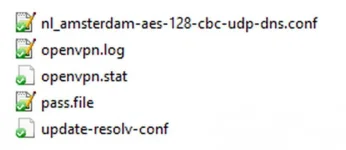
Ok, this is where I`m at now. In my Blackhole image on my Vu+ Ultimo4k I can start openvpn, turns green and is running in the Blackhole Apps menu. When I go to VPN Manager and select the .conf file with the server I want to use I get all the info stats in the right hand window but the Lock image will not turn green. Below are the files I have in

etc/openvpn:

ca.rsa.2048.crt
crl.rsa.2048.pem
openvpn.log
openvpn.stat
pass.file
uk_2-211219182445.conf
update-resolv-conf

media/hdd/PIA_VPN2:
All the ovpn files that I get when I run dsayers scripts generator.
Also:
ca.rsa.2048.crt
crl.rsa.2048.pem
client.conf
pass.file
client.conf
 
Is your .conf file (nl_amsterdam) in your etc/openvpn folder exactly the same in your media/hdd/vpn folder? Or is it named differently?
 
I removed all files except ovpn files from the vpn folder on the hdd and I lost all the data from the right hand window. I put the ca.rsa.2048.crt
crl.rsa.2048.pem files back and the data returned but still won`t turn green.
 
Is your .conf file (nl_amsterdam) in your etc/openvpn folder exactly the same in your media/hdd/vpn folder? Or is it named differently?

It just makes a copy of the ovpn file I'm actually using from /media/hdd/vpn/ in /etc/openvpn/ but adds the path to the config files to it.

This is /media/hdd/vpn/

Code:
client
dev tun
proto udp
remote nl-amsterdam.privacy.network 1198
resolv-retry infinite
nobind
persist-key
persist-tun
cipher aes-128-cbc
auth sha1
tls-client
remote-cert-tls server

auth-user-pass
compress
verb 1
reneg-sec 0

This is /etc/openvpn/

Code:
reneg-sec 0client
dev tun
proto udp
remote nl-amsterdam.privacy.network 1198
resolv-retry infinite
nobind
persist-key
persist-tun
cipher aes-128-cbc
auth sha1
tls-client
remote-cert-tls server

auth-user-pass /etc/openvpn/pass.file
log /etc/openvpn/openvpn.log
status /etc/openvpn/openvpn.stat 10
compress
verb 1
reneg-sec 0

I'm not sure you have downloaded the correct files?
I don't have any crt or pem files. The certificate is actually in each ovpn file.

This is one of my ovpn files with the actual certificate replaced:

View attachment belgium-aes-128-cbc-udp-dns.zip
 
I used the ones dsayers gave me the link to when I asked how you got the files for Linux , I noticed straight away they were different to yours. To be honest I`ve struggled find on the PIA site what files I`m supposed to download.
 
Your Belgium file for example is nothing like the files I get. The ones I get just have the country name and ovpn extension. No AES or UDP in the name.
 
Try this one for pia

Code:
https://www.privateinternetaccess.com/openvpn/openvpn.zip

Those have the certificate included.
 
I've compared one of the downloaded files with my existing working files and this seems to be what happens:

Code:
client
dev tun
proto udp
remote czech.privacy.network 1198
resolv-retry infinite
nobind
persist-key
persist-tun
cipher aes-128-cbc
auth sha1
tls-client
remote-cert-tls server

auth-user-pass
compress
verb 1
reneg-sec 0
<crl-verify>
-----BEGIN X509 CRL-----
OPEN YOUR .PEM FILE WITH NOTEPAD++
AND COPY THE CERTIFICATE HERE
-----END X509 CRL-----
</crl-verify>

<ca>
-----BEGIN CERTIFICATE-----
OPEN YOUR SECURITY CERTIFICATE FILE WITH NOTEPAD++
AND COPY THE CERTIFICATE HERE
-----END CERTIFICATE-----
</ca>

disable-occ

Maybe the dsayers method will do this automatically.
 
Whenever I download a new set of ovpn files, should I generate a new SOCKS username and password?

No you shouldn't need to generate a new username and password just delete current files and send new files over
 

OpenViX Feeds Status

Back
Top