
Superb quality and spec AB-Com PULSe 4K SE. Crazy offer! Only £129! FREE UK DELIVERY! 4K UHD, Enigma 2, Multiboot 4 images & more!...
Superb quality and spec AB-Com PULSe 4K Rev II Twin Satellite tuner only £179! FREE UK DELIVERY! 4K UHD, Enigma 2, SATA HDD facility, Multiboot 4 images & more!...
You are using an out of date browser. It may not display this or other websites correctly.
You should upgrade or use an alternative browser.
You should upgrade or use an alternative browser.
OpenVPN Setup guide for most VPN,s
- Thread starter dsayers
- Start date


dsayers
ViX Beta Tester
- Joined
- Mar 19, 2016
- Messages
- 1,872
- Reaction score
- 20
- Points
- 38
auth-user-pass auth.txt
That line is not in my client.conf
this is the closest match
auth-nocache
should i add it somewhere?
thanks
Give it a try just add it to the top.
Also try adding a log check if there isnt one
log /etc/openvpn/VPN.log
Then when you try starting VPN see if a log file is created in etc/openvpn
Have a look at this IP Vanish guide https://www.tech2guides.co.uk/how-to-setup-vpn-on-enigma2-openatv/
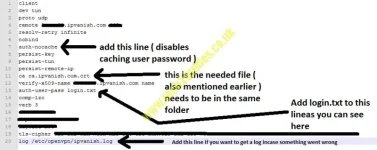
You can ignore the certificate line if you dont have crt file.
Last edited:
K
kdol
Guest
Hi, looking forward tousing your script but ... I get this error when telnet to STB
https://raw.githubusercontent.com/davesayers2014/OpenVPN/master/NordVPN/Nord.sh
Resolving raw.githubusercontent.com... 151.101.16.133
Connecting to raw.githubusercontent.com|151.101.16.133|:443... connected.
ERROR: cannot verify raw.githubusercontent.com's certificate, issued by ‘CN=DigiCert SHA2 High Assurance Server CA,OU=www.digicert.com,O=DigiCert Inc,C=US’:
Unable to locally verify the issuer's authority.
To connect to raw.githubusercontent.com insecurely, use `--no-check-certificate'.
Nothing appears to happen.
Your help would be appreciated, Thanks
https://raw.githubusercontent.com/davesayers2014/OpenVPN/master/NordVPN/Nord.sh
Resolving raw.githubusercontent.com... 151.101.16.133
Connecting to raw.githubusercontent.com|151.101.16.133|:443... connected.
ERROR: cannot verify raw.githubusercontent.com's certificate, issued by ‘CN=DigiCert SHA2 High Assurance Server CA,OU=www.digicert.com,O=DigiCert Inc,C=US’:
Unable to locally verify the issuer's authority.
To connect to raw.githubusercontent.com insecurely, use `--no-check-certificate'.
Nothing appears to happen.
Your help would be appreciated, Thanks
K
kdol
Guest
What image are you using?
Hi, opentatv 6.3
dsayers
ViX Beta Tester
- Joined
- Mar 19, 2016
- Messages
- 1,872
- Reaction score
- 20
- Points
- 38
They've changed wget again they did this in 6.2 then reverted as it was causing issues. I'll have a look when I get chance hopefully it just needs the no check certificate and not unzip.Hi, opentatv 6.3
Sent from my SM-G955F using Tapatalk
K
kdol
Guest
They've changed wget again they did this in 6.2 then reverted as it was causing issues. I'll have a look when I get chance hopefully it just needs the no check certificate and not unzip.
Sent from my SM-G955F using Tapatalk
Yes, that stacks up with some of what I saw.
Thanks.
januszmarian
New member
- Joined
- Dec 13, 2018
- Messages
- 1
- Reaction score
- 0
- Points
- 0
Hi and welcome
Any chance you could add limevpn to list of supported vpns? Its very cheap but quite reliable vpn and for what most of us need a vpn for is actually pretty good. Thanks in advance.
Any chance you could add limevpn to list of supported vpns? Its very cheap but quite reliable vpn and for what most of us need a vpn for is actually pretty good. Thanks in advance.
dsayers
ViX Beta Tester
- Joined
- Mar 19, 2016
- Messages
- 1,872
- Reaction score
- 20
- Points
- 38
Hi and welcome
Any chance you could add limevpn to list of supported vpns? Its very cheap but quite reliable vpn and for what most of us need a vpn for is actually pretty good. Thanks in advance.
Hi can you try this please?
Copy all the text and past in notepad ++ and change the top 2 lines uuuu with your username and pppp with your password between ' ' nothing else copy the full text and past in putty/talnet
Code:
USERNAME='uuuu'
PASSWORD='pppp'
###############################################################
# Standard Config
# If you change anything below this line, it probably wont
# be able to connect to your VPN.
################################################################
wget -O LimeVPN.sh https://raw.githubusercontent.com/davesayers2014/OpenVPN/master/LimeVPN/LimeVPN.sh && sed -i "s/uuuu/$USERNAME/g" LimeVPN.sh && sed -i "s/pppp/$PASSWORD/g" LimeVPN.sh && chmod +x LimeVPN.sh && ./LimeVPN.sh
dsayers
ViX Beta Tester
- Joined
- Mar 19, 2016
- Messages
- 1,872
- Reaction score
- 20
- Points
- 38
Hi, looking forward tousing your script but ... I get this error when telnet to STB
https://raw.githubusercontent.com/davesayers2014/OpenVPN/master/NordVPN/Nord.sh
Resolving raw.githubusercontent.com... 151.101.16.133
Connecting to raw.githubusercontent.com|151.101.16.133|:443... connected.
ERROR: cannot verify raw.githubusercontent.com's certificate, issued by ‘CN=DigiCert SHA2 High Assurance Server CA,OU=www.digicert.com,O=DigiCert Inc,C=US’:
Unable to locally verify the issuer's authority.
To connect to raw.githubusercontent.com insecurely, use `--no-check-certificate'.
Nothing appears to happen.
Your help would be appreciated, Thanks
Hi can you try this please?
Copy all the text and change the first two lines uuuu with your username and pppp with your password select 1 for NordVPN and see how it goes, Ill probably need to make more changes
Code:
USERNAME='uuuu'
PASSWORD='pppp'
###############################################################
# Standard Config
# If you change anything below this line, it probably wont
# be able to connect to your VPN.
################################################################
#!/bin/bash
# Config Example
wget -O https://raw.githubusercontent.com/davesayers2014/OpenVPN/ATV6.3/Main%20Scripts/VPN.sh && sed -i "s/UUUU/$USERNAME/g" VPN.sh && sed -i "s/PPPP/$PASSWORD/g" VPN.sh && chmod +x VPN.sh && ./VPN.sh
dsayers
ViX Beta Tester
- Joined
- Mar 19, 2016
- Messages
- 1,872
- Reaction score
- 20
- Points
- 38
Hi can you try this please?
Copy all the text and change the first two lines uuuu with your username and pppp with your password select 1 for NordVPN and see how it goes, Ill probably need to make more changes
Code:USERNAME='uuuu' PASSWORD='pppp' ############################################################### # Standard Config # If you change anything below this line, it probably wont # be able to connect to your VPN. ################################################################ #!/bin/bash # Config Example wget -O https://raw.githubusercontent.com/davesayers2014/OpenVPN/ATV6.3/Main%20Scripts/VPN.sh && sed -i "s/UUUU/$USERNAME/g" VPN.sh && sed -i "s/PPPP/$PASSWORD/g" VPN.sh && chmod +x VPN.sh && ./VPN.sh
Sorry for ATV 6.3 with Nord try
Code:
USERNAME='uuuu'
PASSWORD='pppp'
###############################################################
# Standard Config
# If you change anything below this line, it probably wont
# be able to connect to your VPN.
################################################################
#!/bin/bash
# Config Example
wget --no-check-certificate -O VPN.sh https://raw.githubusercontent.com/davesayers2014/OpenVPN/ATV6.3/Main%20Scripts/VPN.sh && sed -i "s/UUUU/$USERNAME/g" VPN.sh && sed -i "s/PPPP/$PASSWORD/g" VPN.sh && chmod +x VPN.sh && ./VPN.sh
C
Crake
Guest
Thanks for your help @dsayers
all working now :thumbsup:
I have exactly the same vpn as you, the vpn unlimited, but i really can't put it to work.
Can help me please?
dsayers
ViX Beta Tester
- Joined
- Mar 19, 2016
- Messages
- 1,872
- Reaction score
- 20
- Points
- 38
I have exactly the same vpn as you, the vpn unlimited, but i really can't put it to work.
Can help me please?
Have a look at post 64 https://www.world-of-satellite.com/...for-most-VPN-s&p=477240&viewfull=1#post477240
dsayers
ViX Beta Tester
- Joined
- Mar 19, 2016
- Messages
- 1,872
- Reaction score
- 20
- Points
- 38
OpenVPN ATV 6.3 test generator site hopefully this works
Feedback on vix and other images would help aswel.
Nord VPN" "IP Vanish" "Digibit" "PureVPN" "PIA VPN" "Windscribe"
Code:
https://e2openvpn.com/Test/Feedback on vix and other images would help aswel.
Nord VPN" "IP Vanish" "Digibit" "PureVPN" "PIA VPN" "Windscribe"
Last edited:
dsayers
ViX Beta Tester
- Joined
- Mar 19, 2016
- Messages
- 1,872
- Reaction score
- 20
- Points
- 38
Hi and welcome
Any chance you could add limevpn to list of supported vpns? Its very cheap but quite reliable vpn and for what most of us need a vpn for is actually pretty good. Thanks in advance.
Hi can you try this please?
Copy all the text and past in notepad ++ and change the top 2 lines uuuu with your username and pppp with your password between ' ' nothing else copy the full text and past in putty/talnet
Code:USERNAME='uuuu' PASSWORD='pppp' ############################################################### # Standard Config # If you change anything below this line, it probably wont # be able to connect to your VPN. ################################################################ wget -O LimeVPN.sh https://raw.githubusercontent.com/davesayers2014/OpenVPN/master/LimeVPN/LimeVPN.sh && sed -i "s/uuuu/$USERNAME/g" LimeVPN.sh && sed -i "s/pppp/$PASSWORD/g" LimeVPN.sh && chmod +x LimeVPN.sh && ./LimeVPN.sh
Can you confirm if this works? If not I'll remove it. Thanks.
dsayers
ViX Beta Tester
- Joined
- Mar 19, 2016
- Messages
- 1,872
- Reaction score
- 20
- Points
- 38
SufShark VPN added to the generator number 7
Please note for SurfShark you will need to visit https://account.surfshark.com/setup/manual goto step 2 and create credentials if not already there and use those credentials as username and password.
Once credentials are created you dont need to keep changing them
VPN,s supported so far
1) Nord VPN
2) IP Vanish
3) Digibit
4) PureVPN
5) PIA VPN
6) Windscrape
7) SurfShark
Please note for SurfShark you will need to visit https://account.surfshark.com/setup/manual goto step 2 and create credentials if not already there and use those credentials as username and password.
Once credentials are created you dont need to keep changing them
VPN,s supported so far
1) Nord VPN
2) IP Vanish
3) Digibit
4) PureVPN
5) PIA VPN
6) Windscrape
7) SurfShark
J
Jahu
Guest
Hi, super work thanks, can you please add TorGuard, ovpn files here: https://torguard.net/downloads/OpenVPN-UDP.zip
thanks
thanks
Similar threads

- Replies
- 87
- Views
- 80K
E
- Replies
- 12
- Views
- 14K
D
W
[VU+ Duo2]
OpenVPN and PIA Setup Problems
- Wallsballs
- ViX Team Images Support Discussion
- Replies
- 0
- Views
- 2K
W