
Superb quality and spec AB-Com PULSe 4K SE. Crazy offer! Only £129! FREE UK DELIVERY! 4K UHD, Enigma 2, Multiboot 4 images & more!...
Superb quality and spec AB-Com PULSe 4K Rev II Twin Satellite tuner only £179! FREE UK DELIVERY! 4K UHD, Enigma 2, SATA HDD facility, Multiboot 4 images & more!...
You are using an out of date browser. It may not display this or other websites correctly.
You should upgrade or use an alternative browser.
You should upgrade or use an alternative browser.
OpenVPN Setup guide for most VPN,s
- Thread starter dsayers
- Start date


dsayers
ViX Beta Tester
- Joined
- Mar 19, 2016
- Messages
- 1,872
- Reaction score
- 20
- Points
- 38
hi dsayers,
Late to the party with this, im trying to use PIA and it dosent seem to be downloading the required location files, I can download them manually and add them to HDD/PIA_VPN2
should the script automatically download ALL locations from the PIA website?
Also im using my main site login details, should I be using "PPTP/L2TP/SOCKS Username and Password"
sorry if these have been covered, I have tried to look the thread for relevant info.
I'm seeing different images having issues with downloading the files in script. Possibly different wget
For username and password I think the generated username and password in pia

Andy_Hazza
Moderator
I use my generated PIA user & pass if that helps
Sent from my iPhone using Tapatalk
Sent from my iPhone using Tapatalk
Ok guys, me again..........
have changed providers to surfshark, have generated a manual config user and pass, put these into dsayers generater.
the generater seems to complete fully with no errors, however the username is missing from the "pass.file"
I have manually edited the file using notepad++ but it still wont start the vpn, and shows no username, any help?
It always seems to remove the user name from the pass.file.
have changed providers to surfshark, have generated a manual config user and pass, put these into dsayers generater.
the generater seems to complete fully with no errors, however the username is missing from the "pass.file"
I have manually edited the file using notepad++ but it still wont start the vpn, and shows no username, any help?
It always seems to remove the user name from the pass.file.
Last edited:
dsayers
ViX Beta Tester
- Joined
- Mar 19, 2016
- Messages
- 1,872
- Reaction score
- 20
- Points
- 38
Ok guys, me again..........
have changed providers to surfshark, have generated a manual config user and pass, put these into dsayers generater.
the generater seems to complete fully with no errors, however the username is missing from the "pass.file"
I have manually edited the file using notepad++ but it still wont start the vpn, and shows no username, any help?
It always seems to remove the user name from the pass.file.
Press menu on VPN manager and check the username is in there
Test OpenVPN script generator
Hi im looking for users to test a new version of the script.
Setup is similar but this version will install VPN Manager with an option to edit username and password via the plugin in case it was incorrectly put on the generator.
First open Putty, and in the HostName (or IP address) box enter the enigma2 boxes IP address, and then click the Telnet radio button and click open
View attachment 59823
And then log in using the word, root
View attachment 59824
Users can visit
https://e2openvpn.com/test_gen/
Add there username and password this will now generate a script.
Copy and paste the script in putty and hit enter you should now have the option for what VPN you want to use:
1) Nord VPN
2) IP Vanish
3) Digibit
4) PureVPN
5) PIA VPN
6) Windscrape
7) SurfShark
8) TorGuard
9) Ivacy
10) Quite
Choose your option and hit Enter this should then download the configs and once finished it will say OpenVPN Configs downloaded Please Start OpenVPN.
You will be asked to enter your choice again but you can ignore this.
Reboot box and goto plugins, VPN Manager and choose a country.
View attachment 59825
If you receive auth errors you can press menu and check the location is correct it should be /hdd/vpn_name. You can also check username and password is correct and edit if needed.
Brilliant, thanks tried for 3 days until I found this


^^COMPASS^^
Forum Supporter

- Joined
- Dec 20, 2011
- Messages
- 268
- Reaction score
- 3
- Points
- 18
- Age
- 60
Is anyone having issues Stopping there VPN withing VPN Manager on the latest OpenVIX 5.4.001 Image?
VPN manager was installed via the VPN Script Generator (IPVanish)
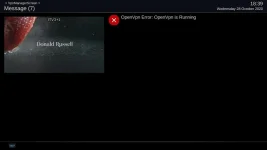
when it fails to stop the box disconnects from the internet due to DNS being blank
The above instance never occured on OpenVIX 5.3.039 it worked flawlesly & still does on my solo2 on build 5.3.039
VPN manager was installed via the VPN Script Generator (IPVanish)
when it fails to stop the box disconnects from the internet due to DNS being blank
The above instance never occured on OpenVIX 5.3.039 it worked flawlesly & still does on my solo2 on build 5.3.039
Code:
<   296.9868> [InfoBarGenerics] Key: 398 (Make) KeyID='KEY_RED' Binding='('RED',)'.
<   296.9943> [ActionMap] Keymap 'OpenVPN_Actions' -> Action = 'red'.
Stopping openvpn: ipvanish-DE-Frankfurt-fra-a01.
<   298.6274> [Skin] Processing screen 'MessageBox', position=(0, 0), size=(1920 x 1080) for module 'MessageBox'.
<   298.6784> [Screen] Warning: Skin is missing element 'icon' in <class 'Screens.MessageBox.MessageBox'>(OpenVpn Stop).
<   298.6821> [Pixmap] setPixmapNum(1) failed! defined pixmaps: []
<   298.6844> [MessageBox] Timeout set to 10 seconds.
Attachments


Andy_Hazza
Moderator
Working ok here using my AX HD61.
Sent from my iPhone using Tapatalk
Sent from my iPhone using Tapatalk
^^COMPASS^^
Forum Supporter
- Joined
- Dec 20, 2011
- Messages
- 268
- Reaction score
- 3
- Points
- 18
- Age
- 60
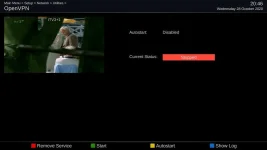
Is openvpn still running in network menu?
Current Status shows as Stopped
But as soon as i manually input the nameserver which currently shows as 0.0.0.0 within Nameserver Settings
The VPN is shown as running again within VPN Manager & OPENVPN.
Only way to stop the VPN is a full reboot which blanks out the Nameserver i can re add 192.168.1.1 and all is fine until next time I restart the VPN
Attachments
Last edited:
^^COMPASS^^
Forum Supporter
- Joined
- Dec 20, 2011
- Messages
- 268
- Reaction score
- 3
- Points
- 18
- Age
- 60
I now have VPN Manager working as its intended to if is set DHCP to yes on my VU Solose & DUO2 OpenVIX 5.4.001 Image
(setting DHCP to No doesnt allow my VPN to stop)
As I mentioned before VPN Manager works as its intended to with DHCP set to NO on OpenVIX 5.3.039
Not sure whats changed between OpenVIX 5.3 & 5.4 to stop Vpn Manager functioning like it did before on a static Lan ?
(setting DHCP to No doesnt allow my VPN to stop)
As I mentioned before VPN Manager works as its intended to with DHCP set to NO on OpenVIX 5.3.039
Not sure whats changed between OpenVIX 5.3 & 5.4 to stop Vpn Manager functioning like it did before on a static Lan ?
The DSAYERS VPN script is spot on. My question is, I have had a subscription with Octane VPN for a few years now. Is there anyway to add it to the VPN script so that I can install it onto a Zgemma H92H. Or is there another way. I have tried many guides etc but to no avail, and the script works so well it would be perfect if Octane could be added into it.
dsayers
ViX Beta Tester
- Joined
- Mar 19, 2016
- Messages
- 1,872
- Reaction score
- 20
- Points
- 38
Yesterday I was thinking of using python to download the configs as some seem to have issues in wget.
I can get this to work but my issue is that I want to have script run and install plugin via opkg install then python download configs then back to script to unzip and change settings
I can get this to work but my issue is that I want to have script run and install plugin via opkg install then python download configs then back to script to unzip and change settings
Yellow Ostrich
Forum Supporter
- Joined
- Nov 8, 2013
- Messages
- 58
- Reaction score
- 0
- Points
- 0
- Age
- 58
I've not installed a vpn before and am just about to subscribe to IP Vanish, unless you think there is a better option at a similar price.For manual setup VPN Manager by murxer
Install ipk, Save all configs to one folder no need to edit them then Open vpn manager and press menu change All config in one folder to yes
Save directory config set to the location of your config files
Then you can add username and password.
I've installed your plugin, but don't where I get the configuration files from. I'm assuming I need to create a folder call vpn in the root of the HDD on the e2 box and copy the files into it??
Thanks,
YO
Yellow Ostrich
Forum Supporter
- Joined
- Nov 8, 2013
- Messages
- 58
- Reaction score
- 0
- Points
- 0
- Age
- 58
I've just found this guide for a linux installation of IPVanish, so I think these are the configuration files you mentioned in the instructions?I've not installed a vpn before and am just about to subscribe to IP Vanish, unless you think there is a better option at a similar price.
I've installed your plugin, but don't where I get the configuration files from. I'm assuming I need to create a folder call vpn in the root of the HDD on the e2 box and copy the files into it??
Thanks,
YO
https://support.ipvanish.com/hc/en-...0vdyO3u_ov_C4ZIimAto2FyI9IT4d_A8aAko_EALw_wcB
Similar threads

- Replies
- 87
- Views
- 80K
E
- Replies
- 12
- Views
- 14K
D
W
[VU+ Duo2]
OpenVPN and PIA Setup Problems
- Wallsballs
- ViX Team Images Support Discussion
- Replies
- 0
- Views
- 2K
W