
Superb quality and spec AB-Com PULSe 4K SE. Crazy offer! Only £129! FREE UK DELIVERY! 4K UHD, Enigma 2, Multiboot 4 images & more!...
Superb quality and spec AB-Com PULSe 4K Rev II Twin Satellite tuner only £179! FREE UK DELIVERY! 4K UHD, Enigma 2, SATA HDD facility, Multiboot 4 images & more!...
You are using an out of date browser. It may not display this or other websites correctly.
You should upgrade or use an alternative browser.
You should upgrade or use an alternative browser.
[Mut@nt] HD51 Picon setting
- Thread starter avalon65
- Start date


Andy_Hazza
Moderator
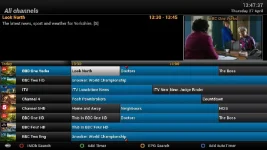
Right get ya. So you want Number > Picon > Name? If so while in EPG press Menu and go through the selection and you will see one that says Service Number, Picon & Service Name and then green button to save.
Sent from my iPhone using Tapatalk
Sent from my iPhone using Tapatalk

abu baniaz
Moderator
ignore, already posted.
Ok it is now as Number, Picon and then Name, so that will do now.
Do you see what I meant about the actual channel number in or on the picon. As I said, I was nearly sure that the picon showed the number on a red background for BBC1, and the ones on this Mutant seem or look different.
Anyway , I'm just a bit picky, so scrub that and they are what they are.
Thanks
Do you see what I meant about the actual channel number in or on the picon. As I said, I was nearly sure that the picon showed the number on a red background for BBC1, and the ones on this Mutant seem or look different.
Anyway , I'm just a bit picky, so scrub that and they are what they are.
Thanks
Andy_Hazza
Moderator
The MK ones have always been like that. Unless you were using different ones?
Sent from my iPhone using Tapatalk
Sent from my iPhone using Tapatalk
Andy_Hazza
Moderator
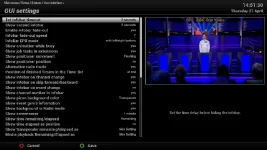
Have you got your Channel number showing in your Info Bar? To do this press Menu > Setup > System > User Interface > GUI Settings. My setup is; Info Bar Fade Out > Yes. I have mine set to 7 secs (Not the default 5 secs) also scroll down and you'll see Show Channel Number Info Bar > Yes & press the Green button to save.
Sent from my iPhone using Tapatalk
Sent from my iPhone using Tapatalk
Have you got your Channel number showing in your Info Bar? To do this press Menu > Setup > System > User Interface > GUI Settings. My setup is; Info Bar Fade Out > Yes. I have mine set to 7 secs (Not the default 5 secs) also scroll down and you'll see Show Channel Number Info Bar > Yes & press the Green button to save.
Sent from my iPhone using Tapatalk
After doing the above and changing Info Bar Fade Out to 7 secs, it was 20 secs, and then changing Channel Number Info to Yes, saved it, exited out and guess what: no channel number, and fade out doesn't fade out.
I have missed something???
Attached pic to show:
Attachments

Last edited:
Andy_Hazza
Moderator
Thats the 2nd Info Bar. Just press the Ok button once while watching TV. [emoji4]
Sent from my iPhone using Tapatalk
Sent from my iPhone using Tapatalk

In this link to how to add picons :
http://www.world-of-satellite.com/s...to-install-Picons-(channel-logos)-Video-Guide
At 3.10 seconds the BBC1 picon is exactly like I was talking about earlier.
On that video, the picon is very different than the BBC1 picon I have now, as others are.
I hope that clarifies it a bit more for you.
http://www.world-of-satellite.com/s...to-install-Picons-(channel-logos)-Video-Guide
At 3.10 seconds the BBC1 picon is exactly like I was talking about earlier.
On that video, the picon is very different than the BBC1 picon I have now, as others are.
I hope that clarifies it a bit more for you.
Andy_Hazza
Moderator
Those Picons look like they are by Ocram. Did you install those via the ViX Plugins before I mentioned the MK ones?
Sent from my iPhone using Tapatalk
Sent from my iPhone using Tapatalk
Those Picons look like they are by Ocram. Did you install those via the ViX Plugins before I mentioned the MK ones?
Sent from my iPhone using Tapatalk
No I didn't actually, as it was the MK ones from the OpenVix website. It is maybe those that I am thinking about and getting mixed up.
Andy_Hazza
Moderator
Hi, Just change the subject slightly, what cam do these run ? is it Oscam or do you have a choice ?
cheers
What do you mean? This is a "Picon" thread, as in channel pictures, not Oscam as in the Softcam.
Sent from my iPhone using Tapatalk
Tkr001
Forum Supporter ,
couldn't find where to post this. 'searched' and found this thread
do you have a link where i should be searching pls
If you have a question of issue start your own thread instead of crapping on someone else's.
abu baniaz
Moderator
couldn't find where to post this. 'searched' and found this thread
do you have a link where i should be searching pls
http://www.world-of-satellite.com/s...-New-method-of-posting-in-ViX-Support-Section!
Similar threads
- Replies
- 4
- Views
- 268
- Replies
- 6
- Views
- 526

[GiGaBlue UHD QUAD 4K]
Crash and stuck in reboot loop after Front Panel Display setting change.
- Replies
- 8
- Views
- 634


- Replies
- 1
- Views
- 301