Superb quality and spec AB-Com PULSe 4K SE. Crazy offer! Only £129! FREE UK DELIVERY! 4K UHD, Enigma 2, Multiboot 4 images & more!...
Superb quality and spec AB-Com PULSe 4K Rev II Twin Satellite tuner only £179! FREE UK DELIVERY! 4K UHD, Enigma 2, SATA HDD facility, Multiboot 4 images & more!...

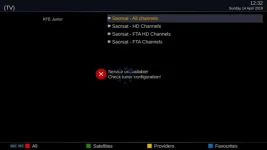
[ABM-DVB-S/S2] Saorsat - Failed to tune Saorsat on tuner B

Xiaomi

Forum Supporter
Donated Member
Joined
May 7, 2018
Messages
150
Reaction score
0
Points
0
Location
N.I.
Hi,

Able to tune and obtain Freesat (via Sky) and Saorsat (KA-SAT), but ABM is falling over with "Failed to tune Saorsat on tune B" message.

I've figured out what the initial problems were, but I'm not getting anywhere now with this.

I've had a look in the lamedb5 and lamedb files, but I cannot see any potential issue. I've looked for the net ID for Saorsat to see if I could spot the issue. From looking at the lamedb5 file I can see two transponders set up for net id 2174:

HTML:
t:005a0000:03ed:2174,s:20190000:25000000:2:2:90:2:0:1:1:2:2
t:005c0000:03ed:2174,s:20185000:25000000:2:2:92:2:0:1:1:0:2

However, from the log file I can see @ 632.210 it picks up the correct Saorsat transponder.


I've attached the lamedb, lamedb5, error log, example files and my custom mix.

Note: I think my custom mix might be incorrect. It is late now, but I think that maybe I should be performing the deletes in the Custom LCN and then performing the additions of the Saorsat channels in the Custom Mix.

View attachment ABM Files.zip

Thanks.
 
Last edited:
Please follow the instructions. Do not use a CustomLCN file.
 
Failed to tune means exactly what it says on the tin. Compounding different issues together won't help.
So far, you have three issues

1. Switch/tune issue
2. mix file. Advice was you were meant to delete then add. You have added then deleted in your file.
3. Possible 9.0/9.2 issue. The data on the table may have the orbital position differently to what we have it listed. We may need to add a hack like we have for 0.8w/1w. On Freesat, we skip services that are not on 28.2. The tables have some of them them on 28.4. However, this issue is best dealt in isolation. If I was trying to diagnose the issue, I would resolve tuning issue. Start with no services on receiver, run ABM for saorsat only, restart. Check if you have services on 9.0 on 9.2.


< 632.200> [ABM-main][doTune] Search NIM for orbital position 92
< 632.208> [ABM-main][doTune] Nim found on slot id 1 with sat 9.0E Ka-band Eutelsat 9B & Ka-Sat 9A
< 632.210> [eDVBFrontend1] prepare_sat System 1 Freq 20185000 Pol 2 SR 25000000 INV 2 FEC 2 orbpos 92 system 1 modulation 1 pilot 2, rolloff 0, is_id -1, pls_mode 0, pls_code 1
< 633.438> [ABM-main][checkTunerLock] TUNING FAILED FATAL


With regards to your reference to line 632.210, it fails to tune. That line is merely specifying what it is looking for, not what it has found.
 
Thanks for your reply.

  1. As I can obtain both satellites and tune, do I need to get Saorsat coming in on HL before progressing to the ABM stage? I had assumed that because I was obtaining 9.0E using KA-SAT then that was sufficient.
  2. Okay - I had thought that might be an issue. I did notice your reply on the other thread stating such, but forgot to apply it - apologies.
  3. The only issue in regards to the tuning is that it comes in via VH, despite data saying it should be HL. I'll speak with the Tech help from EMP again.
 
The difficulty is that you are the only one using this setup. You have two/three issues that are getting mixed up.

I am not a coder, so can only help with the easy stuff. The coding allows for slight drift/assimilation in orbital positions for some satellites. Its a big debate taht can never be solved easily.

When you next do a test, can you:
Connect your receiver directly to the LNB.
Setup the receiver to only use the 9.x position without fake transponders.
Delete all bouquets and lamedb file
Run ABM only for Saorsat, restart and check which satellite/s you have listed in the service list.
 
Last edited:
Won't be until the weekend again, but I'll do that and let you know the outcome.
 
The difficulty is that you are the only one using this setup. You have two/three issues that are getting mixed up.

I am not a coder, so can only help with the easy stuff. The coding allows for slight drift/assimilation in orbital positions for some satellites. Its a big debate taht can never be solved easily.

When you next do a test, can you:
Connect your receiver directly to the LNB.
Setup the receiver to only use the 9.x position without fake transponders.
Delete all bouquets and lamedb file
Run ABM only for Saorsat, restart and check which satellite/s you have listed in the service list.

In order to get things back to a clean starting point. I performed a factory reset on the STB and then downloaded all available updates. Deleted the lamedb and lamedb5 files and removed the EXAMPLE bouquets.

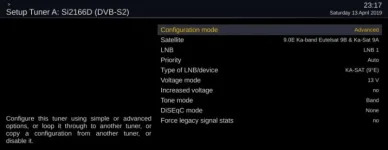
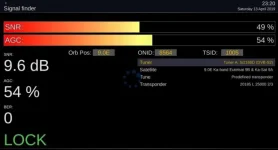
9.0E LNB is now directly fed into Tuners A and B of the Mutant HD51 STB. In order to obtain a signal using the KA-SAT (non fake transponder), this is the tuner configuration required (Note: Voltage had to be set to 13V as previously defined here: 28-2E-and-9-0E-on-Multiswitch Post #19):

9_0_SETUP_DIRECT_FEED.webp

9_0_SIGNAL_DIRECT_FEED.webp

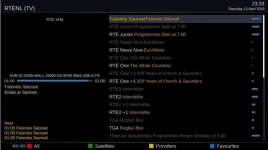
Retuned the box which provided me with 30 channels (inc radio) on 9.2E. However, when I exited the menu and selected TV > Providers, the additional greyed out channels on 9.0E are visible:

9_0_RTENL_PROVIDER_LISTING_DIRECT_FEED.webp
 
Please do not use providers, just use satellites.

Visible, selectable, channels viewable have different meanings.

We want to be in a state where you only have what you should have and the services work.

My simple test is this:
No switch, no enigma2 scan. No pre-existing services. Just run ABM. How many satellites do you have after running ABM?

Script to remove services to avoid you using factory resetting etc is in the linux command thread. Pasted below for you.
Code:
init 4 && sleep 10 && rm -f /etc/enigma2/lamedb && rm -f /etc/enigma2/*.tv && rm -f /etc/enigma2/*.radio  && rm -f /etc/enigma2/*.del &&  init 3

Attach lamedb/lamedb5 here after just an ABM scan.

To remind myself. You should only have one.

90 == Ku-band

92 == Ka-band

Do you use Skype? This will avoid all the cross referencing and mixups.
 
Last edited:
Posting for reference purposes

[ABM-main][doTune] Search NIM for orbital position 92
[ABM-main][doTune] Nim found on slot id 1 with sat 9.0E Ka-band Eutelsat 9B & Ka-Sat 9A
 
Okay, I've a few queries on what you asked me to do, but in the mean time before we make contact, I've tried this:


Satellite set to 9.0E Ka-band Eutelsat 9B & Ka-Sat 9A for Tuner A (same as last night)
Tuner B set equal to Tuner A (same as last night)
Ran command line to remove lamedb and lamedb5
Opened ABM and deleted bouquets
Ran ABM on Saorsat

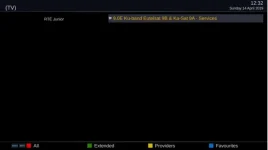
Press TV:
TV.webp

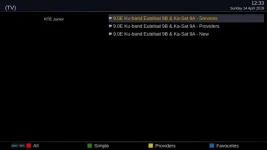
Select Satellites:
TV_Satellites.webp

Select Extended:
TV_Satellites_Extended.webp

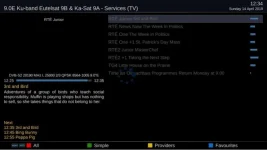
Press Okay:
TV_Satellites_Extended_Services.webp
 

Attachments

That you have to set the tuner config voltage mode to 13V says the LNB is broken. For circular left the lnb should be supplied 18V.
 
Hi Abu Baniaz - was the data I provided you what you were expecting?
 
I've checked on an Irish website, the Triax is a rebranded Inverto which has LHCP on 13V.

LNB is operating as expected.

http://www.inverto.tv/lnb/130/twin-ka-circular-dual-polarity-lnb23mm-197-202ghz-lo212o-ghz

Code:
Polarization                    Dual circular for Ka band (RHCP/LHCP)
...                             ...
Polarization selection - LHCP	13 V
Polarization selection - RHCP	18 V
Ok, That is the opposite to convention. Why would Inverto do something so stupid? This is why Voltage Mode will not work polarisation and why your switch needs the LNB plugged in the wrong port.

With a normal LNB when you insert the dielectric plate "vertical" becomes "RHCP". This has nothing to do with the wiring, but just that the plate is inserted.
 
Please provide a proper debug log with extra debug enabled.
 
Okay - is the process I followed in post #11 correct?
 

OpenViX Feeds Status

Back
Top