
Superb quality and spec AB-Com PULSe 4K SE. Crazy offer! Only £99! FREE UK DELIVERY! 4K UHD, Enigma 2, Multiboot 4 images & more!...
Superb quality and spec AB-Com PULSe 4K Rev II Twin Satellite tuner only £149! FREE UK DELIVERY! 4K UHD, Enigma 2, SATA HDD facility, Multiboot 4 images & more!...
You are using an out of date browser. It may not display this or other websites correctly.
You should upgrade or use an alternative browser.
You should upgrade or use an alternative browser.
SKY.HD Skin +cool tv guide skin
- Thread starter abell431
- Start date

abell431
ViX Skinner-Dev
0.7
Sorry this took a long time to upload. My ipk creator is not working for some reason so you will just have to overwrite the old files using dcc.
v0.7
Massive update to cool tv guide. Looks A lot more like sky now
Added new buttons
Now and next in second infobar screen
New movie selection screen. 'Sky planner'
New record icon
Sorry this took a long time to upload. My ipk creator is not working for some reason so you will just have to overwrite the old files using dcc.
v0.7
Massive update to cool tv guide. Looks A lot more like sky now
Added new buttons
Now and next in second infobar screen
New movie selection screen. 'Sky planner'
New record icon
Attachments
R
rossi2000
Guest
hi
on the planner screen, you can see the tv picture along the left side and along the top, its a few pixels wide at most.
the channel selection screen doenst fill up the screen aswell its just a window in the middle of the screen. half of the picon is missing on the right hand side, maybe due to the screen not been used full size.
nice version of the sly skin. ta
on the planner screen, you can see the tv picture along the left side and along the top, its a few pixels wide at most.
the channel selection screen doenst fill up the screen aswell its just a window in the middle of the screen. half of the picon is missing on the right hand side, maybe due to the screen not been used full size.
nice version of the sly skin. ta

Rob van der Does
ViX Beta Tester
Sorry this took a long time to upload. My ipk creator is not working for some reason so you will just have to overwrite the old files using dcc.
v0.7
Massive update to cool tv guide. Looks A lot more like sky now
Added new buttons
Now and next in second infobar screen
New movie selection screen. 'Sky planner'
New record icon
Please allow me a few remarks.
1- IMHO the picon2 rendere isn't needed; picons are always scaled to the correct dimensions.
2- The buttons in the plugin browser are not correct (too many and no label). The same applies to more screens (I think the general setup screen).
3- Hint text doesn't show
4- The screen for the permanent clock 'burns a hole' in other screens (could be in a lower z-position to overcome that).
5- Several items missing:
Code:
[ePNG] couldn't open /usr/share/enigma2/skin_default/SKY.HD/icons/icons/ico_rec_on.png
[Skin] Error: {SKY.HD/skin.xml}: pixmap file /usr/share/enigma2/skin_default/SKY.HD/icons/icons/ico_rec_on.png not found!. Please contact the skin's author!
[Skin] Error: {SKY.HD/skin.xml}: color 'undcdcdc' must be #aarrggbb or valid named color. Please contact the skin's author!7- Are you sure the renderer RunningText is required? We have something like that in our image (and I see running text without using your renderer). Same question for d2NextEvents. In general: a skin should not bring his own renderers (as that can easily lead to issues and ot's not 'plugin-like' to do so). If something is really required the imagebuilder should be requested to embed functionality.
8- For quick-EPG you fall back on the default skin. Intentional or forgotten?
9- Quite a lot of screens have no button-labels.
Looks good: keep up the god work please!
Last edited:
M
miran007
Guest
thanksssssssssss for this
I
imgold
Guest
how do i install this skin it looks really useful
A
AJT
Guest
how do i install this skin it looks really useful
First read through the thread and find the latest IPK for the skin and ftp to to temp folder then install.
Then again using ftp tool find correct folders take this update and overwrite the files installed by ipk to update them.
Last edited:
I
imgold
Guest
hmm i ftp'd it to tmp but how do install it - its not listed under setup>skins
thanks in advance!
thanks in advance!
I
imgold
Guest
ignore last post found the option under "Vix"
D
devioust
Guest
hi
abell431 excellent work but for some reason it keeps crashing my dreambox 800 se ive put the folders in the right place but it still crashes any ideas , am using tsimage 3.0 211213 version enigma 2 thanks
abell431 excellent work but for some reason it keeps crashing my dreambox 800 se ive put the folders in the right place but it still crashes any ideas , am using tsimage 3.0 211213 version enigma 2 thanks
A
AJT
Guest
hi
abell431 excellent work but for some reason it keeps crashing my dreambox 800 se ive put the folders in the right place but it still crashes any ideas , am using tsimage 3.0 211213 version enigma 2 thanks
Did you install the latest iPK of skin first.This is just an update to update the already installed skin.
D
devioust
Guest
Yeah ive installed all of them and they all seem to crash, ive had to reset my image a few times quite annoying really wanted to use this on my box !!

Conorooney
New member
- Joined
- Aug 21, 2013
- Messages
- 33
- Reaction score
- 0
- Points
- 0
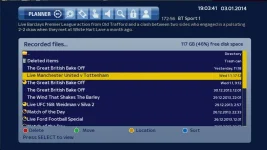
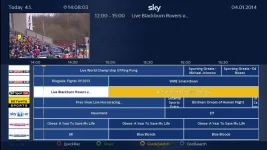
Here is a look at the one I was modding. What annoy me was getting the text for current programming left aligned but I managed that this morning in CoolTVGuide settings. Coolman doesn't make it easy to find things. The other problem I had was the info for the current programme would disappear after I selected it. You can see that on the image below. I coloured the current channel yellow but could not for the life of me find out how to change the font colour for programmes in the guide. Any help would be much appreciated!
A
AJT
Guest
great stuff lets see who will be first to complete a skin mod compatible with vix and a sky lookie likie.
Conorooney
New member
- Joined
- Aug 21, 2013
- Messages
- 33
- Reaction score
- 0
- Points
- 0
Haha not me anyway!! I'm going to let the boys work away but anyone is welcome to mine when I finish it but I know i'll be using theirs for guidance.
A
AJT
Guest
Haha not me anyway!! I'm going to let the boys work away but anyone is welcome to mine when I finish it but I know i'll be using theirs for guidance.
you can do it.....ha ha

Similar threads
- Replies
- 2
- Views
- 6K

