Superb quality and spec AB-Com PULSe 4K SE. Crazy offer! Only £99! FREE UK DELIVERY! 4K UHD, Enigma 2, Multiboot 4 images & more!...
Superb quality and spec AB-Com PULSe 4K Rev II Twin Satellite tuner only £149! FREE UK DELIVERY! 4K UHD, Enigma 2, SATA HDD facility, Multiboot 4 images & more!...

Trouble mounting NAS drive

  • Thread starter Thread starter Tw4T
  • Start date Start date
T

Tw4T

Guest
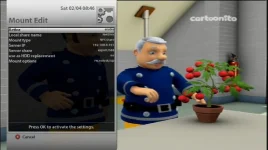
Hi guys, I`m having a bit of trouble mounting my NAS drive. I have set it up in Network Manager and all looks good except for a little red X on the drive icon.I am also unable to see the drive from within Media Player, which I assume is where it gets "mounted" to, or at least where you "see" the mount. As it is independent of any operating system I assume it is an issue with my router. I have read the many post on here but all seem to relate to PC shares. I have enclosed a few screen caps to show what I have done so far. If as I suspect it is a router issue, what steps do I need to take to get it up and running? Thanks once again.
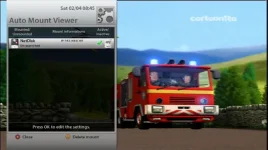
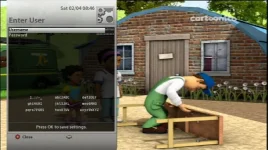
Mount1.webpMount2.webpMount3.webp
 
Forgot to mention, I can mount the drive fine in both Window7 and Debian (Linux) by using the ftp:user : [email protected] command. This makes be doubt my firewall theory.
 
Last edited by a moderator:
Does the "Server Share" option relate to the NAS or the VU Box? at the moment its set to export/hdd but if I set it to a dir on the drive, movies/ for example, it says a share with that name already exists. Im starting to pull what little hair i have left out. Cheers
 
Tried changing from NFS Share to Cifs but still cant see the mount :( - I know its not a firewall issue as I can mount it fine on both my Laptop (Linux) and my Desktop (Win7). The "Server Share" option has me thinking tho, could this be the problem?
 
when i get home ill have a look at my nas setup. i dont use any username/pass and it was as simple as discoverng it in network browser and just "OK" default settings it has and it mounted it no problem.
 
Managed to get it working, I had a user/pass on the actual drive and a separate user/pass on the individual folders. I set the drive up with the main admin/pass which gave me access to it. I them set the server share to /movies in Cifs and used the username/password for that folder. It is now showing up in media player :)
 
Try mounting it through the network browser, I have done it couple of time works fine - no changes to router config.
 

OpenViX Feeds Status

Back
Top