Superb quality and spec AB-Com PULSe 4K SE. Crazy offer! Only £99! FREE UK DELIVERY! 4K UHD, Enigma 2, Multiboot 4 images & more!...
Superb quality and spec AB-Com PULSe 4K Rev II Twin Satellite tuner only £149! FREE UK DELIVERY! 4K UHD, Enigma 2, SATA HDD facility, Multiboot 4 images & more!...

Update manager crashed

Manno

Member
Joined
Dec 12, 2020
Messages
46
Reaction score
3
Points
8
Location
Boxmeer NL
While watching a movie a error message pop up the screen something with the update manager.....system needs to reboot...
Try update again....error message.....system needs reboot........this goes on and on.....
Need to re-install Openvix....
Error logs attached
 

Attachments

While watching a movie a error message pop up the screen something with the update manager.....system needs to reboot...
Try update again....error message.....system needs reboot........this goes on and on.....
Need to re-install Openvix....
Error logs attached

Feeds are down at the moment ..... and the issue shown has been fixed, so please update to latest image version when feeds are back.
 
Youŕe right, all working now....6.6 no updates anymore....going up to 6.7 :thumbsup:
 
Software update let system crash.......
Did a box restart, no luck....
Want to re-flash, but the back-up function is gone in this version (6.7.012) and don't want to lose all the tv channels........
Log file attached.....
 
1. There is no crash log attached
2. The settings backup is still on by default. Double check your storage devices are mounted properly. If there is no storage device mounted, the settings can't be saved anywhere. You can create a settings backup manually if you want to test it's working fine.
 
Still no crashlog, you uploaded debug log.

The software update option is still there. Please be exact in your choice of wordings to avoid confusion.
  • Software Update
  • Flash image using image manager.
Both of those will start the "create a settings backup process" before continuing their own process. You can manually start a settings backup from Blue - Vix - Backup Manager. If there is no storage device mounted or not enough free space, this is where a problem could arise. Please go to Blue - ViX - Mount Manager and double check everything is mounted correctly. Then Blue - ViX - Backup Manager. Check it is using correct storage device then try to create a settings backup manually.

That being said, it is pointless performing a software update, then flashing a new image on top. You might as well as just flash the newest image and then restore settings and and plugins afterwards. It avoids the updating issues that occur once in a while. I use "software update" instead of flash then restore. Use whatever you want, but pointless doing both.
 
In 6.7.010 in the menu main/settings/system you could do a manual update, i did it every time before flash/update......
I could be wrong as things may have changed system update from image versions won't work ie 6.6 to 6.7 full flash is needed.

Blue button vix image management backup manager to create a settings backup.

Image manager to download and flash an image. Once image is flashed you should be able to choose yes to reload settings and plugins (plugins restored available via image feeds external plugins may need to be reinstalled,)

You can also make a full image backup incase of issues you can flash your stable image. Flashing images via image manager should also create a settings backup.
 
Still no crashlog, you uploaded debug log.

The software update option is still there. Please be exact in your choice of wordings to avoid confusion.
  • Software Update
  • Flash image using image manager.
Both of those will start the "create a settings backup process" before continuing their own process. You can manually start a settings backup from Blue - Vix - Backup Manager. If there is no storage device mounted or not enough free space, this is where a problem could arise. Please go to Blue - ViX - Mount Manager and double check everything is mounted correctly. Then Blue - ViX - Backup Manager. Check it is using correct storage device then try to create a settings backup manually.

That being said, it is pointless performing a software update, then flashing a new image on top. You might as well as just flash the newest image and then restore settings and and plugins afterwards. It avoids the updating issues that occur once in a while. I use "software update" instead of flash then restore. Use whatever you want, but pointless doing both.
Sorry, attached the crashlog.
Again, i got a notification for software update, started update the software and this made the box crash. Tried it 3 times.
So i want to flash the box with (newer) software, but before this i want to make a back-up with the Back-up Manager.........The problem, there is no Back-up Manager.....
For storage there is a 500GB ssd with 400 GB free, so plenty enough space....But searching for the Mount Manager....there is no Mount Manager.....
Start to believe somethings wrong this version......
Plugins : WARNING Some plugins are not available: SystemPlugins/ViX (No module named 'Components.UserInstalledPackages')
 

Attachments

Last edited:
Before we go any further, can you please confirm your storage devices are mounted correctly. I think we have asked you to check three times now. Please post a screenshot.

Thanks for the crashlog, it's crashing on backup manager. And you are saying it's not visible whe you press Blue, Vix. Somehow it has got deleted on your system. You will need to go into plugins and re-install it. Otherwise, disable the create backup option in image manager. You will be able to restore the last backup you had made.
 
@Manno - so it looks like the software update has failed to install a new module ( 'Components.UserInstalledPackages'). So ViX plugin is not initialised.
Do you have the knowledge to use putty and filezilla to copy the module to the receiver?
 
Last edited:
My recommendation is you reflash the box from scratch and set it up again.
 
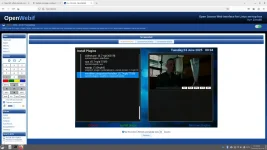
This is the plugin browser, no VIX plugin.....
 

Attachments

  • Screenshot from 2025-06-24 00-05-54.webp
    Screenshot from 2025-06-24 00-05-54.webp
    54.3 KB · Views: 9
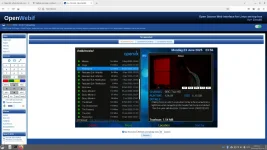
The storage manager, all films can be started so the storage works.....
 

Attachments

  • Screenshot from 2025-06-23 23-56-44.webp
    Screenshot from 2025-06-23 23-56-44.webp
    72 KB · Views: 4
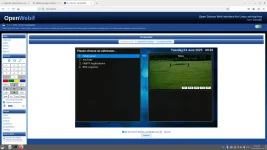
When i push the blue button
 

Attachments

  • Screenshot from 2025-06-24 00-02-36.webp
    Screenshot from 2025-06-24 00-02-36.webp
    53.1 KB · Views: 6
@Manno - so it looks like the software update has failed to install a new module ( 'Components.UserInstalledPackages'). So ViX plugin is not initialised.
Do you have the knowledge to use putty and filezilla to copy the module to the receiver?
Did some things with putty, so we can give it a try....
 
Did some things with putty, so we can give it a try....
so putty.
using the boxes IP address login (root, password) ... if it doesn,t ask for the password then enter "passwd" and create new password.
type init 4 (space between)
using Filezilla or similar (use IP address and root/password) copy attachment to /usr/lib/enigma2/python/Components
in Putty type init 3 (space between).

Assuming this is done,
Blue button on remote, ViX,
BackupManager -----> menu button on remote ...check save location is OK (HDD).
exit and create new settings backup.
ImageManager ... yellow button download latest OpenViX image ----- Blue button flash (if multiboot installed select different slot)
On reboot, Wizard should find your settings backup, select and then let it restore.
Will Reboot and you should be on latest image with your settings.

In future, I would flash image ... I never use software update.
 

Attachments

OpenViX Feeds Status

Back
Top