Superb quality and spec AB-Com PULSe 4K SE. Crazy offer! Only £129! FREE UK DELIVERY! 4K UHD, Enigma 2, Multiboot 4 images & more!...
Superb quality and spec AB-Com PULSe 4K Rev II Twin Satellite tuner only £179! FREE UK DELIVERY! 4K UHD, Enigma 2, SATA HDD facility, Multiboot 4 images & more!...

[ViX_Misc] Virtual keyboard bugs

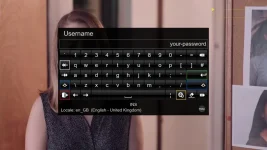
This is crashing on openvix too. Thanks for reporting.

Crashlog on other side of forum
 
Looks like:
Code:
 https://github.com/OpenPLi/enigma2/blob/develop/lib/python/Screens/VirtualKeyBoard.py
The problem is the exec(cmd) is evaling this statement (well, there are two...).
u"SPACEICONALT": "self['text'].char(" ".encode('UTF-8'))"
u"SPACEICON": "self['text'].char(" ".encode('UTF-8'))",

​
which isn't going to work (as those are just two strings concatenated, no space in the middle).
Perhaps:
u"SPACEICONALT": "self['text'].char(' '.encode('UTF-8'))"
u"SPACEICON": "self['text'].char(' '.encode('UTF-8'))",
​
would work?
 
Hi,

Birdman is correct. The issue was caused by nested quotation marks.

Pull requests have been made to the OpenViX and OpenPLi repositories. The OpenPLi request has already been merged.

Regards,
Ian.
 
Not sure which recent update caused this, but I don't seem to have a virtual keyboard showing up anymore on OpenVix-5.2.037 when I press the yellow button to perform a new EPG search. I can still press the buttons on my Mut@nt HD51 remote keypad, but I can't delete any characters and therefore cannot edit the string to search with. I assume this is a bug?
 
Hi Mick,
Not sure which recent update caused this, but I don't seem to have a virtual keyboard showing up anymore on OpenVix-5.2.037 when I press the yellow button to perform a new EPG search. I can still press the buttons on my Mut@nt HD51 remote keypad, but I can't delete any characters and therefore cannot edit the string to search with. I assume this is a bug?
Can you please provide the name of the skin that is giving you issues. Does the problem change if you change skins? Could I please have a screen capture of the VirtualKeyBoard screen that is not working. I will investigate as soon as I get this information.

Regards,
Ian.
 
Last edited:
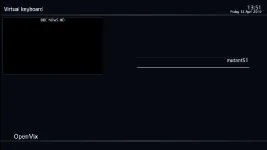
Thank you both, I just checked and it is a skin issue. I use Magic-HD-Night. The virtual keyboard shows up if I switch to another skin, e.g. Vix-HD-Night. Screenshot attached.
 

Attachments

  • BBC ONE HD-1242019-846.webp
    BBC ONE HD-1242019-846.webp
    5.3 KB · Views: 5
I have tried 5.2 037 with the magic night * skins. Keyboard shows.

I have tried it by following:
Menu > Setup > Network > Mounts > Mount Manager > Change hostname
I also tried while in live TV- Yellow> Yellow

Do these tests tally with what you are doing?
038 should be finished soon. Try uninstalling then re-installing the skin should issue persist.
 
Last edited:
I have tried 5.2 037 with the magic night * skins. Keyboard shows.

Thanks abu baniaz, I tried the Magic-FHD skin and the keyboard shows. The keyboard does not show with the Magic-HD-Night. I may need to mention here that although the skin is just HD, the output resolution is set at 2160p - this never caused a problem before.

I have tried it by following:
Menu > Setup > Network > Mounts > Mount Manager > Change hostname
I also tried while in live TV- Yellow> Yellow

Do these tests tally with what you are doing?
Yes. I first noticed it while in EPG I pressed the yellow button and then yellow button again to edit the search field, but no keyboard showed up (as per previous screenshot). I tried changing hostname as you mention above and it is also not showing - see attached screenshot.

BBC NEWS HD-1242019-1315.webp

038 should be finished soon. Try uninstalling then re-installing the skin should issue persist.
I uninstalled and reinstalled Magic-HD-Night, just in case, but the keyboard is still missing. I'll keep an eye out for 038 version and see what this does.
 
Hi Mick,

I suspect that Magic-HD-Night uses the VirtualKeyBoard images from the skin_default skin. The default skin was only updated with the new images 8 days ago. When the next update is released please upgrade to that version and then test this again. If there is still an issue please report it here.

I believe that Rob is away at the moment so if there is still a problem I will try to fix the skin in his absence.

Regards,
Ian.
 
When the next update is released please upgrade to that version and then test this again. If there is still an issue please report it here.
Thank you Ian,

I just flashed my Mut@nt with OpenVix-5.2.038 and the problem remains. No virtual keyboard is shown. I attach /etc/enigma2/settings in case it helps troubleshooting it.

EDIT: The Magic-HD-Night skin has had problems for months now with text not showing next to buttons on some pages - e.g. the coloured buttons at the bottom of the Timers page have no text showing next to them to explain what they do. So, I don't know if it is still being maintained, or if it requires tweaking to show up on Mut@nt HD51.
 

Attachments

Last edited:
Hi Mick,

Do you know who developed this skin? The fact that it has had problems for a while makes me think this is not one of Rob's skins.

Your report makes it sound like there are a number of problems with the skin. Is there a reason why you are sticking with this skin?

EDIT: It is one of Rob's skins. Last edited late last year. I will reach out to Rob and see what is happening.

Regards,
Ian.
 
Last edited:
Thank you Ian,

I prefer it for many reasons, one being my wife finds it easier to read the EPG, without eye-straining garish electric blue or lime green colours. ;)

I like it because it shows the resolution and whether it is progressive or interlaced, as well as the strength of the signal. The only thing that looks wrong on my TV is the file manager plugin, it is not wide enough for my 4K TV - just occupies a small part of the screen and I can't read the whole file name or path.
 
Are you installing the skin from a downloaded ipk or from the plugin server?
I install it from the plugin server using the OpenVix GUI.
PS. When updating OpenVix I use the option to reinstall plugins as part of the update process, rather than installing them manually.
 
Hi Mick,

While I await a reply from Rob I will load the skin when I awake and try and find a patch for the VirtualKeyBoard.

Regards,
Ian.
 
Hi Mick,

The Magic-HD-Night skin has had none of the VirtualKeyBoard changes or updates. I will look at fixing it today.

Regards,
Ian.
 
Hi Mick,

I have submitted corrections for the VirtualKeyBoard for both the Magic-HD-Night and Magic-HD-Noire skins. (Pull request #54)

I must apologise to Rob as these skins are based on Rob's Magic-HD skin but they are not Rob's effort. They were created and potentially abandoned by "DeLaGrooV".

Regards,
Ian.
 

OpenViX Feeds Status

Back
Top