Superb quality and spec AB-Com PULSe 4K SE. Crazy offer! Only £99! FREE UK DELIVERY! 4K UHD, Enigma 2, Multiboot 4 images & more!...
Superb quality and spec AB-Com PULSe 4K Rev II Twin Satellite tuner only £149! FREE UK DELIVERY! 4K UHD, Enigma 2, SATA HDD facility, Multiboot 4 images & more!...

VIX Team Vu+ Duo Image v1.3 - 05/12/2010

Status
Not open for further replies.
hey,

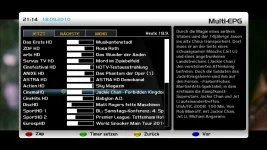
i mean that multi-epg screen see attchment.
i want to do ZAP & EXIT with OK-Button
and if possible on RED=the EPG info wich was before on OK Button
hope you can help to change the keymapping here.

and second:
how i can disable the BouquetSelector? can i do hardfix that to one?

greettz
 

Attachments
  • Multi-EPG.webp
    Multi-EPG.webp
    149.4 KB · Views: 31
Last edited by a moderator:
short blue vix menu, vix settings

set quickEPG usage to long press ok
 
ok,

i have found selection on EpgSelection.py

Code:
self["actions"] = ActionMap(["EPGSelectActions", "OkCancelActions"],
			{
				"cancel": [COLOR="red"]self.closeScreen[/COLOR],
				"ok": [COLOR="red"]self.zapTo[/COLOR],
				"timerAdd": self.timerAdd,
				"yellow": self.yellowButtonPressed,
				"blue": self.blueButtonPressed,
				"info": self.infoKeyPressed,
				"red": self.eventSelected,
				"input_date_time": self.enterDateTime,
				"nextBouquet": self.nextBouquet, # just used in multi epg yet
				"prevBouquet": self.prevBouquet, # just used in multi epg yet
				"nextService": self.nextService, # just used in single epg yet
				"prevService": self.prevService, # just used in single epg yet

i have switch this two: "cancel": self.closeScreen, "ok": self.zapTo, and works for zapchange ;)

next thing i cant set that after OK then EXIT the Multi-EPG. I have testet many things but no result ;(

Code:
	def zapTo(self): # just used in multiepg
		if self.zapFunc and self.key_red_choice == self.ZAP:
			lst = self["list"]
			count = lst.getCurrentChangeCount()
			if count == 0:
				self.closeRecursive = True
				ref = lst.getCurrent()[1]
				self.zapFunc(ref.ref)

how i can add here: self.closeScreen, ? or must i do the close command on other position?

another thing i have tryed was to add an new def:

Code:
def zapToClose(self):
                self.zapTo()
		self.closeScreen()

and change to:

Code:
self["actions"] = ActionMap(["EPGSelectActions", "OkCancelActions"],
			{
				"cancel": self.closeScreen,
				"ok": [COLOR="red"]self.zapToClose[/COLOR],
				"timerAdd": self.timerAdd,
				"yellow": self.yellowButtonPressed,
				"blue": self.blueButtonPressed,
				"info": self.infoKeyPressed,
				"red": self.eventSelected,
				"input_date_time": self.enterDateTime,
				"nextBouquet": self.nextBouquet, # just used in multi epg yet
				"prevBouquet": self.prevBouquet, # just used in multi epg yet
				"nextService": self.nextService, # just used in single epg yet
				"prevService": self.prevService, # just used in single epg yet
			})

but dont works ;(

hope anyone can help with that ;)

greetz
 
ok i have done myself ;)

edit this /usr/lib/enigma2/python/Screens/EpgSelection.py

this i working code to change:

Code:
	self["actions"] = ActionMap(["EPGSelectActions", "OkCancelActions"],
			{
				"cancel": self.closeScreen,
				"ok": [COLOR="red"]self.eventSelected,[/COLOR]
				"timerAdd": self.timerAdd,
				"yellow": self.yellowButtonPressed,
				"blue": self.blueButtonPressed,
				"info": self.infoKeyPressed,
				"red": [COLOR="red"]self.zapTo,[/COLOR]
				"input_date_time": self.enterDateTime,
				"nextBouquet": self.nextBouquet, # just used in multi epg yet
				"prevBouquet": self.prevBouquet, # just used in multi epg yet
				"nextService": self.nextService, # just used in single epg yet
				"prevService": self.prevService, # just used in single epg yet
			})

to that:

Code:
	self["actions"] = ActionMap(["EPGSelectActions", "OkCancelActions"],
			{
				"cancel": self.closeScreen,
				"ok": [COLOR="red"]self.zapTo,[/COLOR]
				"timerAdd": self.timerAdd,
				"yellow": self.yellowButtonPressed,
				"blue": self.blueButtonPressed,
				"info": self.infoKeyPressed,
				"red": [COLOR="red"]self.eventSelected,[/COLOR]
				"input_date_time": self.enterDateTime,
				"nextBouquet": self.nextBouquet, # just used in multi epg yet
				"prevBouquet": self.prevBouquet, # just used in multi epg yet
				"nextService": self.nextService, # just used in single epg yet
				"prevService": self.prevService, # just used in single epg yet
			})

then change this:


Code:
def zapTo(self): # just used in multiepg
		if self.zapFunc and self.key_red_choice == self.ZAP:
			lst = self["list"]
			count = lst.getCurrentChangeCount()
			if count == 0:
				self.closeRecursive = True
				ref = lst.getCurrent()[1]
				self.zapFunc(ref.ref)

to:

Code:
def zapTo(self): # just used in multiepg
		if self.zapFunc and self.key_red_choice == self.ZAP:
			lst = self["list"]
			count = lst.getCurrentChangeCount()
			[COLOR="red"]self.closeRecursive = True
			self.close(self.closeRecursive)[/COLOR]
			if count == 0:
				self.closeRecursive = True
				ref = lst.getCurrent()[1]
				self.zapFunc(ref.ref)
				[COLOR="red"]self.close(self.closeRecursive)
[/COLOR]

last for change Name Zap to Info:

Code:
elif self.key_red_choice != self.ZAP and  self.type == EPG_TYPE_MULTI:
				self["key_red"].setText("[COLOR="red"]Zap[/COLOR]")
				self.key_red_choice = self.ZAP

to:

Code:
elif self.key_red_choice != self.ZAP and  self.type == EPG_TYPE_MULTI:
				self["key_red"].setText("[COLOR="red"]Info[/COLOR]")
				self.key_red_choice = self.ZAP

ok now works great for me ;)

2 things too plz.
First: after this mod i get an greenscreen if i will exit Multi-EPG with Exit Button hmm dunno why lol

Second: How i can disable the Bouqout Selection if i start Multi-EPG? The last thing then i am be habby and xmas can come ;)

greetz
 
Hi.

How is it possible to do my own button assignements please, on the coloured buttons.
I can't seem to remeber how to do it?

Thaks..
 
Hi.

How is it possible to do my own button assignements please, on the coloured buttons.
I can't seem to remeber how to do it?

Thaks..

install Multiquickbutton from feed and after that you can fin idt at Settings on the bottom.
greetz
 
Press menu whilst in EPG guide.

hmm,

if i check menu in multi-epg i get Date insert window not more.

Need help with that:
Second: How i can disable the Bouqouet Selection if i start Multi-EPG? The last thing then i am be habby and xmas can come

greetz
 
In the Vix epg the Event name does not appear beside the time, also can I go forward/backward by 24hrs?
 
I have a reproducible crash with the current image (VU + Duo) and autotimer. If I want to create an autotimer on the wizard crashes the VU + with a green screen. What could be the reason?
 
If Im recording and want to set another autotimer it crashes.
 
hi all i am new in vu+ solo can any one tell me where can i find the config cam for cccam 2.2.1 i see the cams but the config cam no way ?????
 
I have got some time today and got down to teh ecm times not showing, so an update i have tested all the skins and ecm times still not showing.
Also is there going to be an update for sat dish moveent icon?
Many thanks vix team
 
Just a niggly, but maybe is me, Lol
To stop my HDD ramping up everytime i zap, I normally store Picons/epg on a USB drive, and mapped accordingly.
It seems tho, whenever I hard boot the box, I seem to lose my EPG, and need to do another EPG download!
Has anybody noticed this?
Also, after I upgraded to Vix 1.3 my Picons are no longer dispalyed, although they are all on the USB stick still in the Picons folder.
I'll reformat the USB stick when I get home later, and start again.
I'ts not a massive problem, or big deal, but I just thought I'd give it a mention.
Perhaps I have overlooked something?
By the way, it's not only on my VU+, but also happens on my DM800HD clone using Dream Elite.
Very strange.
Maybe is a core issue in the image?
Please feel free to correct me, but may I assume that the Vu images are derivatives of the original Dream Multimedia images??
Just curious.

A very merry Xmas to you all, and than you Admins for the great support forum.
 
Last edited by a moderator:
I have got some time today and got down to teh ecm times not showing, so an update i have tested all the skins and ecm times still not showing.
Also is there going to be an update for sat dish moveent icon?
Many thanks vix team

I think that's on everybodys Xmas wish, Lol
 
I have got some time today and got down to teh ecm times not showing, so an update i have tested all the skins and ecm times still not showing.
Also is there going to be an update for sat dish moveent icon?
Many thanks vix team

ecm times will only show if you use ccam 2.20 or above and will show in 2nd infobar once setup.
 
Thanks Chris.
Am using 2.1.3 at the moment.
Will update it later.
Will be nice to get it back.
 
Status
Not open for further replies.

OpenViX Feeds Status

Back
Top