Superb quality and spec AB-Com PULSe 4K SE. Crazy offer! Only £99! FREE UK DELIVERY! 4K UHD, Enigma 2, Multiboot 4 images & more!...
Superb quality and spec AB-Com PULSe 4K Rev II Twin Satellite tuner only £149! FREE UK DELIVERY! 4K UHD, Enigma 2, SATA HDD facility, Multiboot 4 images & more!...

[VU+ Solo2] VU Solo2 ViX Image Discussion

Status
Not open for further replies.
Yes, I have a problem too.. the image overspill on my tv screen. Video display just fix in the tv frame but menu display will spread out to the side of tv screen. Hopefully the coder or developer will rectify this.
 
Yes, I have a problem too.. the image overspill on my tv screen. Video display just fix in the tv frame but menu display will spread out to the side of tv screen. Hopefully the coder or developer will rectify this.

This is not a problem with the image but your TV, google overscan and your TV model number to find out how to disable overscan, or if thats not possible and only as a last resort adjust the OSD in Menu> setup> system> User interface> Position setup.
 
Hi Folks,

Firstly thank you for all of the updates - great work, and I have noted the "wait" message is now gone. I have seen one new issue with the ViX 3.0.668 release - on the ViX HD Night skin, there is now a problem with the signal details - i.e. Frequency, H or V etc, - the bottom of text is cut off on the second info screen. I noted this is OK on similar screen for "default" (basic) skin. Small item of detail.

Also for some time (many releases) I have been experiencing inconsistency with DNS. If I could fully put my hand on it I would be more specific. Symptoms as follows:

1. DHCP Network settings, manual DNS - each reboot DHCP over-writes manual DNS config - this maybe by design, but not intuitive.
2. Manual network config - Primary and secondary DNS set; settings are lost, and go back to default DHCP - but can't specifically say under what circumstances - it seems to happen over time, but not strictly on full restart
3. With my current router - supplied by broadband provider - I must set Google DNS on openViX for Plugins and Updates to work. Pretty standard network config in that the gateway is 192.168.1.254 (typical) which is also the DNS server. This obviously works for elements of openViX, as ECM functions resolve by DNS - i.e. softcams. It's just that with Plugins or Updates you get "feeds may be down message"; this is very strange as all feeds seem to be from http://www.world-of-satellite.com/ which does resolve from PC or I would blame my service providers DNS. I have ruled this out by setting Google DNS as primary DNS service on the router, but the same setting does not work from 192.168.1.254 - the router! I cannot make sense of what is happening, and my work around is to set the DNS directly in openViX, BUT from time to time this gets over written by default DHCP 192.168.1.254 in my case.

Any ideas - I am pretty familiar with network settings in general, and have no other issues on my home network. I do think my home router is perhaps not responding as expected to the DNS requests from my VU+ Solo 2, but in any event I am losing specific Manual DNS settings, and otherwise my home network is fine. Thanks.

Vu+ Solo 2
OpenVix 3.0.668
ViX HD Night
 
Last edited:
Hi,
1. is by partly by design. The server seems to decide with settings are given to the client. So it seems possible that there are DHCP server which deliver only IP and netmask but not gateway or DNS. Your server seems to deliver all settings.
2. i use manual settings since I got my Solo2 6 month ago and never had problems. You only have to make sure that you do a real shutdown or reboot after you did your changes. I you just cut the power supply or reboot with telnet no changes are saved.
3. There I cannot help at all because it seems to have something to do with your ISP.

ciao
 
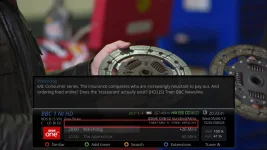
Perhaps my comment above was missed - sorry if it is in hand. I have seen one new issue with the ViX 3.0.668 - > 3.0.678 release - on the ViX HD Night skin, there is now a problem with the signal details - i.e. Frequency, H or V etc, - the bottom of text is cut off on the second info screen for the full width (incl. ECM info). I noted this is OK on similar screen for "default" (basic) skin - i.e. the skin that is the actual default rather than ViX-Night which is what is supplied. Small item of detail. See attacment for view.


BBC 1 NI HD-562013-2047.webp


Vu+ Solo 2
OpenVix 3.0.668 - >3.0.678
ViX HD Night
 
Perhaps my comment above was missed - sorry if it is in hand. I have seen one new issue with the ViX 3.0.668 - > 3.0.678 release - on the ViX HD Night skin, there is now a problem with the signal details - i.e. Frequency, H or V etc, - the bottom of text is cut off on the second info screen for the full width (incl. ECM info). I noted this is OK on similar screen for "default" (basic) skin - i.e. the skin that is the actual default rather than ViX-Night which is what is supplied. Small item of detail. See attacment for view.


View attachment 26391


Vu+ Solo 2
OpenVix 3.0.668 - >3.0.678
ViX HD Night

The problem arises because this is a general discussion thread, if you need to report a bug you really should make a thread for it your self rather than posting in this one, otherwise your posts may be missed.
 
OK. thanks phoenix, but I did think this was the place for minor general items - apologies and thanks for the advice.

As a general discussion it might be a good idea to have a bug tracker in that case? I am new to this, but I cannot see starting a "new" thread for each very minor bug or observation to be helpful? Some guidelines for newbies like me would be useful. Perhaps they are somewhere that I haven't found?

Thanks
 
OK. thanks phoenix, but I did think this was the place for minor general items - apologies and thanks for the advice.

As a general discussion it might be a good idea to have a bug tracker in that case? I am new to this, but I cannot see starting a "new" thread for each very minor bug or observation to be helpful? Some guidelines for newbies like me would be useful. Perhaps they are somewhere that I haven't found?

Thanks

We do have a bug tracker in place in our private development sections of the forum. This whole entire section of the forum is dedicated to helping users with there ViX related problems, so if you have problems make a thread and we will help where possible.

Sent from my GT-I9300 using Tapatalk 2
 
Perhaps my comment above was missed - sorry if it is in hand. I have seen one new issue with the ViX 3.0.668 - > 3.0.678 release - on the ViX HD Night skin, there is now a problem with the signal details - i.e. Frequency, H or V etc, - the bottom of text is cut off on the second info screen for the full width (incl. ECM info). I noted this is OK on similar screen for "default" (basic) skin - i.e. the skin that is the actual default rather than ViX-Night which is what is supplied. Small item of detail. See attacment for view.


View attachment 26391


Vu+ Solo 2
OpenVix 3.0.668 - >3.0.678
ViX HD Night

looks like you have edited, or something has edited the default skin font's those are not the correct fonts for ViX Night.
 
This is what it should look like with the correct fonts as standard.
 
Hi,
There is a plugin called "Font Magnifier" which can change all Skins. Have you used it?

ciao
 
When i use the Damir Subtitle Plugin 2.27 and i hit the number 5 button on the remote control the image always crash! Please fix it..thank you:)
 
Thanks @andyblack and @phoenix and @trial. I did say I was a newbie!!

I used a skin_user xml file to modify the epg theme to a popular "blue" type, and changed the "regular" and a couple of the fonts as they had a nice effect on the epg as well as the "service list" (TV) screen! Very sorry to put you guys to the trouble - I did redown the skin to check before I posted- I never thought it would carry through and mess something else up.

@phoenix - what screen grabber do you use?

Thanks folks and sorry
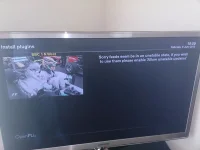
 
When i use the Damir Subtitle Plugin 2.27 and i hit the number 5 button on the remote control the image always crash! Please fix it..thank you:)

That depends on whether the plugin is open source or closed, also we would need to see your crash logs to be able to even start looking into this.
 
Thanks @andyblack and @phoenix and @trial. I did say I was a newbie!!

I used a skin_user xml file to modify the epg theme to a popular "blue" type, and changed the "regular" and a couple of the fonts as they had a nice effect on the epg as well as the "service list" (TV) screen! Very sorry to put you guys to the trouble - I did redown the skin to check before I posted- I never thought it would carry through and mess something else up.

@phoenix - what screen grabber do you use?

Thanks folks and sorry

I use one of two commands via a telnet session to create screenshots or screen grabs.

have a look here for details.

How to Take a screenshot from your satellite receiver
Click Here
 
Hey, i installed the newest one on the download image page openvix-3.0.678-vusolo2_usb.zip. After a while i tried to play with some plugins but im getting the following

DSC_0050.webp

EDIT

Sorry guys i sorted it by doing what it said todo my bad.
 
Last edited by a moderator:
After upgrading vix image, on the epg , i seem to have lost additional details of the actual programs

Previous you would see in the epg of a program lost of details, like HD.Runing time etc etc.
I seem to have lost this and just wonder if its a setup setting somewhere.

Also i cant connect using the openwebif extension - just keep getting this in browser above the top border

Request failed for: /web-data/tpl/default/tplBouquetsAndServices.htm
Status: 404 Not Found

I have heard that the old version may work, but cant find a way of getting hold of this.
 
Hello

This morning I turned my solo2 on and im having a few issuses

1- plugins ..when I try to down load plugins the box crashes with the encounterd software problem ect

2- update... when I try to update I get get ' a background check is in progress try again in a few mins'

both these problems I have never encountered before is there a issue with the plugins/udates or is it something to do with my box ?

thank you
 
Hello

This morning I turned my solo2 on and im having a few issuses

1- plugins ..when I try to down load plugins the box crashes with the encounterd software problem ect

2- update... when I try to update I get get ' a background check is in progress try again in a few mins'

both these problems I have never encountered before is there a issue with the plugins/udates or is it something to do with my box ?

thank you
Please create a thread if you encounter any problem.
 
Hello!
Yesterday I updated my solo2 with new SW Version openvixx from kernel 3.3.6 to 3.3.8.
After upgrade my DVB-T receiver Cinergy Diversity Usb XS doesn`t work.
It was one of the advantages of openvixx, that this image works with my solo2 and dvb-t stick . ( many images don`t )
Is this a known problem and is s.o. working on a solution to this problem?
It would be great.
In the meantime I switched back to my backup openvixx with kernel 3.3.6.
By the way which one is the latest release of openvix with kernel 3.3.6?
Thanks in advance for responding
 
Last edited:
Status
Not open for further replies.

OpenViX Feeds Status

Back
Top