Superb quality and spec AB-Com PULSe 4K SE. Crazy offer! Only £99! FREE UK DELIVERY! 4K UHD, Enigma 2, Multiboot 4 images & more!...
Superb quality and spec AB-Com PULSe 4K Rev II Twin Satellite tuner only £149! FREE UK DELIVERY! 4K UHD, Enigma 2, SATA HDD facility, Multiboot 4 images & more!...

Quad GBLAN update

Well... my Lan/Wan is provided by a sitecom wireless modem/router with 4 gigabit lan port and 802.11N wireless and a gigabit switch.
I've an iPad2 and there i can trust the problem with wi-fi speed.
But I've also a macbookpro attached to the gigabit switch, and also there, if I watch an hd channel, i have too many freezes. Too many means I can't watch it, but switch to SD channel, who works well.
WiFi is notorious in giving stream problems. Don't forget that the slowest device (e.g. the ipad in the garden or so) will define the actual network speed.

If wired 100Mb-LAN is giving stream problems there is something seriously wrong. I can't look into your network, but a bad cable/connection can kill the speed.
Or you're streaming too many streams simultaneous.
 
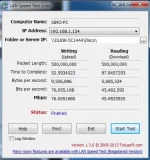
My macbookpro has 100 Mbps lan port, i've tried a test to a nas (d-link with giga lan port) attached on the same giga-lan switch.
Cattura.webp
This is a screenshot of the effective read/write speed.
If I watch a full-HD mkv video from my macbook reading it from the NAS, i can watch it clearly without problems.
Only opening HD channels streams from macbook or ipad (via openwebif or via dreamote and goodplayer) give me that problems, so i did think that problem was data "exiting" the Quad lan port.

Is there any plugin to use in vix image to check lan speed from the Quad?

Thanks!


Edit:

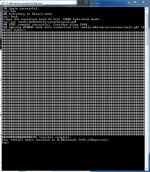
I've also tried an ftp read test (from windows, run -> ftp "Quad ip" -> bin -> hash -> get /media/hdd/movie/filename.ext ) from the macbook to the movie folder of the Quad and with a 6 MB file this is the answer:
Cattura2.webp

I'va also tried ftp-ing up an 8.110.117 KB video with filezilla, getting from its interface a 4,6 - 4,7 MBs upload speed. then tried again the read speed test getting the next result:

<<will post soon>>
 
Last edited by a moderator:
Cattura3.webp
and here is the ftp download speed of the same 8+ GB video file.

It not seems to be a bad speed in my opinion...
am I wrong?

I think that with those speeds I must be able to watch HD streams without problems... but I can't... :confused:
 
To do a proper test I think you should play the same TS-recording from the Quad and from the NAS.
Remember a recording has much more data then 'just' an HD-file.
 
View attachment 27573
and here is the ftp download speed of the same 8+ GB video file.

It not seems to be a bad speed in my opinion...
am I wrong?

I think that with those speeds I must be able to watch HD streams without problems... but I can't... :confused:

When you try watching the streams, are you using the internal ip, or an external address?
 
There are loads of example speeds given in other threads.

Most users find they get 11.8 Mbytes/s to the built-in fast ethernet port and a max of around 32 MBytes/s using an external USB gigabit adapter and a gigabit switch.

Wifi speeds are switch/wifi chipset dependant and, in my experience, are poor regardless of the media device involved.
 
Oh, don't get me wrong: the USB-GB-lan adapter will indeed be faster then the onboard NiC. And indeed: several people have reported that.
Point is, that the onboard NiC should be able to cope with HD streams without any problem.


PS: I think you meant 32 Mbytes/s, not 32 MBytes/s ?
 
PS: I think you meant 32 Mbytes/s, not 32 MBytes/s ?

What's the difference between MByte and Mbyte then? There is none afaik... There difference is between MBps and Mbps as far as I know :p All symantecs though
 
Isn't 1B equal to 7b then?

But I think you're right: the speed must be 32Mb/s (Mega bits per second) I think.
 
Last edited:
I'll give a try, but if i play from phone, from ipad or other remote device, also via wifi, a ts recording of an HD channel from the media/hdd/movie/ folder of the QUAD, after a some seconds time to hold, i can watch it regularry, without any problem or freeze.

Only live streams have these problem...
 
all by internal ip, no access from outside of the lan.


Other information: ftp download of a ts recording from the movie folder of the Quad has a speed of aout 11,5 MB/s...
 
Last edited by a moderator:
I don't stream that often but when I have done ive not had any issues with freezing. My pc is connected to a bt hh3 via a tp link and neither of them are gigabit.

What is the range of serial numbers that receive the adapter?
 
Yes this is true.
It's another port, 8001 for streams and 80 for http access...
don't know if this can create problems...
 

OpenViX Feeds Status

Back
Top