I'll try an answer the points raised as best as I can.
1) Bootlogo - VIX places the bootlogo in a different folder to other images so the ones from the website will not work. Having said that I made a VIX/MetrixHD bootlogo that goes in the right folder (and is included in the skin) however when VIX is updated the default logo overwrites this so I wouldn't worry anyway
2) How to see if you are on the current version of the skin.
You could check my github>> https://github.com/scwheeler/MetrixHD-for_VIX and you will see we are on commit/version 44, however to make things easier I will now keep this thread updated with version number.
You can then compare with what's installed on your box in the plugin menu here:
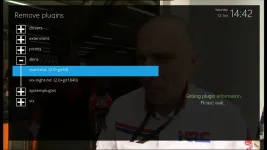
(So I am currently a version behind)
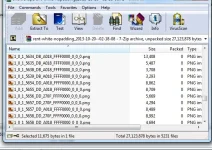
3) Picons - Dave HD (with that ref) definitely in Ocram's 10/10 update that I downloaded from directly from his website, have checked my box and in my downloads.
I hope this helps.
Steve
1) Bootlogo - VIX places the bootlogo in a different folder to other images so the ones from the website will not work. Having said that I made a VIX/MetrixHD bootlogo that goes in the right folder (and is included in the skin) however when VIX is updated the default logo overwrites this so I wouldn't worry anyway
2) How to see if you are on the current version of the skin.
You could check my github>> https://github.com/scwheeler/MetrixHD-for_VIX and you will see we are on commit/version 44, however to make things easier I will now keep this thread updated with version number.
You can then compare with what's installed on your box in the plugin menu here:
(So I am currently a version behind)
3) Picons - Dave HD (with that ref) definitely in Ocram's 10/10 update that I downloaded from directly from his website, have checked my box and in my downloads.
I hope this helps.
Steve