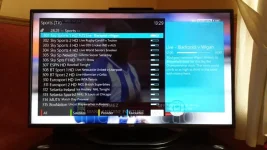
Superb quality and spec AB-Com PULSe 4K SE. Crazy offer! Only £99! FREE UK DELIVERY! 4K UHD, Enigma 2, Multiboot 4 images & more!...
Superb quality and spec AB-Com PULSe 4K Rev II Twin Satellite tuner only £149! FREE UK DELIVERY! 4K UHD, Enigma 2, SATA HDD facility, Multiboot 4 images & more!...

MetrixHD_MOD (Now includes a full 1080 HD version too)

I'll try an answer the points raised as best as I can.

1) Bootlogo - VIX places the bootlogo in a different folder to other images so the ones from the website will not work. Having said that I made a VIX/MetrixHD bootlogo that goes in the right folder (and is included in the skin) however when VIX is updated the default logo overwrites this so I wouldn't worry anyway :)

2) How to see if you are on the current version of the skin.

You could check my github>> https://github.com/scwheeler/MetrixHD-for_VIX and you will see we are on commit/version 44, however to make things easier I will now keep this thread updated with version number.

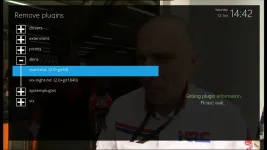
You can then compare with what's installed on your box in the plugin menu here:
screenshot.webp

(So I am currently a version behind)


3) Picons - Dave HD (with that ref) definitely in Ocram's 10/10 update that I downloaded from directly from his website, have checked my box and in my downloads.

I hope this helps.

Steve
 
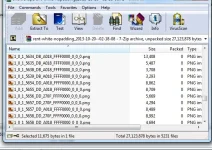
I've double checked the shd.transparent-black-nopadding_2013-10-10--20-04-59 downloads from http://ocram.github.io/picons/downloads.html

And the particular service ref is not within there. The format of the filenames use '_' instead of ':' as shown from the the Information/Service menu of the reciever but the range is

1_0_1_1_1FA4_13E_820000_0_0_0.png
to
1_0_2_FC3_451_35_C00000_0_0_0.png

So they do not extend up to ...19...
1:0:19:F3E:7F3:2:11A0000:0:0:0:111 - for the Dave HD Service Ref

I have also check the non SHD ones eg hd.black-white_2013-10-10--20-04-59.7z

I've checked the other missing picons and they also have Service Ref's with ...19.. in the range.
Any other ideas why the Service ref range is so high or the picons are so low..

thx
 
Last edited:
I think we are both referring to the same update version 10/10 as the file also dated 10/10:
shd.transparent-black-nopadding_2013-10-10--20-04-59

Perhaps have a read of the version detail to double check.

Sent from my iPad using Tapatalk HD
 
Just a heads up, the update (44) causes a crash on the channel list, thanks for letting me know Ocram.

As I can't fix today or tomorrow, I have pushed a quick update (45) to reverse for this screen. An quick alternative is to delete the ChannelSection with modified next from the skin parts and then redownload from the Openstore.

Very sorry, try fix properly soon.
 
I'm missing quite a lot of picons and I have manually downloaded the zip shd file but no change
 

Attachments

  • uploadfromtaptalk1381802874961.webp
    uploadfromtaptalk1381802874961.webp
    59.9 KB · Views: 62
why generating the skin take to much time on my vu solo... or metrix hd is not for vu solo
 
why generating the skin take to much time on my vu solo... or metrix hd is not for vu solo

The Solo and Duo for that matter have a relatively low amount of ram, try activating a swap file.
 
Good morning,
Since recent software updates, the ocram picons are no longer showing.
I never had a problem installing etc with experience over 2 year, usb eternal is mounted as normal.
Formatted pendrive incase corrupt files but the same after fresh install.
I always manually install the picons after downloading shd transparent picons, but still not happening.
As anyone else been having same issues if picons showing since current updates?
Thank you
 
Good morning,
Since recent software updates, the ocram picons are no longer showing.
I never had a problem installing etc with experience over 2 year, usb eternal is mounted as normal.
Formatted pendrive incase corrupt files but the same after fresh install.
I always manually install the picons after downloading shd transparent picons, but still not happening.
As anyone else been having same issues if picons showing since current updates?
Thank you
 
Hi foxylady - since the renderer was changed recently, it will no longer look in xpicon directories previously suggested. Are your picons in usb/picon directory?

If so can you also check that the picos have downloaded correctly i.e in the directory they should all be 1_0_1....... files and not tv.discoveryplus1.png etc.

Hope that helps.
 
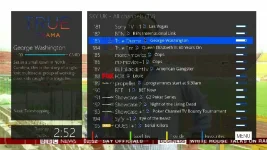
I have a strange problem with the picons also.

The display fine in the main bar

b3fb.webp

mini epg

rb0z.webp

but don't here when they used to (some picons still do).
o4wm.webp

The picons that won't display on the screen above are the same ones that there was an issue with earlier in the week.
 
:thumbsup:

WOW, those picons look amazing, where did you get those? Wanna try them myself...
 
:thumbsup:

WOW, those picons look amazing, where did you get those? Wanna try them myself...
They truly are outstanding.
You sir are the king of the picon makers.

Between you and scwheeler my Solo2 looks the dog's danglies.
 
I have a strange problem with the picons also.

The display fine in the main bar


mini epg


but don't here when they used to (some picons still do).


The picons that won't display on the screen above are the same ones that there was an issue with earlier in the week.

Don't worry it is in hand! Sure there's an easy fix - just haven't found it yet :)
 
Hi foxylady - since the renderer was changed recently, it will no longer look in xpicon directories previously suggested. Are your picons in usb/picon directory?

If so can you also check that the picos have downloaded correctly i.e in the directory they should all be 1_0_1....... files and not tv.discoveryplus1.png etc.

Hope that helps.

Morning fella,
I am having some weird issues with teh box since recent software updates, of which another issue i will post in correct section.
As regard picons, i download them manually and install into picon folder on usb pendrive therefore in correct place.
I checked the files and took screenshot to show bud.

picon.webp
 
Same problem here...I' m about sure it coud be something related to XPiconChannel renderer because in the channel selection screen some picos does not shows. Specially here in Italy s*y cinema hd channels picons.
Thanks
 

OpenViX Feeds Status

Back
Top