Superb quality and spec AB-Com PULSe 4K SE. Crazy offer! Only £129! FREE UK DELIVERY! 4K UHD, Enigma 2, Multiboot 4 images & more!...
Superb quality and spec AB-Com PULSe 4K Rev II Twin Satellite tuner only £179! FREE UK DELIVERY! 4K UHD, Enigma 2, SATA HDD facility, Multiboot 4 images & more!...

[TIVIAR-ALPHA+] Freeview Tuner doesn't show Freeview channels

Thanks everybody for all your help. My original problem was that Freeview channels kept breaking up and I noticed the channels said HbbTV on them. It seems some idiot freeview installer screwed up the freeview splitter we have in the attic. That's been fixed and I'm no longer getting breakup on channels that say HbbTv or not but I kept posting as I wasn't getting all the channels such as a lack of BBC Four HD and BBC News HD and some people on the forum said that if my aerial transmitter is pointed at Caldbeck then I should be getting those channels.

However I contacted Freeview support today and they said this:
The Caldbeck transmitter does not broadcast the COM7 HD channel group (Which shows BBC Four HD and BBC News) as this channel group was taken off back in July of 2019.

I also did a scan on my downstairs TV which has Freeview integrated and it didn't get those channels either.

So it seems it's correct that I don't get BBC Four HD and BBC News HD.

So just to double-check, if a freeview channel such as BBC One HD says DVB-T2 HBBtV on it, it's still the correct channel I've got and it's nothing to worry about. Is that correct?
 
So just to double-check, if a freeview channel such as BBC One HD says DVB-T2 HBBtV on it, it's still the correct channel I've got and it's nothing to worry about. Is that correct?

Correct .
 
So it seems it's correct that I don't get BBC Four HD and BBC News HD.

Looks like
Code:
https://ukfree.tv/transmitters/tv/Caldbeck/
is about 15 months out of date.

I know they're not 100% reliable, but that's crazy!
 
Now that you are out of fault finding/diagnostic mode, use ABM. There are two Caldecks, select the correct one.

Before you do so, please upload your lamedb and lamedb5 files. You will find them in /etc/enigma2. You will need to zip before you can upload them. Your lamedb files will be useful if fixes for ABM are required for your area.
 
Caldbeck Scotland only just includes parts of Dumfries ...

Code:
https://ukfree.tv/maps/tvregions/84

Caldbeck Cumbria manages the area surrounding and including parts of Dumfries ....

Code:
https://ukfree.tv/maps/tvregions/10

:confused::confused:
 
Last edited:
Caldbeck Scotland only just includes parts of Dumfries ...

Code:
https://ukfree.tv/maps/tvregions/84

Caldbeck Cumbria manages the area surrounding and including parts of Dumfries ....

Code:
https://ukfree.tv/maps/tvregions/10

:confused::confused:

What's your point?
 
What's your point?
There are 2 Caldbeck transmitters (news to me until an hour ago), which one are you using?

I'm just surprised that the ukfree.tv data for Caldbeck Cumbria is 15 months out of date if that's the one you're using.

Time for me to give up on this one.
 
Last edited:
Looks like
Code:
https://ukfree.tv/transmitters/tv/Caldbeck/
is about 15 months out of date.

I know they're not 100% reliable, but that's crazy!

I think the guy who does it has a real job now.
 
Now that you are out of fault finding/diagnostic mode, use ABM. There are two Caldecks, select the correct one.

Before you do so, please upload your lamedb and lamedb5 files. You will find them in /etc/enigma2. You will need to zip before you can upload them. Your lamedb files will be useful if fixes for ABM are required for your area.

The saga continues. So I watched BBC One HD on freeview for 45 minutes to check there was no breakup in the picture and there wasn't. However today, I'm getting breakup on freeview channels. It will get so bad that the picture cuts out completely on all freeview channels and gives the message "No data on Transponder. Tune failed." Then the picture will come back on in a minute or so. Seems random. Then the picture will be fine for 45 minutes or so.

I wasn't recording anything on freesat at the same time so that's not causing the problem not that I expected it would.
Breakup doesn't effect radio channels on Freeview in that the audio doesn't cut out.

Attached are the files you requested. I'm only watching freeview via channels that appear in the Green button, Terrestrial Services channel list that got there via terrestrial scan. ABM freeview is turned off.

Is there something I can do to check that my freeview signal is working properly or not instead of having to watch channels waiting until breakup occurs?

Should I try a scan via ABM now?View attachment Lamedb & Lamedb5.zip
 
Hire an installer who knows what he is at to go up the ladder.
 
The saga continues. So I watched BBC One HD on freeview for 45 minutes to check there was no breakup in the picture and there wasn't. However today, I'm getting breakup on freeview channels. It will get so bad that the picture cuts out completely on all freeview channels and gives the message "No data on Transponder. Tune failed." Then the picture will come back on in a minute or so. Seems random. Then the picture will be fine for 45 minutes or so.

I wasn't recording anything on freesat at the same time so that's not causing the problem not that I expected it would.
Breakup doesn't effect radio channels on Freeview in that the audio doesn't cut out.

Attached are the files you requested. I'm only watching freeview via channels that appear in the Green button, Terrestrial Services channel list that got there via terrestrial scan. ABM freeview is turned off.

Is there something I can do to check that my freeview signal is working properly or not instead of having to watch channels waiting until breakup occurs?

Should I try a scan via ABM now?View attachment 60700

If you have an up to date tv plug your aerial into it and check the signal quality on it. Most have a pretty good signal quality meter built in.
 
Some of your services are duplicated on different frequencies. Surely you saw there are two versions of several services!

There is duplication between:
474 MHz (Ch 21) and 482 MHz (Ch 22) (BBC Two HD )
498 MHz (Ch 24) and 530 MHz (Ch 28) (ITV 3)
506 MHz (Ch 25) and 522 MHz (Ch 27) (BBC Four)

You need to establish which frequencies are the problematic ones and which are fine. I gave you example on how to phrase your text.
Then say "I selected BBC One on Ch 23, 490MHz, it did not work there was a blank picture. I selected BBC One on Ch 24, 498 MHz, it kept breaking up. I selected BBC One on Ch 25 506 MHz, it worked fine".


You can receive these frequencies:
Code:
<?xml version="1.0" encoding="UTF-8"?>
<locations>
    <terrestrial name="Sky fan aerail (Europe DVB-T/T2)" flags="5">
        <transponder centre_frequency="474000000" bandwidth="0" constellation="3" code_rate_hp="0" code_rate_lp="0" guard_interval="4" transmission_mode="2" hierarchy_information="4" inversion="2" />
        <transponder centre_frequency="482000000" bandwidth="0" constellation="3" code_rate_hp="0" code_rate_lp="0" guard_interval="4" transmission_mode="2" hierarchy_information="4" inversion="2" />
        <transponder centre_frequency="490000000" bandwidth="0" constellation="3" code_rate_hp="0" code_rate_lp="0" guard_interval="4" transmission_mode="2" hierarchy_information="4" inversion="2" />
        <transponder centre_frequency="498000000" bandwidth="0" constellation="3" code_rate_hp="0" code_rate_lp="0" guard_interval="4" transmission_mode="2" hierarchy_information="4" inversion="2" />
        <transponder centre_frequency="506000000" bandwidth="0" constellation="3" code_rate_hp="0" code_rate_lp="0" guard_interval="4" transmission_mode="2" hierarchy_information="4" inversion="2" />
        <transponder centre_frequency="514000000" bandwidth="0" constellation="3" code_rate_hp="0" code_rate_lp="0" guard_interval="4" transmission_mode="2" hierarchy_information="4" inversion="2" />
        <transponder centre_frequency="522000000" bandwidth="0" constellation="3" code_rate_hp="0" code_rate_lp="0" guard_interval="4" transmission_mode="2" hierarchy_information="4" inversion="2" />
        <transponder centre_frequency="530000000" bandwidth="0" constellation="3" code_rate_hp="0" code_rate_lp="0" guard_interval="4" transmission_mode="2" hierarchy_information="4" inversion="2" />
        <transponder centre_frequency="546000000" bandwidth="0" constellation="3" code_rate_hp="0" code_rate_lp="0" guard_interval="4" transmission_mode="2" hierarchy_information="4" inversion="2" />
    </terrestrial>
</locations>
 
Last edited:
The saga continues. So I watched BBC One HD on freeview for 45 minutes to check there was no breakup in the picture and there wasn't. However today, I'm getting breakup on freeview channels. It will get so bad that the picture cuts out completely on all freeview channels and gives the message "No data on Transponder. Tune failed." Then the picture will come back on in a minute or so. Seems random. Then the picture will be fine for 45 minutes or so.

I wasn't recording anything on freesat at the same time so that's not causing the problem not that I expected it would.
Breakup doesn't effect radio channels on Freeview in that the audio doesn't cut out.

Attached are the files you requested. I'm only watching freeview via channels that appear in the Green button, Terrestrial Services channel list that got there via terrestrial scan. ABM freeview is turned off.

Is there something I can do to check that my freeview signal is working properly or not instead of having to watch channels waiting until breakup occurs?

Should I try a scan via ABM now?View attachment 60700

When you say the breakup is on all channels do you actually mean ALL channels or just the few you tried? Freeview is broadcast on typically 6 MUXs with a dozen of more TV and radio channels on each MUX. It is important to narrow down that you are having problems with ALL MUXs or just one (or two). For instance is it just HD channels or SD channels as well? Note: that there is a slight complication in that some SD channels are broadcast on a HD MUX so when checking SD channels check more than just a few..

You suggested part of your initial problem was an incorrectly fitted splitter.
How many ways are you splitting the signal from your aerial?[1]
Does your splitter have a full metal can to screen it? (a picture may help)
Does the aerial come down to a face plate and from there do connect a fly lead to your TV or box.
Do you have more than one splitter. Perhaps one in the loft to split the signal between different rooms and another behind your box to split the signal for two tuners?

As other have said one main requirement for good reception is signal strength which the box can give some indication.

However there are other causes for signal breakup including local electrical interference as a result of not using fully screened or inadequately screened cable, splitters and faceplates.

Assuming that you have chosen the signal(s) from the correct transmitter[2] it shouldn't matter how you did the scan. The terrestrial plugin or ABM will give the same signal. Just changing the scanning method will not improve a marginal signal. You will be using the same tuner(s), the same aerial and the same signal distribution components.

You may even now have the wrong aerial for your location BUT you indicate that you have had reliable working reception in the recent past and that would have required a wideband aerial. The type of aerial which should also work for you now. Now this is assuming that it hasn’t moved or been damaged since the street view photo of your house which may be anything to a year ago! What, if anything, has been done to the aerial or leads since you last had reliable working reception?

[1]
When you fit a passive splitter in a TV aerial down-lead you reduce the signal at each of the outputs

A good quality two way passive split has a typical insertion loss of 4.7dB (each output = approx 0.58 of the input voltage)
A good quality three way passive split has a typical insertion loss of 7.0dB (each output = approx 0.45 of the input voltage)
A good quality four way passive split has a typical insertion loss of 8.5dB (each output = approx 0.38 of the input voltage)

So, the signal level from the aerial was just enough for reliable reception without a splitter then inserting a passive splitter may just take the signal level below this threshold. If this is suspected, as a test, the splitter can be removed from the circuit and the box plugged directly into aerial output to see if an increase in signal level improves any problems.


[2]
With terrestrial TV via an aerial it is possible to receive signals from more than one transmitter but for most people the strongest and most reliable signal will be from their chosen transmitter (or in the vast majority of cases the transmitter chosen by the aerial installer) and from the transmitter to which the aerial is pointing. When it is possible to get signals from more than one transmitter it is important that the scan is limited to those MUX broadcast channels/frequencies from a named transmitter or that the correct signal is chosen for each MUX when a scan produces multiple choices.
 
The duplication may be down to the same transmitter providing the two services
Some MUXs have England orientated programming and some Scottish orientated programming. The signal reliability (or not) may be the same for both variants.

Code:
From
https://www.aerialsandtv.com/knowledge/main-6-mux-transmitters

Caldbeck NY 299 425, 12 miles SW of Carlisle.
MUXES 1 to 3 are transmitted at 100kW and MUXES 4 to 6 at 50kW.
Calbeck Scotland (only transmitted to the North) MUX 1 at 100kW, 2 & 3 at 50kW.

All 9 MUXs are valid for that transmitter.
 
Last edited:
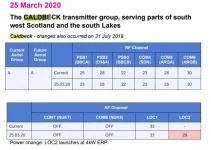
This is another source of details for the Caldbeck transmitter....
 

Attachments

  • Caldbeck.webp
    Caldbeck.webp
    37.9 KB · Views: 11
As some people continue to post incorrect details with regards to the way Enigma2/plugin "scanning" works, I shall leave you in their care.
 

OpenViX Feeds Status

Back
Top