Superb quality and spec AB-Com PULSe 4K SE. Crazy offer! Only £99! FREE UK DELIVERY! 4K UHD, Enigma 2, Multiboot 4 images & more!...
Superb quality and spec AB-Com PULSe 4K Rev II Twin Satellite tuner only £149! FREE UK DELIVERY! 4K UHD, Enigma 2, SATA HDD facility, Multiboot 4 images & more!...

[VU+ Duo4K SE] Cannot move up and down in a Setup screen


Thanks for the tip on saving a screenshot - neat.

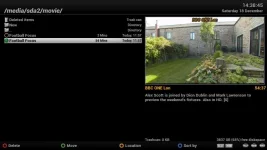
vu 1.jpg shows that the box has successfully made recordings. You can see a couple of recordings and, from the top of the screen, see where they have been recorded - /media/sda2/movie. You can also see at the bottom of the screen that there's tons of space available on the disk.

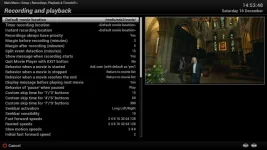
vu 2.jpg shows the Settings screen that is giving me trouble. The Default movie location is showing as /media/hdd/movie. I cannot move the cursor down the list to change other settings. I have tried changing this setting as described previously but cannot get any value accepted. But the fact that I can record and view my recordings indicates that things are, at some level, OK with the disk.

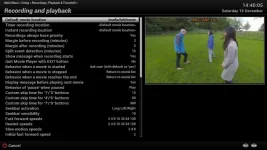
vu 3.jpg is the same, but with me having selected /media/sda2/movie for the default movie location and just about to hit the green button.

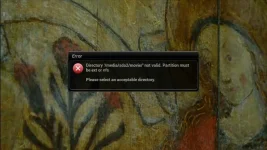
vu 4.jpg shows the error message when I hit the green button.

I guess the question in my mind is: "Why does the interface not allow this NTFS location to be specified as the default location but the underlying system is happy with that location?"

The irony in all this is that I'm not actually trying to change the Default location - I just want to change some of the other settings but cannot reach them.

Thanks for all the help. If anyone can suggest a way I can bypass this issue so that I can change other settings then please do.
 
Thanks for the tip on saving a screenshot - neat.

vu 1.jpg shows that the box has successfully made recordings. You can see a couple of recordings and, from the top of the screen, see where they have been recorded - /media/sda2/movie. You can also see at the bottom of the screen that there's tons of space available on the disk.

vu 2.jpg shows the Settings screen that is giving me trouble. The Default movie location is showing as /media/hdd/movie. I cannot move the cursor down the list to change other settings. I have tried changing this setting as described previously but cannot get any value accepted. But the fact that I can record and view my recordings indicates that things are, at some level, OK with the disk.

vu 3.jpg is the same, but with me having selected /media/sda2/movie for the default movie location and just about to hit the green button.

vu 4.jpg shows the error message when I hit the green button.

I guess the question in my mind is: "Why does the interface not allow this NTFS location to be specified as the default location but the underlying system is happy with that location?"

The irony in all this is that I'm not actually trying to change the Default location - I just want to change some of the other settings but cannot reach them.

Thanks for all the help. If anyone can suggest a way I can bypass this issue so that I can change other settings then please do.

Apologies - left off the attachments.
 

Attachments

  • Vu 1.webp
    Vu 1.webp
    31.6 KB · Views: 17
  • Vu 2.webp
    Vu 2.webp
    44 KB · Views: 18
  • vu 3.webp
    vu 3.webp
    43.4 KB · Views: 18
  • vu 4.webp
    vu 4.webp
    43.7 KB · Views: 33
Which files do users change to re-allow usage of fat32 devices. This will once again allow users to plugin their USB stick to other devices which do not allow ext filesystem.
I wasn't aware of it being disabled.
 
Will creating a bookmark allow the drive to be selected?

There's already a lot of space used on the disc, I'd just let the box format it to EXT4 if it's not wanted.
 
FAT and NTFS do not support hardlinks. Therefore they are not valid.
 
The fuse NTFS driver (which is what I think is used?) allows hard-links.

This is on my laptop, with the Windows partition mounted under Linux.

[gmllaptop]: touch afile
[gmllaptop]: ln afile hlink
[gmllaptop]: ls -l
total 4
drwxrwxrwx 1 gml4410 ukgcs 240 Dec 18 20:29 ./
drwxrwxrwx 1 gml4410 ukgcs 4096 Dec 18 20:29 ../
-rwxrwxrwx 2 gml4410 ukgcs 0 Dec 18 20:29 afile*
-rwxrwxrwx 2 gml4410 ukgcs 0 Dec 18 20:29 hlink*
[gmllaptop]: rm afile
rm: remove regular empty file 'afile'? y
[gmllaptop]: ls -l
total 4
drwxrwxrwx 1 gml4410 ukgcs 144 Dec 18 20:29 ./
drwxrwxrwx 1 gml4410 ukgcs 4096 Dec 18 20:29 ../
-rwxrwxrwx 1 gml4410 ukgcs 0 Dec 18 20:29 hlink*
[gmllaptop]: df -T .
Filesystem Type 1K-blocks Used Available Use% Mounted on
/dev/nvme0n1p4 fuseblk 230719108 59777500 170941608 26% /media/gml4410/Windows
 
So allow the NTFS device in timeshift setup and see if it passes the hard link test.
 
Are hardlinks used for recordings, just timeshift or both? If just for timeshift, is it possible to apply the newly added prohibition just for timeshift?
 
So allow the NTFS device in timeshift setup and see if it passes the hard link test.
The test is done by hasHardLinks() in Screens/Timeshift.py.

If I extract that and run it with a simple call for ext4, ntfs, vfat, exfat and hfs+ locations on my desktop I get this:
Code:
[parent]: ./TStest.py  
Filesystem     Type Mounted on 
/dev/sda6      ext4 /var 
sda6 ext4   /var 
hasHardLinks for: /var/tmp returns True 

Filesystem     Type    Mounted on 
/dev/sdb2      fuseblk /media/gml4410/windows 
sdb2 ntfs   /media/gml4410/windows 
hasHardLinks for: /media/gml4410/windows returns True 

Filesystem     Type Mounted on 
/dev/sdf1      vfat /media/gml4410/PC-Spcl 
sdf1 vfat   /media/gml4410/PC-Spcl 
[Timeshift] DEBUG: Create link - I/O Error 1: Operation not permitted! 
[Timeshift] DEBUG: Remove target - I/O Error 2: No such file or directory! 
hasHardLinks for: /media/gml4410/PC-Spcl returns False 

Filesystem     Type  Mounted on 
/dev/sdh1      exfat /media/gml4410/ExFat 
sdh1 exfat  /media/gml4410/ExFat 
[Timeshift] DEBUG: Create link - I/O Error 1: Operation not permitted! 
[Timeshift] DEBUG: Remove target - I/O Error 2: No such file or directory! 
hasHardLinks for: /media/gml4410/ExFat returns False 

Filesystem     Type    Mounted on 
/dev/sdi1      hfsplus /media/gml4410/MacTest 
sdi1 hfsplus /media/gml4410/MacTest 
hasHardLinks for: /media/gml4410/MacTest returns True
so an ntfs file-system passes the test.
 
Are hardlinks used for recordings, just timeshift or both? If just for timeshift, is it possible to apply the newly added prohibition just for timeshift?

Hardlinks are used for Timeshift, which is why the test is done in that module, but it makes sense we use identical file systems in both modules.
 
That won't work.
That code picks up the file system type from /proc/mounts, which for ntfs will list it as fuseblk, as it's run by a user-space daemon. Other file-systems could also show up as fuseblk there and not work (such as exfat).
The only real test for a file-system is to try hard-linking and check the result.
 
Last edited:
vfat shows as vfat. The tests for writeablility and hardlinks happen additionally.
 
vfat shows as vfat.
Which has no relevance at all to ntfs, which doesn't show as ntfs.

The tests for writeablility and hardlinks happen additionally.
So why bother checking the file-system type at all? Although I can see why you might want a blacklist (e.g. to rule out tmpfs, which would pass the tests while not being useful for recordings).
 
You said:
Other file-systems could also show up as fuseblk there and not work (such as exfat).
The only real test for a file-system is to try hard-linking and check the result.
Which is why I mentioned vfat (fat32).

Anyway if it works add it to the list.
 
Anyway if it works add it to the list.
>>Sigh<<.. There is no point, as it won't show up as ntfs but as fuseblk! And exfat would also show up as fuseblk, but that won't work.

(Let's hope this doesn't go round the loop again.)

So, why not make that list a blacklist rather then a whitelist, which makes much more sense if the writeable and hard-linkable tests also have to pass anyway.
 
Add fuseblk. And anything that fails the hard link test won't be allowed.
 
I don't see any reason why we should prevent users from using devices with working file systems for recording. As in the OP's case, even though he has been locked out of the menu, he can record/playback fine. For arguments sake, somebody's internal HDD on receiver fails, he can use an external ntfs one until replacement arrives.

The hardlinks issue is specific to timeshift only, so any prohibitions should apply to that functionality only.
 

OpenViX Feeds Status

Back
Top