Post a screenshot with the error message.
How to take a screenshot here: https://www.world-of-satellite.com/showthread.php?44054-How-to-take-screen-shots-How-to-attach-files
Thanks for the tip on saving a screenshot - neat.
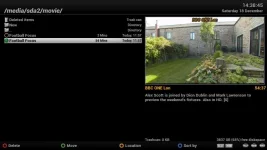
vu 1.jpg shows that the box has successfully made recordings. You can see a couple of recordings and, from the top of the screen, see where they have been recorded - /media/sda2/movie. You can also see at the bottom of the screen that there's tons of space available on the disk.
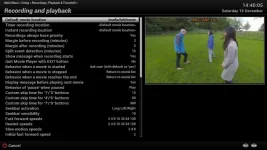
vu 2.jpg shows the Settings screen that is giving me trouble. The Default movie location is showing as /media/hdd/movie. I cannot move the cursor down the list to change other settings. I have tried changing this setting as described previously but cannot get any value accepted. But the fact that I can record and view my recordings indicates that things are, at some level, OK with the disk.
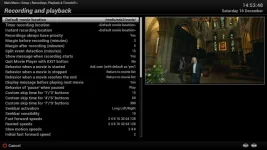
vu 3.jpg is the same, but with me having selected /media/sda2/movie for the default movie location and just about to hit the green button.
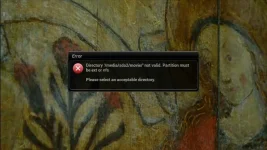
vu 4.jpg shows the error message when I hit the green button.
I guess the question in my mind is: "Why does the interface not allow this NTFS location to be specified as the default location but the underlying system is happy with that location?"
The irony in all this is that I'm not actually trying to change the Default location - I just want to change some of the other settings but cannot reach them.
Thanks for all the help. If anyone can suggest a way I can bypass this issue so that I can change other settings then please do.