Superb quality and spec AB-Com PULSe 4K SE. Crazy offer! Only £99! FREE UK DELIVERY! 4K UHD, Enigma 2, Multiboot 4 images & more!...
Superb quality and spec AB-Com PULSe 4K Rev II Twin Satellite tuner only £149! FREE UK DELIVERY! 4K UHD, Enigma 2, SATA HDD facility, Multiboot 4 images & more!...

Channels problem

Did you restore the backup or do you want to continue from where you are now?

I think I restored the backup as instructed so would like to get to the stage where I can get the TV off the floor along with cables etc. before my wife kills me! I am in update providers but it is telling me no providers configured
 
I think I restored the backup as instructed so would like to get to the stage where I can get the TV off the floor along with cables etc. before my wife kills me! I am in update providers but it is telling me no providers configured

See post #77 and #80
 
In the ABM menu, click on Providers, then select Saorview, then region. The Saorview transmitters will come up in alphabetical sequence - choose Cork/Spur Hill. Don't forget to save (green button). You can also select Freesat and pick a region for your sat connection.


EDIT - I don't want to step on Abu's toes! He's doing the hard works here. I'm just adding local Saorview knowledge!

Thanks very much. I feel sorry for Abu and sattelitter last night. It must be a trial for them! If there was Vix for Dummies book, it would be good for the likes of me!
 
Info:
ABM will not show any providers if tuner configuration does not allow it. You cannot update providers unless providers are set.

For you to action:
Go into your tuner configuration and make sure that your tuners are correctly set? Post a picture .
Then set your providers as per Joe's instructions
 
Ok, so I have Saorview sorted as per post 80, for Freesat is that the same as Freeview (UK) in ABM Providers menu?
 
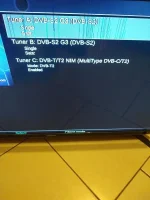
How do I locate Freesat? Here is what I see in the Tuner SetupIMG_20230221_222750636.webp
 
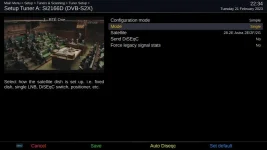
When you select the tuner you will get options - this is mine (I have only one tuner on this box and the tuner type is different to yours).
 

Attachments

  • sat_tuner.webp
    sat_tuner.webp
    26.4 KB · Views: 3
Thanks, I have set the two tuners to Astra as per your screenshot and for Tuner C I have set it to spur hill. Is there anything else I should be doing whilst the box is connected to the internet?
 
Freeview is for Aerial/Terrestrial providers in UK.
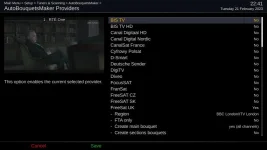
Freesat is for satellite on Astra 28.2.

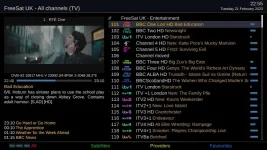
Here's my Freesat config in ABM. Ignore the other providers as I have a motor and can select other providers. The end of the Freesat provider is cut off as it's on the next page.
 

Attachments

  • freesat_provider.webp
    freesat_provider.webp
    26.3 KB · Views: 6
Thanks, I have set the two tuners to Astra as per your screenshot and for Tuner C I have set it to spur hill. Is there anything else I should be doing whilst the box is connected to the internet?

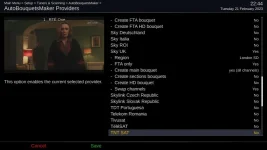
You should be good to connect back to Saorview/Satellite. Here's my second page of ABM config.
 

Attachments

  • freesat_provider2.webp
    freesat_provider2.webp
    28 KB · Views: 5
Thanks, I have set the two tuners to Astra as per your screenshot
If you have two signal wires from a satellite dish pointing at 28.2, that is correct.

and for Tuner C I have set it to spur hill. Is there anything else I should be doing whilst the box is connected to the internet?

You might need to transfer a mix file, await Joe_90's response. If you do not have to install the wi-fi drivers then you can move it back. Don't drop the TV!

In the ABM configure menu, I recommend to enable "add provider name to bouquets". Avoids confusion between bouquets of different providers with same name.
 
Yes - you can have a Sky bouquet as well - just the free-to-air (FTA) stuff. It hacks Irish Sky viewers off no end when you show them all the Channel 5 and ITV variants that are not carried on the official Sky box!
 
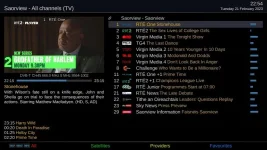
@abu's reference to a mix file can wait until another time. I use a custom mix file to link the Saorview and Freesat bouquets into one. Saorview starts at position 1 and runs through to 21 or so. Then Freesat starts at 101 and goes on from there... small steps first.
 
Here's what you should see on the Saorview and Freesat bouquets once you're up and running.
 

Attachments

  • freesat_bouquet.webp
    freesat_bouquet.webp
    58.1 KB · Views: 8
  • saorview_bouquet.webp
    saorview_bouquet.webp
    51.5 KB · Views: 5
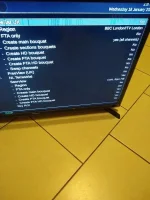
Thanks for all the help guys. The pics are a great help Joe 90. I have followed your settings so wonder if I need to do anything else now at this stage. IMG_20230221_225545256.webp
 

Attachments

  • IMG_20230221_224703853.webp
    IMG_20230221_224703853.webp
    26.3 KB · Views: 2
ABM will create the channels correctly for you.

I don't know what dishes/aerial you have, so this could take long. Exit out of all menus, then
Blue > Vix im.... > Backup Manager > Select the most recent settings backup, restore it. Box will reboot.

Then go into ABM, update the provider files, then run ABM. Install wi-fi drivers and put TV back. We can tidy the rest up when you have more time.

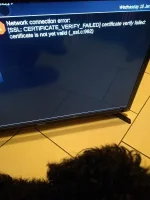
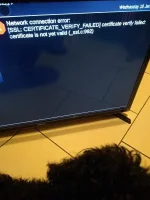
When I try to do this now I get the follwing IMG_20230221_224703853.webp
 
Thanks for all the help guys. The pics are a great help Joe 90. I have followed your settings so wonder if I need to do anything else now at this stage. View attachment 64829

Just connect up to your aerial and satellite leads and run ABM! You'll need to configure your EPG and run the OpenTV grabber to pull down the satellite EPG from Sky.
 
Are the next steps so to do a scan or what do I need to do to get the Saorview and freesat bouquets that you have in your post?
 
Just connect up to your aerial and satellite leads and run ABM! You'll need to configure your EPG and run the OpenTV grabber to pull down the satellite EPG from Sky.

Any chance you could give me the instructions on how to do the above please as I have the aerial and satellite in? Or point me in the direction of the page on the manual?
 

OpenViX Feeds Status

Back
Top