abu baniaz
Moderator
Explanatory/detailed post:
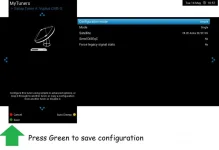
You have a Sky squad LNB. This is just universal LNBs in one unit. The correct tuner configuration for a tuner with that LNB is: Simple, single 28.2 Press Green to save. It should look like this:
The tuner overview should look like this (this was posted earlier by bmitie)
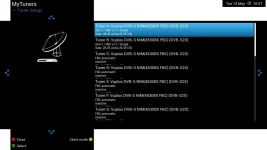
Once you have to done the transferring, please confirm tuners look as pictured. Please go to Backup manager and create a new settings backup
Blue > Vix > Backup Manager > Green (new backup)
Then delete all the older backups so that in future, you do not inadvertently restore one with wrong details.
Blue > Vix > Backup Manager > Red (Delete)
If you want to do the deletion by FTP, the setting backups are in
/media/hdd/backup
As information only, as you should not be manually editing files, the entries in the settings file for a universal LNB should be:
config.Nims.0.diseqcA=282
config.Nims.1.diseqcA=282
Can I retitle your thread to "Duo 4K SE with Sky quad LNB"?
You have a Sky squad LNB. This is just universal LNBs in one unit. The correct tuner configuration for a tuner with that LNB is: Simple, single 28.2 Press Green to save. It should look like this:
The tuner overview should look like this (this was posted earlier by bmitie)
Once you have to done the transferring, please confirm tuners look as pictured. Please go to Backup manager and create a new settings backup
Blue > Vix > Backup Manager > Green (new backup)
Then delete all the older backups so that in future, you do not inadvertently restore one with wrong details.
Blue > Vix > Backup Manager > Red (Delete)
If you want to do the deletion by FTP, the setting backups are in
/media/hdd/backup
As information only, as you should not be manually editing files, the entries in the settings file for a universal LNB should be:
config.Nims.0.diseqcA=282
config.Nims.1.diseqcA=282
Can I retitle your thread to "Duo 4K SE with Sky quad LNB"?


 I guess I still need to remove the erroneous 19.2 entries in settings. Pretty sure something keeps putting them back during a reboot or simply just opening the tuner screen is somehow putting them in again.