

groove_timer
Forum Supporter

- Joined
- Aug 13, 2013
- Messages
- 65
- Reaction score
- 0
- Points
- 0
Hi Guys,
Was wondering if anyone could help me. I have setup my new Solo2 box using the excellent guide from Phoenix and now wish to add my NAS shared folder. I've had a look on the forum and followed a couple of similar issues but for the life of me can't get this to setup properly.
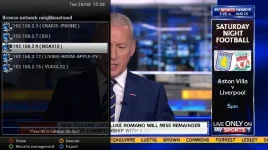
I have enabled both NFS and Samba but when I scan for shares, I see my NAS appearing in the list but not the shared folders underneath.
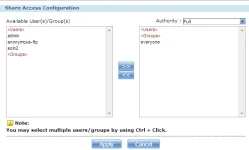
I have checked and it looks like I've not got any security on the share and have everyone group selected.

Totally stumped in getting this setup. Hope someone might have had a similar problem or could advice. Thanks
Setup:
Box - VU+ SOLO2
Firmware - openvix-3.0.720
NAS - Zyxel NSA310
Was wondering if anyone could help me. I have setup my new Solo2 box using the excellent guide from Phoenix and now wish to add my NAS shared folder. I've had a look on the forum and followed a couple of similar issues but for the life of me can't get this to setup properly.
I have enabled both NFS and Samba but when I scan for shares, I see my NAS appearing in the list but not the shared folders underneath.
I have checked and it looks like I've not got any security on the share and have everyone group selected.
Totally stumped in getting this setup. Hope someone might have had a similar problem or could advice. Thanks
Setup:
Box - VU+ SOLO2
Firmware - openvix-3.0.720
NAS - Zyxel NSA310


