gintarasarm
Member
- Joined
- Feb 29, 2024
- Messages
- 81
- Reaction score
- 4
- Points
- 8
DimitarCC, Thank you so much for your clear answer everything is clear now. Thanks again!


        <widget source="session.CurrentService" render="Pixmap" pixmap="audioicon/icon_4k.png" position="948,167" size="60,44" alphatest="blend" zPosition="1">
            <convert type="ServiceInfo">Is4K</convert>
            <convert type="ConditionalShowHide" />
        </widget>
        <widget source="session.CurrentService" render="Pixmap" pixmap="audioicon/icon_fhd.png" position="948,167" size="60,44" alphatest="blend" zPosition="1">
            <convert type="ServiceInfo">Is1080</convert>
            <convert type="ConditionalShowHide" />
        </widget>
        <widget source="session.CurrentService" render="Pixmap" pixmap="audioicon/icon_hd.png" position="948,167" size="60,44" alphatest="blend" zPosition="1">
            <convert type="ServiceInfo">Is720</convert>
            <convert type="ConditionalShowHide" />
        </widget>
        <widget source="session.CurrentService" render="Pixmap" pixmap="audioicon/icon_sd.png" position="948,167" size="60,44" alphatest="blend" zPosition="1">
            <convert type="ServiceInfo">Is576</convert>
            <convert type="ConditionalShowHide" />
        </widget>
        <widget source="session.CurrentService" render="Pixmap" pixmap="audioicon/icon_sd.png" position="948,167" size="60,44" alphatest="blend" zPosition="1">
            <convert type="ServiceInfo">Is480</convert>
            <convert type="ConditionalShowHide" />
</widget>@Orlandox, Please provide a link where I can download this file. I would really appreciate itDepending the resolution:
XML:<widget source="session.CurrentService" render="Pixmap" pixmap="audioicon/icon_4k.png" position="948,167" size="60,44" alphatest="blend" zPosition="1"> <convert type="ServiceInfo">Is4K</convert> <convert type="ConditionalShowHide" /> </widget> <widget source="session.CurrentService" render="Pixmap" pixmap="audioicon/icon_fhd.png" position="948,167" size="60,44" alphatest="blend" zPosition="1"> <convert type="ServiceInfo">Is1080</convert> <convert type="ConditionalShowHide" /> </widget> <widget source="session.CurrentService" render="Pixmap" pixmap="audioicon/icon_hd.png" position="948,167" size="60,44" alphatest="blend" zPosition="1"> <convert type="ServiceInfo">Is720</convert> <convert type="ConditionalShowHide" /> </widget> <widget source="session.CurrentService" render="Pixmap" pixmap="audioicon/icon_sd.png" position="948,167" size="60,44" alphatest="blend" zPosition="1"> <convert type="ServiceInfo">Is576</convert> <convert type="ConditionalShowHide" /> </widget> <widget source="session.CurrentService" render="Pixmap" pixmap="audioicon/icon_sd.png" position="948,167" size="60,44" alphatest="blend" zPosition="1"> <convert type="ServiceInfo">Is480</convert> <convert type="ConditionalShowHide" /> </widget>
Yes all fixed. So you either need to retrieve the fixes and load them yourself or wait for the next release build.
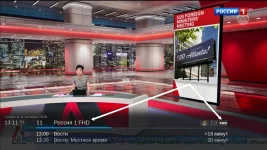
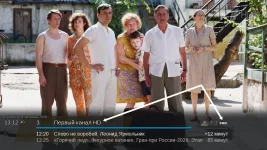
No skin I'm not going to change I want to stay with Simple_Ten_Eighty (I made way too many changes to the icons on this skin) ... Does the Full HD icon really only show up on the YouViX-Blue-mod skin? I think if the icon displays that way, it should show up on all skins, not just oneInstall YouViX-Blue-mod skin from the feeds.

I think you could edit this line https://github.com/OpenViX/skins/bl...080/Simple_Ten_Eighty/skin_templates.xml#L269No skin I'm not going to change I want to stay with Simple_Ten_Eighty (I made way too many changes to the icons on this skin) ... Does the Full HD icon really only show up on the YouViX-Blue-mod skin? I think if the icon displays that way, it should show up on all skins, not just one

That is not really helpful. S1080 is using Addons.ServiceInfoBar, not Converter.ServiceInfo. Therefore:Depending the resolution:
XML:<widget source="session.CurrentService" render="Pixmap" pixmap="audioicon/icon_4k.png" position="948,167" size="60,44" alphatest="blend" zPosition="1"> <convert type="ServiceInfo">Is4K</convert> <convert type="ConditionalShowHide" /> </widget> <widget source="session.CurrentService" render="Pixmap" pixmap="audioicon/icon_fhd.png" position="948,167" size="60,44" alphatest="blend" zPosition="1"> <convert type="ServiceInfo">Is1080</convert> <convert type="ConditionalShowHide" /> </widget> <widget source="session.CurrentService" render="Pixmap" pixmap="audioicon/icon_hd.png" position="948,167" size="60,44" alphatest="blend" zPosition="1"> <convert type="ServiceInfo">Is720</convert> <convert type="ConditionalShowHide" /> </widget> <widget source="session.CurrentService" render="Pixmap" pixmap="audioicon/icon_sd.png" position="948,167" size="60,44" alphatest="blend" zPosition="1"> <convert type="ServiceInfo">Is576</convert> <convert type="ConditionalShowHide" /> </widget> <widget source="session.CurrentService" render="Pixmap" pixmap="audioicon/icon_sd.png" position="948,167" size="60,44" alphatest="blend" zPosition="1"> <convert type="ServiceInfo">Is480</convert> <convert type="ConditionalShowHide" /> </widget>
            if key == "videoRes":
                if video_height >= 720 and video_height < 1500:
                    return "IS_HD"
                elif video_height >= 1500:
                    return "IS_4K"
                else:
return "IS_SD"Could you please tell me, what if I set the resolution by myself for example, making HD channels 720–1199 and FHD channels 1200–1500? I’m asking for myself so that I can make changes so the FHD icon appears on infobar the IPTV FHD channels if this is possible, please let me know how to do it and where to make the changes. I’d really appreciate it! By the way, @spevs asked a very good question in post #130, maybe you could answer something about that? Thanks in advance!That is not really helpful. S1080 is using Addons.ServiceInfoBar, not Converter.ServiceInfo. Therefore:
As you can see the HD icon is for 720 -1499Code:if key == "videoRes": if video_height >= 720 and video_height < 1500: return "IS_HD" elif video_height >= 1500: return "IS_4K" else: return "IS_SD"
Try the attached. The icon probably needs to be drawn better I just used AI to make itCould you please tell me, what if I set the resolution by myself for example, making HD channels 720–1199 and FHD channels 1200–1500? I’m asking for myself so that I can make changes so the FHD icon appears on infobar the IPTV FHD channels if this is possible, please let me know how to do it and where to make the changes. I’d really appreciate it! By the way, @spevs asked a very good question in post #130, maybe you could answer something about that? Thanks in advance!
The skin uses Addons.ServiceInfoBar, so that needs modifying. The whole point was to remove all those ServiceInfo converter widgets.Try the attached. The icon probably needs to be drawn better I just used AI to make it
To install it:
Put skin_user_Simple_Ten_Eighty.xml in /etc/enigma2/.
Put icon_fhd.png in /etc/enigma2/Simple_Ten_Eighty/infobar/
Enigma2 looks in /etc/enigma2/<SkinName>/ for images before the skin's own folder, so the icon survives updates too.
Restart the GUI.
Edit for some reason uploading the png it's inserting it as .webp
After downloading it rename it to icon_fhd.png