Superb quality and spec AB-Com PULSe 4K SE. Crazy offer! Only £129! FREE UK DELIVERY! 4K UHD, Enigma 2, Multiboot 4 images & more!...
Superb quality and spec AB-Com PULSe 4K Rev II Twin Satellite tuner only £179! FREE UK DELIVERY! 4K UHD, Enigma 2, SATA HDD facility, Multiboot 4 images & more!...

OpenVPN Setup guide for most VPN,s

Hi,
Do you think it might be possible to add Fastestvpn to the VPN Generator?
The config files are available here
https://support.fastestvpn.com/download/openvpn-tcp-udp-config-files/
It would be very much appreciated if you could. :thumbsup:
Thanks in anticipation.

I think someone asked me about adding Fastest VPN in the past but didn't say if it works or not.

Try to copy and paste the text below in notepad++

https://raw.githubusercontent.com/davesayers2014/OpenVPN/master/FastestVPN/VPN.sh

Change uuuu for your username pppp for your password leaving in " "

Copy and paste in telnet in putty and let me know if it works and I can add to main script generator.
 
Last edited:
I think someone asked me about adding Fastest VPN in the past but didn't say if it works or not.

Try to copy and paste the text below in notepad++

https://raw.githubusercontent.com/davesayers2014/OpenVPN/master/FastestVPN/VPN.sh

Change uuuu for your username pppp for your password leaving in " "

Copy and paste in telnet in putty and let me know if it works and I can add to main script generator.

Thanks for getting back to me. I'm old and stupid, :violin: so I dont quite know what I'm supposed to do, or where to copy and paste it to?

EDIT:

I telneted to my vu+Duo2, but don't know what I should do next :confused:
 
Last edited:
Thanks for getting back to me. I'm old and stupid, :violin: so I dont quite know what I'm supposed to do, or where to copy and paste it to?

EDIT:

I telneted to my vu+Duo2, but don't know what I should do next :confused:

What part are you stuck at? If you've copied the content of the github page and pasted in notepad ++ edited your details, copied and pasted in telnet and hit enter did it give any errors?

Can you goto plugins and see vpn changer and choose a country?
 
What part are you stuck at? If you've copied the content of the github page and pasted in notepad ++ edited your details, copied and pasted in telnet and hit enter did it give any errors?

Can you goto plugins and see vpn changer and choose a country?

Told you I was old and stupid!
It all works flawlessly :smiley_yup:
Sorry for the confusion..........And many thanks for all your help :thumbsup:
 
hi got this working perfect with nord brill work thanks to all involed but when i try with windscribe it all works loads everything but when i pick a server vpn says running but ip dosnt change, do i need to change my dns settings in network set up, if so anyone no what they should be cheers , im using a vu duo 2
 
hi got this working perfect with nord brill work thanks to all involed but when i try with windscribe it all works loads everything but when i pick a server vpn says running but ip dosnt change, do i need to change my dns settings in network set up, if so anyone no what they should be cheers , im using a vu duo 2

Just stick with Nord if its working.


Sent from my iPhone using Tapatalk
 
Thank you for creating this plugin mate

I have a nordvpn subscription and am trying to get this to work.

I created the VPN folder in HDD (/hdd/vpn), and ran commands 2,3 & 4 from the OP but when I enter commend 5 I get the following:

"cp: can't stat '/temp/password.conf': no such file or directory"

Where am I going wrong?

Also I dont know where I enter my nord vpn details

Can someone point me in the right direction?

Thanks guys


Edit: nordvpn gives me the choice to download either UDP or TCP config files, which should I choose?conf.webp
 
Last edited:
hi got this working perfect with nord brill work thanks to all involed but when i try with windscribe it all works loads everything but when i pick a server vpn says running but ip dosnt change, do i need to change my dns settings in network set up, if so anyone no what they should be cheers , im using a vu duo 2


What countries have you tried and have you ran a network test when running vpn?

To change dns

Turn off VPN.

In network menu run network wizard turn dhpc to no and set

Nameserver 1: 8.8.8.8
Nameserver 2: 8.8.4.4

You may be asked to confirm just re enter Nameservers.

Turn on VPN then run network test.
 
Last edited:
Thank you for creating this plugin mate

I have a nordvpn subscription and am trying to get this to work.

I created the VPN folder in HDD (/hdd/vpn), and ran commands 2,3 & 4 from the OP but when I enter commend 5 I get the following:

"cp: can't stat '/temp/password.conf': no such file or directory"

Where am I going wrong?

Also I dont know where I enter my nord vpn details

Can someone point me in the right direction?

Thanks guys


Edit: nordvpn gives me the choice to download either UDP or TCP config files, which should I choose?View attachment 59459

You create password.conf in tmp folder with your username and password or for Nord just run the openvpn script http://e2openvpn.com/OpenVPN_Generator/

For Nord vpn I use UDP files for the script
 
Last edited:
My VPN provider is ExpressVPN. I can confirm that it works on OPENVPN. I didn't use the script here provided. I just added my ExpressVPN username and password to the password file then I manually copied the 2 files over. I also have the IPChecker Plugin installed which checks my external IP

Just wanted to let you guys know
I didn't need to change DNS either
 
Last edited:
Just wanted to say a big thank you to Dsayers for all his hard work and his time in making a VPN that works with our boxes.

I have a Duo 2 and used his script to generate and install the VPN which is working great with PureVPN.

Many thanks again sir - for all your hard work !!:amen:
 
Test OpenVPN script generator

Hi im looking for users to test a new version of the script.

Setup is similar but this version will install VPN Manager with an option to edit username and password via the plugin in case it was incorrectly put on the generator.

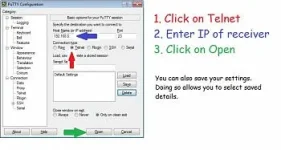
First open Putty, and in the HostName (or IP address) box enter the enigma2 boxes IP address, and then click the Telnet radio button and click open


Main screen.webp


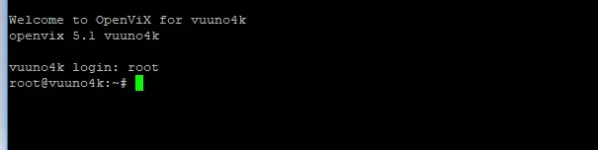
And then log in using the word, root


telnet.webp


Users can visit

https://e2openvpn.com/test_gen/
Add there username and password this will now generate a script.

Copy and paste the script in putty and hit enter you should now have the option for what VPN you want to use:

1) Nord VPN
2) IP Vanish
3) Digibit
4) PureVPN
5) PIA VPN
6) Windscrape
7) SurfShark
8) TorGuard
9) Ivacy
10) Quite


Choose your option and hit Enter this should then download the configs and once finished it will say OpenVPN Configs downloaded Please Start OpenVPN.


You will be asked to enter your choice again but you can ignore this.

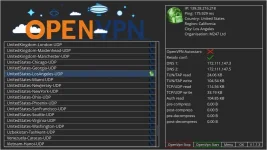
Reboot box and goto plugins, VPN Manager and choose a country.

VPN_Manager.webp

If you receive auth errors you can press menu and check the location is correct it should be /hdd/vpn_name. You can also check username and password is correct and edit if needed.
 
For manual setup VPN Manager by murxer

Install ipk, Save all configs to one folder no need to edit them then Open vpn manager and press menu change All config in one folder to yes

Save directory config set to the location of your config files

Then you can add username and password.
 

Attachments

For manual setup VPN Manager by murxer

Install ipk, Save all configs to one folder no need to edit them then Open vpn manager and press menu change All config in one folder to yes

Save directory config set to the location of your config files

Then you can add username and password.

So has vpnManager replaced vpnChanger?

Is 1.1.3 still the lastest version? I ahve it up and running and it seems easy enough to use.
 
So has vpnManager replaced vpnChanger?

Is 1.1.3 still the lastest version? I ahve it up and running and it seems easy enough to use.

On script yes. For manual vpn changer or vpn manager is fine although vpn manager is easier to setup as you can add all configs to one folder and no need to edit them.
 
for some reason it is not updating my username. I have tried to change it on the box and pressed every button on the remote and it will not delete the UUUU
 
for some reason it is not updating my username. I have tried to change it on the box and pressed every button on the remote and it will not delete the UUUU

Have you tried getting up the keyboard?
 
VPN manager plugin

This VPN manager makes things a bit easier as no need to mess around editing files

You can download the plugin from here
https://github.com/davesayers2014/O...a2-plugin-extensions-vpnmanager_1.1.3_all.ipk
Install it.

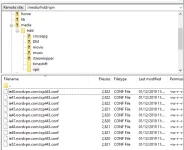
Now download the config files from your provider and send all config files to HDD/vpn create the vpn folder if needed.

Now open VPN manager then menu and set the following settings:
All config in one folder: yes
Save directory is default hdd/vpn
Add username and password then exit

You should be able to choose a country.

For long username and password in terminal openwebife or putty you can use this command just change USERNAME and PASSWORD with your details

Code:
cd .
init 4
sleep 3
sed -i '$i config.vpnmanager.username=USERNAME' /etc/enigma2/settings
sed -i '$i config.vpnmanager.password=PASSWORD
 
Last edited:
hi dsayers,
Late to the party with this, im trying to use PIA and it dosent seem to be downloading the required location files, I can download them manually and add them to HDD/PIA_VPN2
should the script automatically download ALL locations from the PIA website?

Also im using my main site login details, should I be using "PPTP/L2TP/SOCKS Username and Password"

sorry if these have been covered, I have tried to look the thread for relevant info.
 

OpenViX Feeds Status

Back
Top