Superb quality and spec AB-Com PULSe 4K SE. Crazy offer! Only £129! FREE UK DELIVERY! 4K UHD, Enigma 2, Multiboot 4 images & more!...
Superb quality and spec AB-Com PULSe 4K Rev II Twin Satellite tuner only £179! FREE UK DELIVERY! 4K UHD, Enigma 2, SATA HDD facility, Multiboot 4 images & more!...

OpenVPN Setup guide for most VPN,s

I've got it running on several boxes as per my signature on ViX 6.0.004, one of which is a Vu+.
Maybe after you've had a few days to chill you might consider installing openmultiboot and then try again on a ViX setup.
It definitely works with just the attached files in /media/hdd/vpn/ and entering your details into the VPN Manager menu options.

Forget script generators and adding crt and pem files, It doesn't need them.

View attachment openvpn.zip
 
:confused::confused: :) I have started my Xmas holidays today so I`m gonna spend a couple of hours to beat this problem.:eek: I`ve done as willo instructed. Clean install of OpenVIX 6.004 on my Ultimo4k. Setup the network. Put the ovpn files without the crt and pem files. Entered my details in OpenVPN manager 1.1.7. The data has returned to the right hand window but I get "Login Error: AUTH_FAILED". The username and password are correct in VPN Manager menu. The right hand window shows 3 DNS. The first is a MAC address, the second is 8.8.8.8 and the third is 8.8.4.4. Shouldn`t the first show my router IP like it is set in my adapter settings nameserver?
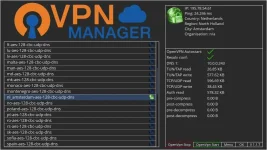
 
I must admit I cheat a little to save entering my password with the remote.
I access the box with putty and init 4 to stop enigma2 and then add my details to the very bottom of /etc/enigma2/settings with notepad++ and then init 3 to start enigma2 again.

Obviously you have to use your own dns and user details.

Code:
config.vpnmanager.active=nl_amsterdam-aes-128-cbc-udp-dns
config.vpnmanager.autostart=True
config.vpnmanager.dns=192.168.0.1
config.vpnmanager.one_folder=True
config.vpnmanager.password=willos-password
config.vpnmanager.username=willos-username

1_0_19_1B1C_802_2_11A0000_0_0_0_20211224102838.webp
 
I have managed to change, what looks like a MAC address as my DNS1, to my router IP. If that`s what it is supposed to be. I still get the AUTH_FAILED message even if I change the DNS to the google DNS, 8.8.8.8/8.8.4.4
 
Why do the ovpn files in my VPN Manager look nothing like the ones in your VPN Manager? I`ve asked this before but never got an answer.
 
I`ve also noticed I can`t get OpenVPN in Network/Utilities to start. I`m guessing this is the new problem?:confused:
 
Last edited:
Does PIA generate a user & pass for you on there website? I know you do with SurfShark as my friend found out when we were setting up SurfShark for him. Just a thought guys.


Sent from my iPhone using Tapatalk
 
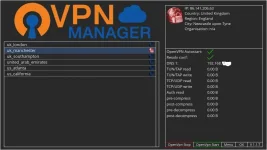
Don`t know how to screenshot from my Vu. Mine look like this:

uk_london

yours:

london-aes-128-cbc-udp-dns
 
Does PIA generate a user & pass for you on there website? I know you do with SurfShark as my friend found out when we were setting up SurfShark for him. Just a thought guys.


Sent from my iPhone using Tapatalk

Yes. The socks user & password
 
Here`s the screenshot
 

Attachments

  • 1_0_19_D7E7_82C_2_11A0000_0_0_0_20211224115510.webp
    1_0_19_D7E7_82C_2_11A0000_0_0_0_20211224115510.webp
    27.5 KB · Views: 20
I had to use my account username and password. Since I got that working on the OpenXIX image, I decided to go back to my Blackhole image and try that. No joy. So I`ve been trying to get OpenMultiboot going so I can keep the Blackhole image. I like the plugins I have on Blackhole. None of them work on VIX. So since I only need the VPN for the footy on the VIX image. I would like to keep using Blackhole as my main image. Just hitting obstacles, as usual.

Thanx for your help Willo and everyone else who put input in.
Merry Xmas everyone.
 
I had to use my account username and password. Since I got that working on the OpenXIX image, I decided to go back to my Blackhole image and try that. No joy. So I`ve been trying to get OpenMultiboot going so I can keep the Blackhole image. I like the plugins I have on Blackhole. None of them work on VIX. So since I only need the VPN for the footy on the VIX image. I would like to keep using Blackhole as my main image. Just hitting obstacles, as usual.

Thanx for your help Willo and everyone else who put input in.
Merry Xmas everyone.

I know you may have it working now but what you can do normally on enigma2 systems (not sure about Black Hole) is copy pass.file from etc\openvpn folder to where you have your config files stored i,e, Harddisk\PiaVPN folder or whatever vpn you are using.

Then if you need to reflash from scratch and install vpnmanager your login details are still there. Also good if using more than one vpn.
 
Is openvpn.1.1.7 available on this site, cant find it?
Have upgrade to vix 6.0.3 and now cannot get openvpn working again. Think I'm on 1.1.3 and it needs a python3 update?
 

OpenViX Feeds Status

Back
Top