Superb quality and spec AB-Com PULSe 4K SE. Crazy offer! Only £129! FREE UK DELIVERY! 4K UHD, Enigma 2, Multiboot 4 images & more!...
Superb quality and spec AB-Com PULSe 4K Rev II Twin Satellite tuner only £179! FREE UK DELIVERY! 4K UHD, Enigma 2, SATA HDD facility, Multiboot 4 images & more!...

Plugins no internet connection

Any time i reflash a new image i setup from scratch and run the network wizard to link to network which gives me an ip and other settings.

Thanks cactikid, I might re-run the network wizard and see if that solves the problem.

Wondering if your router is locking you out with something like child lock?
Can you say who provides your router as others might know of a way to override it.

My Router is an Asus RT-N66U and there are no child lock type settings activated.

Looks like getting this box internet connected and set up with a new SSD is going to be my Christmas project!!

Happy Christmas to you and everyone here who has been so helpful to date.
 
Might not doing any harm but to try powering off the router and box for a few minutes then router on and then box on,lan port should be flashing to show a connection after you run the network test and network wizard.

Hope it works happy Xmas to you and everybody else.
 
Might not doing any harm but to try powering off the router and box for a few minutes then router on and then box on,lan port should be flashing to show a connection after you run the network test and network wizard.

Hope it works happy Xmas to you and everybody else.

Hi cactikid, tried that this morning and no joy I'm afraid.

It's really odd.

It passes the Vix Network test with flying colours but when I try to download plugins I get an error message saying there's no internet connection. I can see it connected to my Asus RT-N66U router, I can see the HD2400 on my home network via File Explorer and can see the folders etc on the HD2400 HDD plus I can access the HD2400 via OpenWebif.

I'm stumped as to what I can try next.

Is it worth throwing this internet connection issue into a new thread here on the HD2400 forum or on a more appropriate networking/Vix settings type forum?
 
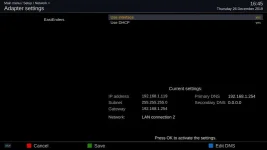
Can you post your current network settings - blanking them out is not really helpful and posting them is not going to expose you
 
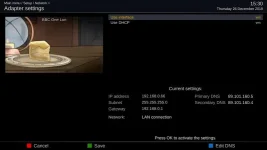
Just done a screenshot of my vu zero just to show its settings.adapter settings.webp.


Trying to remember issues when boxes had no mac ids?
 
Can you post your current network settings - blanking them out is not really helpful and posting them is not going to expose you

Hi twol,

I wasn't sure about posting them so err'd on the side of caution but understand it's hard for people to help me unless you can see the detail.

Here goes!

Adapter-Settings1577374583.jpg


Would a screenshot of the Nameserver Settings or Network MAC settings help?
 
Well here are my network settings FWIW, I always assumed I'd defaulted everything and changed nothing.....
 

Attachments

  • nw.webp
    nw.webp
    14.9 KB · Views: 14
Hi twol,

I wasn't sure about posting them so err'd on the side of caution but understand it's hard for people to help me unless you can see the detail.

Here goes!

Adapter-Settings1577374583.jpg


Would a screenshot of the Nameserver Settings or Network MAC settings help?

That looks fine to me - so thats probably blown my network knowledge
 
Threads should be issue specific and titled appropriate to the problem. Helps other people searching for similar problem


Please see these threads
https://www.world-of-satellite.com/...internet-access-quot-after-upgrade-to-5-0-029

https://www.world-of-satellite.com/showthread.php?59709-Internet-Connection-Problem

Thanks Abu Baniaz, I read both of those threads and because I don't know much about networking/routers/firewalls etc and am just a regular user my understanding from the threads is that the LAN connections are actually fine and the boxes are in fact connected to the internet but due to how the box/Vix checks for internet access (via Googles 8.8.8.8 DNS?) if that check is not successful the Vix Firmware behaves as though an internet connection doesn't exist and prevents the box from connecting to the internet to download plugins or to update firmware etc.

Am I close to correct?
 
That looks fine to me - so thats probably blown my network knowledge

The only thing which (intuitively) looks potentially incorrect is that the Gateway and Primary DNS addresses are both the same i.e. 192.168.1.1. Could that be causing some sort of loop and/or preventing the Vix firmware from doing it's internet connection test?
 
same settings here and no problem.The DNS is set to the modem /router so that one should be doing the translation.
 
Thanks Abu Baniaz, I read both of those threads and because I don't know much about networking/routers/firewalls etc and am just a regular user my understanding from the threads is that the LAN connections are actually fine and the boxes are in fact connected to the internet but due to how the box/Vix checks for internet access (via Googles 8.8.8.8 DNS?) if that check is not successful the Vix Firmware behaves as though an internet connection doesn't exist and prevents the box from connecting to the internet to download plugins or to update firmware etc.

Am I close to correct?

Spot on actually.

Can you do the ping test on the box please?
On the box do a ping to 8.8.8.8
 
maybe try to set second dns to 8.8.8.8 .Then accessing with pings to internet will bypass your modem/router
 
maybe try to set second dns to 8.8.8.8 .Then accessing with pings to internet will bypass your modem/router

I did try various ways to manually set the DNS via the network wizard and via any manual settings I could see but couldn't find any way to do it. :(
 
Use Putty and after you are logged in type
ping 8.8.8.8

There is a guide to issuing commands in my signature.
 

OpenViX Feeds Status

Back
Top