Superb quality and spec AB-Com PULSe 4K SE. Crazy offer! Only £129! FREE UK DELIVERY! 4K UHD, Enigma 2, Multiboot 4 images & more!...
Superb quality and spec AB-Com PULSe 4K Rev II Twin Satellite tuner only £179! FREE UK DELIVERY! 4K UHD, Enigma 2, SATA HDD facility, Multiboot 4 images & more!...

Plugins no internet connection

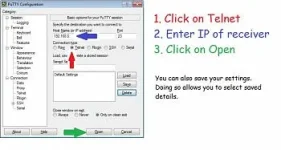
Use Putty and after you are logged in type
ping 8.8.8.8

There is a guide to issuing commands in my signature.

Thanks for your patients Abu, I appreciate it.

So I downloaded Putty and launched it using the box IP address of 192.168.1.130. I then pinged 8.8.8.8 but it failed with the error message in the screenshot below.

20191227-11577473550.png
 
OK, thanks. Did you actually connect to the box and log on? It doesn't seem like it.

My one is as below: (Ignore that it says OpenPLI)

Code:
openpli develop gbue4k

gbue4k login: root
root@gbue4k:~# ping 8.8.8.8
PING 8.8.8.8 (8.8.8.8): 56 data bytes
64 bytes from 8.8.8.8: seq=0 ttl=54 time=23.325 ms
64 bytes from 8.8.8.8: seq=1 ttl=54 time=15.299 ms
64 bytes from 8.8.8.8: seq=2 ttl=54 time=12.060 ms
64 bytes from 8.8.8.8: seq=3 ttl=54 time=11.730 ms
64 bytes from 8.8.8.8: seq=4 ttl=54 time=13.904 ms
64 bytes from 8.8.8.8: seq=5 ttl=54 time=13.446 ms
64 bytes from 8.8.8.8: seq=6 ttl=54 time=13.353 ms
64 bytes from 8.8.8.8: seq=7 ttl=54 time=13.260 ms
64 bytes from 8.8.8.8: seq=8 ttl=54 time=15.058 ms
64 bytes from 8.8.8.8: seq=9 ttl=54 time=13.450 ms
64 bytes from 8.8.8.8: seq=10 ttl=54 time=11.614 ms
64 bytes from 8.8.8.8: seq=11 ttl=54 time=21.889 ms
^C
--- 8.8.8.8 ping statistics ---
12 packets transmitted, 12 packets received, 0% packet loss
round-trip min/avg/max = 11.614/14.865/23.325 ms
root@gbue4k:~#
 
What happens if you bring up the command prompt on your windows pc and type ping 8.8.8.8
 
I don't think you've ticked telnet in putty

Main screen.webp
 
timed out means no internet connection
 
OK, spotted something odd.

When I posted the network settings screenshot yesterday the IP address for the box is stated as being 192.168.1.130.

I just checked my router and the IP address of the box is now 192.168.1.131 which opens OpenWebif when I enter it into a browser but interestingly when I enter 192.168.1.131 into Putty and launch Telnet I get

"Welcome to OpenViX for mutant2400
openvix 5.3 mutant2400

mutant2400 login:"

This is the current network settings for the box

Adapter-Settings-21577479582.jpg
 
Last edited:
If he also times out on pinging 8.8.8.8 (post #45) on his PC, then surely its the router setup???? .... not the receiver.
 
If he also times out on pinging 8.8.8.8 (post #45) on his PC, then surely its the router setup???? .... not the receiver.

I'm inclined to agree with you yet there are dozens of devices (phones, laptops, media boxes, IOT devices, printers etc) all connected to the router via WAN or LAN (only 5 via LAN) and all other devices including the one I'm typing on have fast (200mb) internet connections despite not being able to ping 8.8.8.8 from either Telnet or PowerShell :confused:

This is what I get when I try to ping 8.8.8.8 from the router's own Ping facility

118174ping1577480683.png
 
Last edited:
If he also times out on pinging 8.8.8.8 (post #45) on his PC, then surely its the router setup???? .... not the receiver.
Maybe we need to adjust the connectivity checks. He is not the first and sadly wont be the last one to experience this.
 
I'm inclined to agree with you yet there are dozens of devices (phones, laptops, media boxes, IOT devices, printers etc) all connected to the router via WAN or LAN (only 5 via LAN) and all other devices including the one I'm typing on have fast (200mb) internet connections despite not being able to ping 8.8.8.8 from either Telnet or PowerShell :confused:

This is what I get when I try to ping 8.8.8.8 from the router's own Ping facility

118174ping1577480683.png
what do you see if you hit diagnose?? ............ignore I guess thats how you send teh ping?
 
............ignore I guess thats how you send teh ping?

Yep.

Interestingly the "Target" box where I manually entered 8.8.8.8 has a drop down list of domains to ping including www.google.com which if selected instead of 8.8.8.8 returns a successful result, no packet loss etc

--- www.google.com ping statistics ---
5 packets transmitted, 5 packets received, 0% packet loss
round-trip min/avg/max = 9.601/20.413/44.372 ms

Also, when I ping www.google.com via Powershell it too is successful.

I can't try via Putty as it's asking me for a login to the box and I don't have one that I recall setting. I tried the usual admin / admin but that didn't work.
 
Last edited:
The username is root and there should be no password unless you set one. However your issue most likely is your ISP blocking access to 8.8.8.8 which is used as a check for connectivity.
 
The username is root and there should be no password unless you set one. However your issue most likely is your ISP blocking access to 8.8.8.8 which is used as a check for connectivity.

Thanks ronand, I logged into Telnet via Putty using root as the username (no password was asked for) and pinged 8.8.8.8

This was the only response I got.

Root-21577490902.png
 
Seen as you clearly have access to world of satellite forum, please log into relnet via putty using root as username, issue the following command...

ping world-of-satellite.com
 

OpenViX Feeds Status

Back
Top