To enigma? Or where?can i contribute a translation fix?


To enigma? Or where?can i contribute a translation fix?
maybe i contact the plugin owner to change the import.We are not going to track IanSav's continual changes. As you can see changes like this are not good for compatibility. https://github.com/openatv/enigma2/commit/f75b393e4c84d0e88f35c85246b5ea8fda8628f5
to enigma for this bug: https://world-of-satellite.com/threads/openvix-on-dm900.67447/post-547941To enigma? Or where?
Yes, just commit your changes to the enigma repo.can i contribute a translation fix?
i adapted the imports to make the plugin start without error but afterwards the plugin crashes probably due to differences in the list handling. anyway, saw that you deleted the plugin from the download list... so the problem is fixedWe are not going to track IanSav's continual changes. As you can see changes like this are not good for compatibility. https://github.com/openatv/enigma2/commit/f75b393e4c84d0e88f35c85246b5ea8fda8628f5

If there is an error the console window will not close.one more observation: when i install or deinstall a plugin the console window opens but automatically closes so fast that i cant read the message.
thanks for accepting my single translation fix. i checked the whole translation and found lots of typos, missing commas, no german date format using dots, missing translations... before i spend work, would you accept more changes?Yes, just commit your changes to the enigma repo.
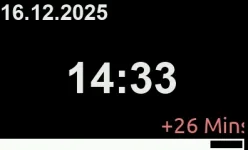
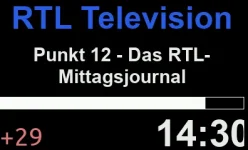
i'm trying to find out why the display doesnt fit the screen... and found that the display size is defined as 390,240. but the actual display size is 400,240. i change the size to 400,240... but no difference... that's strange.i installed the display skins and found much nicer ones... however, at least the event progress screen seems to be missing a few pixels at the right hand side.
Date format should be handled in enigma code, not in the translation file. Just select the correct date format in setup.thanks for accepting my single translation fix. i checked the whole translation and found lots of typos, missing commas, no german date format using dots, missing translations... before i spend work, would you accept more changes?
maybe... but why does 390,240 basically work? it must be scaled to 400,240 somehow. but as the clock position was calculated based on a 400 width it doesnt fit on the display.Must admit I questioned the display size in https://github.com/oe-alliance/oe-a...eta-brands/meta-dream/conf/machine/dm900.conf … says colorlcd390 but was told it was correct.
As I tend to self build, I just changed it to the dm920,s colorlcd400 …..
Maybe the dm900 model changed at some stage?
yes, the more i use vix on dm900 the more i come to the conclusion that i probably wont need/want a vu duo 4k se.@2stein - you mentioned that you were “ still waiting for the vu+ duo 4k“ but have to say the dm900 is a nice box, good coloured lcd display, boots fast and with multiboot installed is easy to update/change images without needing to use the dreambox method of flashing a root image.
its from OE-A_LCDSkin_3Please post the unmodified skin_display.xml file.
i had a brief look at the conf... it specifies 4 gb flash... which was correct for the first generation, the second generation now has 8 gb, same as 920.Must admit I questioned the display size in https://github.com/oe-alliance/oe-a...eta-brands/meta-dream/conf/machine/dm900.conf … says colorlcd390 but was told it was correct.
As I tend to self build, I just changed it to the dm920,s colorlcd400 …..
Maybe the dm900 model changed at some stage?
yes, a few pixels... moving it 5 pixels to the left fixes it. but one major question is: why does a 390 width work, when the display has a width of 400?Is the clock too far right?