Superb quality and spec AB-Com PULSe 4K SE. Crazy offer! Only £129! FREE UK DELIVERY! 4K UHD, Enigma 2, Multiboot 4 images & more!...
Superb quality and spec AB-Com PULSe 4K Rev II Twin Satellite tuner only £179! FREE UK DELIVERY! 4K UHD, Enigma 2, SATA HDD facility, Multiboot 4 images & more!...

OpenViX 6.9 Release discussion thread

Well if you don't ,I certainly have no chance of finding out! Just one thing that may or may not have a bearing is that I had slot 1 and slot 4 with exactly the same image and the settings backup was from slot 1. I flashed slot 4 with 6.9.003 and used the settings backup. Not sure if that would make any difference as there is no indication in the backup as to what slot it came from.
Edit: I installed 6.9.003 to slot1 with absolutely no settings or plugins restored and the pseudo swap is running so it appears to be an image problem.
 
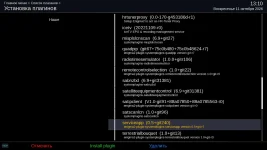
Dear OpenVIX developers, Please fix the ServiceApp plugin, becouse today I install a new image from USB and installed the ServiceApp plugin, but I can't open it because the system again generates a crashlog
 

Attachments

Thanks a lot for the reply, but I just installed a new image and the ServiceApp plugin, and the system generated a crash log, I did all this 30 minutes ago
 
Thanks a lot for the reply, but I just installed a new image and the ServiceApp plugin, and the system generated a crash log, I did all this 30 minutes ago
Did you take the serviceapp from the repo (the repaired version) or did you just load from feeds (where it is broken).
 
I downloaded the ServiceApp plugin from the feed where the system plugins are located
 

Attachments

  • 222.webp
    222.webp
    65.9 KB · Views: 6
You already know that is the broken version, which is why I provided you with the link to the repaired version.
 
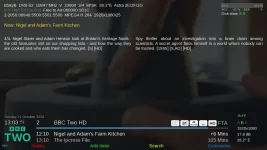
Possibly another bug with 6.9.003 is that the 'next' programme title info is missing on info screen. Screenshot attached.
By the way regarding the small white info squares what is the one second from right with the small random black squares?
And what does disk state E and S mean?
 

Attachments

  • info screen.webp
    info screen.webp
    62.1 KB · Views: 13
Last edited:
Ok thanks twol, good to have an explanation so every person who has updated will have the same and nobody bothered to reply!
Well its good you asked as otherwise would not have looked into this - was part of the early implementation for e2egl and I hadn,t seen the zram addition
If I can will not show in swapmanager
 
Possibly another bug with 6.9.003 is that the 'next' programme title info is missing on info screen. Screenshot attached.
By the way regarding the small white info squares what is the one second from right with the small random black squares?
And what does disk state E and S mean?
Do you mean the number of the audio channels (2.0) ? 1791734948595.webp
E = External, S = SSD
 
Do you mean the number of the audio channels (2.0) ? View attachment 69106
E = External, S = SSD
Thanks for the info but the square is this one. Sorry for the confusion I've just realised I said second from the right in my original post, I meant second from the left!
 

Attachments

  • info screen2.webp
    info screen2.webp
    880 bytes · Views: 0
Last edited:
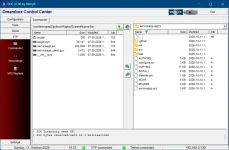
@Huevos, Could you please give me some advice? As I understand it, I need to delete all the old files in the ServiceApp folder but which files should I move from the serviceapp-sigc3 folder into the ServiceApp folder, given that there are so many of them? I’ve attached a screenshot showing the contents of both folders. I’d appreciate your help!
 

Attachments

  • 000.webp
    000.webp
    59.1 KB · Views: 5
Possibly another bug with 6.9.003 is that the 'next' programme title info is missing on info screen. Screenshot attached.
Looks like this is not working anymore :

XML:
        <widget source="session.Event_Next" render="Label" position="975,162" size="915,36" backgroundColor="secondBG" transparent="1" zPosition="1" foregroundColor="secondFG" noWrap="1" font="Regular;33" halign="left">
            <convert type="EventName">NameNext</convert>
        </widget>

Maybe @Huevos can check it out.
 

OpenViX Feeds Status

Back
Top