Superb quality and spec AB-Com PULSe 4K SE. Crazy offer! Only £129! FREE UK DELIVERY! 4K UHD, Enigma 2, Multiboot 4 images & more!...
Superb quality and spec AB-Com PULSe 4K Rev II Twin Satellite tuner only £179! FREE UK DELIVERY! 4K UHD, Enigma 2, SATA HDD facility, Multiboot 4 images & more!...

Plugins no internet connection

Seen as you clearly have access to world of satellite forum, please log into relnet via putty using root as username, issue the following command...

ping world-of-satellite.com

Hi Compass,

Thanks for your input.

I ping'd WOS from Telnet and this is a screen grab of what started happening

ping-31577528990.jpg


The result lines kept building until I ended the session by closing the Telnet window.
 
Might be a silly question but would it be worth a shot to try box at a mates house for checking if you get network connection there and if so box works.
 
seems rather a problem off the provider or your router is blocking pings on ip address.Strange because ping translation on name is working and then you pass the DNS server.
 
Google suggests that some ISP's block ping altogether - PlusNet for example.

May have changed since the comments were made.
 
The box is fine - its a problem with the ISP. However bringing it to a friends house who has a different ISP will allow access to the feeds to download plugins.
 
I admit I scanned through this thread so forgive me if this has been mentioned but I noticed from previous screenshots you were using 192.168.0.x / 24 subnet and also I noticed 192.168.1.x IP also being referred to. These are two different subnets you're referring to which for a typical home networking setup isn't normal.

Do you have any other network equipment that would change the subnet from 192.168.0.x to 192.168.1.x ?

I would say go back to basics and directly connect ethernet cable from router directly into back of box and re-run network setup and please don't try messing with DNS entries (defaults are more than fine).

The IP of your router whether that be 192.168.0.x or 192.168.1.x should match what your box has except the last octet (eg .x in my example). So if your router is on 192.168.0.1 then your box, when connected directly to it, should pickup an IP in the range 192.168.0.2 to 192.168.0.254
 
Last edited:
He did notice his ip had changed when webif did not work,network test all green and hard wired to router.
Possibly rebooting box ip might have changed as mine does every so often and webif does not work.
 
The box is fine - its a problem with the ISP.

I tend to agree with you except the problem isn't really with the ISP. Setting 8.8.8.8 as a universal check for internet connectivity isn't in fact a check of internet connectivity, it's just a check that 8.8.8.8 is ping'able.

Not being able to ping 8.8.8.8 does not mean the box isn't connected to the internet.

My box is in fact connected to the internet but because (for whatever reason) I cannot ping 8.8.8.8 the plugin download/firmware update processes won't start and I get a false error saying I'm not connected to the internet.

However bringing it to a friends house who has a different ISP will allow access to the feeds to download plugins.

Not really an option I'm afraid.
 
Can you clarify the question on post #66 ref using 192.168.0.x and 192.168.1.x ??
 
Can you clarify the question on post #66 ref using 192.168.0.x and 192.168.1.x ??

Yes, it's a very interesting and detailed response which I'll do my best to understand and respond to correctly.

I'll revert ASAP.
 
that network setting was from someone else
 
Can you clarify the question on post #66 ref using 192.168.0.x and 192.168.1.x ??

Hi Twol,

Forgive the newbie question but is it ok for me to post screenshots of my router set up including IP & MAC addresses etc??

I'm a bit paranoid about posting info which could be used by people with nefarious intentions but happy to do so here as you guys have been super helpful to me with this challenge.
 
Only thing i am aware of that may be tricky are login details (e.g. to your internet supplier), your actual IP address (not the 192.168.x.x addresses), Mac addresses and Wifi login details.... I am sure if there is anything else people will jump in.
 
I admit I scanned through this thread so forgive me if this has been mentioned but I noticed from previous screenshots you were using 192.168.0.x / 24 subnet and also I noticed 192.168.1.x IP also being referred to. These are two different subnets you're referring to which for a typical home networking setup isn't normal.

Do you have any other network equipment that would change the subnet from 192.168.0.x to 192.168.1.x ?

Hi bbbuk,

Thanks for your insightful response.

I'm in a bit over my (networking) head here but I'll try to answer as best I can.

My home setup is that I have a small business fibre broadband package in my home supplied by Virgin Media (Ireland) as I have a home office.

I have a note from when it was set up several years ago that the Virgin modem is used as a bridge to my ASUS RT-N66U Router and I have 5 static IP addresses supplied by Virgin one of which is used by the ASUS WAN internet connection setting.

Could this explain the unusual setup and dual subnets?

I would say go back to basics and directly connect ethernet cable from router directly into back of box and re-run network setup and please don't try messing with DNS entries (defaults are more than fine).

The HD2400 is connected directly to the ASUS Router, should it be connected to the Virgin modem instead?

The IP of your router whether that be 192.168.0.x or 192.168.1.x should match what your box has except the last octet (eg .x in my example). So if your router is on 192.168.0.1 then your box, when connected directly to it, should pickup an IP in the range 192.168.0.2 to 192.168.0.254

Router IP address is 192.168.1.1, HD2400 IP address is 192.168.1.131 so that is correct?

Here are what I think are the relevant screenshots from the router LAN setup:-

Asus-11577546310.png


Asus-21577546316.png


Should the DNS be set here to 8.8.8.8? What about the WINS Server?

Asus-31577546321.png


Asus-41577546325.png


Asus-51577546329.png


Would turning on "Port Triggering" in the WAN settings, which is supposed to temporarily open a port for the LAN seeking internet access, be a useful thing to do?
 
Last edited:
Thats a lot to digest!
I would be tempted to just run the receiver into the modem on one of the spare modem Lan ports and see if that works, whilst some more clued up people do the digestion!
 
Thanks for your post with those screenshots.

I don't have Virgin box but from what I understand, using the virgin box in modem mode only (ie not a router) would normally leave an IP of something like 192.168.100.1 on the LAN side (someone please correct me if this is incorrect). I would remove the routing via Google DNS (it can be added back later once we try and get to the bottom of issues).

The WAN (Wide Area Network) side of your Asus Router should be set as DHCP so that it can pickup a special IP that Virgin use when in modem mode as you are.

The LAN side of your Asus router is set to use 192.168.1.2 to .254 IP range.

I assume your laptop or other device is working fine when connected to ASUS router wifi (or it's ethernet ports)?

Could you explain how you did manage to switch subnets as indicated because if your virgin modem/router is in modem mode then normally only one subnet would be in use (as used by Asus router).

UPDATE: Unless your virgin router isn't running in modem mode as such hence why two different subnets in use
 
Last edited:
I'm on VM broadband and using their router in modem mode and also using an Asus RT-N66U.
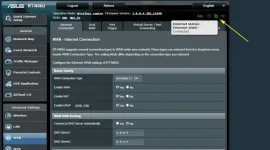
I notice from your screenshots that there is no internet connection? i.e, no green symbol on the top right of the router page.

2019-12-28_172823.webp
 
I'm on VM broadband and using their router in modem mode and also using an Asus RT-N66U.
I notice from your screenshots that there is no internet connection? i.e, no green symbol on the top right of the router page.

View attachment 59580

You're spot on there Willo3092, and it's emphasized by this screenshot also :confused:

Asus-61577556447.png


So how are so many devices successfully connected to the internet via the router if the router isn't connected to the internet???
 
Thanks for your post with those screenshots.

I don't have Virgin box but from what I understand, using the virgin box in modem mode only (ie not a router) would normally leave an IP of something like 192.168.100.1 on the LAN side (someone please correct me if this is incorrect). I would remove the routing via Google DNS (it can be added back later once we try and get to the bottom of issues).

And BINGO!! :thumbsup: :fart2: :p

Removing the routing Via Google DNS restored the internet connection.


And as soon as I tested the Plugin Download on the HD2400 it passed the internet check and is offering me a list of plugins to download.

Plugin-Info1577559351.jpg


Now part two of my box restoration from near death project can begin........... a combined DVB-C/T2 and DVB-S bouquet, 7n day EPG etc and finally part 3 which will be replacing the dead HDD with the 1TB SSD I got a good deal on.

Thanks all for the amazing help untangling this little mess and identifying the problem.

I'll be back for more help no doubt ref the rest of my setting up but for now I'll sign off and hope this thread serves as some sort of resource for others in the future who may have Google routing set on their router.
 
Last edited by a moderator:

OpenViX Feeds Status

Back
Top